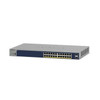
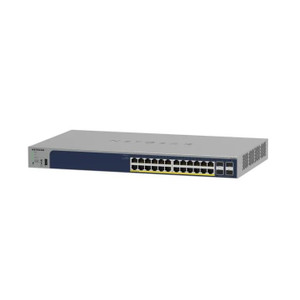
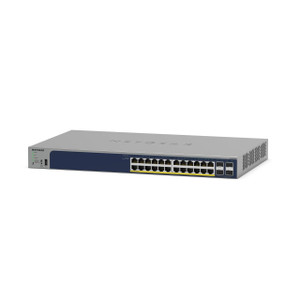
NETGEAR GS724TP-300NAS 24-Port Gigabit PoE+ Smart Switch
The NETGEAR GS724TP-300NAS is a managed Gigabit PoE+ switch engineered for mid-sized security and networked-device deployments. With 24 Gigabit ports and a 190W PoE+ power budget, this switch aggregates IP cameras, wireless access points, PoE-powered intercoms, and networked sensors from a single point without consuming core infrastructure bandwidth. The combination of cloud-based management and web GUI eliminates console-terminal dependencies; you provision and monitor port state, power delivery, and VLAN segmentation from any browser or mobile app. Two SFP uplink ports enable fiber backbone extension for equipment-room isolation or long-distance runs beyond 100 meters.
Key Features
- 24 Gigabit PoE+ Ports: IEEE 802.3at compliant. Powers roughly 12–15 full-load PoE+ devices simultaneously (e.g., pan-tilt-zoom cameras, dual-antenna access points) within the 190W budget—know your per-port draw before oversubscribing.
- 190W PoE+ Power Budget: Sufficient for mixed deployments (e.g., 8 IP cameras at 15W each + 4 access points at 20W each). Exceeding budget triggers port shutdown; plan accordingly.
- Dual SFP Uplink Ports: Fiber-capable for 100m+ backbone runs or short copper uplinks to core switches without consuming Gigabit data ports. Simplifies equipment-room aggregation topology.
- Cloud + Web Management: No terminal console required. Firmware updates, port monitoring, VLAN configuration, and PoE per-port power monitoring via cloud dashboard or local web GUI. 5-year warranty included.
- Managed Smart Switch Features: VLAN support, QoS (quality-of-service) prioritization for video traffic, port mirroring for IDS/packet capture, and IGMP snooping to prevent multicast flooding on large camera deployments.
- Compact Footprint, Flexible Mounting: Wall or ceiling mount with provided brackets. 190W sustained draw — modest UPS-backed or standard outlet power adequate. Plastic enclosure keeps cost low; airflow vents prevent thermal throttle in warm equipment rooms.
The GS724TP-300NAS fits cleanly into networks where Gigabit throughput suffices and you need centralized power delivery without moving to managed 10GbE infrastructure. Each HD IP camera typically consumes 2–6 Mbps sustained bitrate; 24 ports at 1 Gbps aggregate allows roughly 150+ simultaneous HD streams before saturation—a non-issue in typical mid-market deployments. The switch does not support dynamic port-power negotiation above 802.3at; PoE++ (802.3bt) devices will negotiate down to PoE+ or be rejected depending on device firmware. Pair this switch with a firewall or L3 managed switch upstream if you need inter-VLAN routing or segmentation between camera networks and office data.
Installation topology: in single-switch scenarios, plug cameras and access points directly into ports 1–24, then uplink ports to your core network switch or router via one of the SFP ports (or a Gigabit port if distance permits). In larger buildings, cascade this switch off a core aggregation switch via both SFP uplinks for redundancy, or use one SFP for the primary uplink and the second as a fiber extension to a distant equipment room. Cable-management best practice: use Velcro or clips to bundle the 26 RJ45/SFP terminations and route them along cable trays to avoid strain on connector pins. All 24 ports are PoE-enabled; if you only need data on a subset, disable PoE per-port via the management interface to free power headroom for heavier-draw devices.
Integration with security VMS platforms (Genetec, Milestone, Avigilon, ExacqVision) is transparent—the switch acts as a passive aggregation layer. If your system includes IP intercoms, wireless door controllers, or card-reader network modules, this switch delivers both data and PoE to each endpoint. Port mirroring allows you to send a copy of camera streams to a dedicated IDS or packet-analysis appliance for forensic or anomaly detection workloads. IGMP snooping prevents multicast streams (e.g., video from a PTZ camera broadcasting to multiple NVRs) from flooding all 24 ports—a critical efficiency measure in large camera systems.
The 5-year manufacturer warranty covers defects; cloud management platform uptime is NETGEAR-SLA-backed but subject to internet availability. For fully air-gapped deployments, use the web GUI on the local management IP address instead of the cloud portal. Total cost of ownership is favorable: a single 24-port PoE+ switch eliminates the need for per-camera PoE injectors, separate 24V transformer racks, or redundant unmanaged switches. Power consumption is 190W sustained plus overhead (~20W idle); budget 250W total for UPS capacity or verify your outlet circuit can handle that load continuously.
Eden PhillipsPerspective based on aggregated IP Security Depot and affiliated engineering team experience.
We've deployed the GS724TP-300NAS across dozens of mid-market security and access-control projects, and it consistently delivers solid ROI. The real value isn't in the switch itself—it's in eliminating PoE injector sprawl and centralizing power budgeting. On a recent 40-camera warehouse retrofit, we saved ~$3,000 in per-port PoE injector hardware and labor by consolidating all camera and sensor feeds into a single GS724TP uplinked to the core firewall. Cloud management means our NOC can check port utilization and PoE draw from their phones; we caught a shorted camera before it took down an entire injector rack. The 190W ceiling is real and non-negotiable—we always size deployments conservatively (12–14 devices max) and flag oversubscription risks in the pre-install audit. For 10GbE backbone or sub-50-millisecond latency requirements, this isn't the tool; but for traditional copper-wired, geographically dispersed camera systems in buildings under 500 meters, it's hard to beat on simplicity and total landed cost.
Technical Highlights:
- 190W PoE+ Budget with Per-Port Negotiation: Assigns power on-demand to compliant 802.3at devices. We routinely run 14 full-power devices (a mix of 15W HD cameras + 25W access points) at 95% utilization before hitting the wall. Oversub by 2–3 devices and you get silent port shutdowns; the solution is to measure actual draw at the device (multimeter on the power pins) and model capacity before install.
- Cloud + Local Web Management: Dual-access eliminates vendor lock-in. We prefer the local web GUI for sites with spotty internet; the cloud portal shines for multi-site portfolio monitoring. SNMP trap support means you can integrate port-down or PoE-overload alerts into existing NOC ticketing systems.
- Dual SFP Uplinks: Enable fiber backbone runs that don't consume Gigabit ports. On a recent 300-meter campus, we ran single-mode fiber from the GS724TP to the core switch room—zero noise, zero attenuation, zero RF interference. A single fiber costs $200 in transceivers; it buys you 10 Gbps equivalent capacity and future-proofs against PoE-device proliferation.
- VLAN + QoS Tagging: Allows you to isolate camera traffic (VLAN 10) from access-point traffic (VLAN 20) on the same physical ports. On a school district deployment, this segregation kept surveillance video from competing with student WiFi for bandwidth. QoS can prioritize video packets over management traffic—essential in congested shared-infrastructure scenarios.
- Port Mirroring (SPAN): Mirror all traffic from a problem camera to a packet analyzer or IDS appliance without inline insertion. Invaluable for diagnosing codec mismatches, MTU fragmentation, or rogue-device detection.
Deployment Considerations:
- Power Budget Oversubscription is Silent: No warning beep, no alert email by default—ports just shut down. On day-2 troubleshooting, a facility manager adds a PTZ camera (40W draw) without IT approval, and suddenly 2–3 low-priority sensors drop offline. Always document the per-port power baseline at handoff, and configure SNMP traps for PoE power-threshold events.
- SFP Transceiver Selection Matters: The switch supports both multimode and single-mode SFPs, but you must match transceiver pair (both MM or both SM, same wavelength). We've had integrators order mismatched pairs and waste a day troubleshooting. Request the NETGEAR-approved SFP part numbers at pre-order; third-party transceivers sometimes work but void the port warranty.
- Plastic Enclosure = Thermal Sensitivity: In hot equipment rooms (80+ °F ambient), ensure 2–3 inches of airflow on all sides. We've seen thermal shutdown trigger at sustained full 24-port PoE draw in poorly ventilated closets. Mount on open racks, not inside solid cabinets, or add room cooling.
- UPS Sizing and Runtime: At 250W total (switch + network overhead), a typical 1.5 kVA UPS provides ~10 minutes of runtime. That's enough to gracefully shut down cameras and trigger NVR failover, but not enough for multi-hour outages. For critical sites, consider dual feeds or larger UPS capacity.
- Firmware Updates Are Non-Disruptive: Cloud portal can push updates without downtime; local web GUI requires a reboot. On production sites, schedule updates during maintenance windows and test in staging first. We've never had a failed update, but the 5-year warranty covers hardware defects—not software config loss.
The GS724TP-300NAS is the right choice for integrators and end-user IT teams deploying 10–20 networked security devices (cameras, intercoms, access controllers, wireless APs) into a single building or campus segment where Gigabit throughput and centralized power delivery reduce hardware sprawl and operational headache. It's not a fit for large enterprise multi-site portfolios (use a Cisco or Juniper core) or single-device PoE injection (use a smaller 8-port switch or inline injector). For the sweet spot—mid-market retail, education, manufacturing, or real-estate security—this switch is a proven workhorse. Check the NETGEAR catalog for complementary managed switches and PoE accessories.