
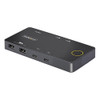

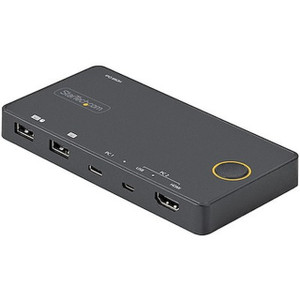
Startech 2-Port USB-C Cable Kvm Switch 4K - C2-D46-UC2-Cbl-Kvm
In stock · Ships same business day
Free shipping over $499
$126.99

Manufacturer-verified compatible cameras, recorders, mounts, accessories, and licenses for this product. Adjust quantities and add the entire bundle to your cart in one click.
Questions about this product? Free pre-sales support from a senior specialist — product questions, compatibility checks, BOM quotes, price confirmation — typically answered within one business day. Need camera placement or system design work? Engineering time is $175 per hour (qty 1 = 1 hour). Hardware buyers get up to one hour ($175) credited back on their order.
The StarTech C2-H46-UC2-PD-KVM is a compact, bus-powered 2-port KVM switch designed for professionals who need to drive a single 4K monitor from two USB-C host computers without touching a power brick or swapping cables. It outputs up to 4096x2160 at 60Hz over HDMI 2.1, keeping full 4K resolution intact rather than dropping to 4K/30Hz the way older HDMI 1.4-based switches do. At 7.1 oz and a footprint of 5.5 x 2.8 x 0.6 inches, it sits flat on a desk or tucks behind a monitor without taking up meaningful space. If you're running a dual-workstation setup — a laptop alongside a desktop, or two developer machines sharing one display — this is the switch to evaluate first among KVM switches in this class.
The C2-H46-UC2-PD-KVM connects to any host computer with a USB-C port that supports DisplayPort Alt Mode for video output — standard on most USB-C laptops and desktops produced after 2018. The HDMI 2.1 output pairs with any 4K monitor that accepts HDMI input, which covers the vast majority of current professional displays. The USB-C accessory ecosystem for both hosts remains fully intact since the switch passes data and power simultaneously over a single cable to each machine. The 480Mbps USB data ceiling on the console ports is adequate for keyboard, mouse, and basic USB storage — it is not intended for high-speed peripheral transfers like external SSDs, so plan accordingly if your workflow requires rapid file transfers through the KVM. For teams managing multi-workstation deployments, pair this with a quality monitor arm or mount to centralize the display and minimize desk clutter. Buyers evaluating desktop switching infrastructure may also want to review the broader desktop KVM switch lineup to compare multi-display and multi-port alternatives. If your hosts require Thunderbolt 4 bandwidth passthrough or daisy-chained display support, evaluate a Thunderbolt-native KVM — the C2-H46-UC2-PD-KVM is USB-C DisplayPort Alt Mode, not Thunderbolt, and those are distinct specifications with different bandwidth ceilings.
Q: Does the C2-H46-UC2-PD-KVM require a separate power adapter to operate?
A: No. The switch is bus-powered and can operate from the host USB-C connection alone, consuming 10W in normal use. However, to deliver 90W charging to the active host computer, you need to connect a USB-C power adapter (up to 100W) to the power delivery pass-through port. Without the adapter, charging capability is limited to what the host connection provides.
Q: What is the maximum display resolution supported?
A: The C2-H46-UC2-PD-KVM supports up to 4096x2160 (4K DCI) at 60Hz via HDMI 2.1. This is the full DCI 4K specification, higher than standard UHD 3840x2160, and at 60Hz — not the 30Hz cap of older HDMI 1.4 KVM switches.
Q: Can I connect USB-A host computers to this switch?
A: No. Both host ports are USB-C only. The switch is designed specifically for hosts with USB-C ports that support DisplayPort Alt Mode for video. USB-A host connections are not supported without an active adapter, and compatibility through adapters is not guaranteed.
Q: What USB peripherals can I connect to the console USB-A ports?
A: The two USB-A console ports support standard HID devices — keyboard and mouse — at up to 480Mbps (USB 2.0 speed). They are not designed for high-speed data transfer devices like external SSDs or fast USB storage. Stick to input devices and low-bandwidth accessories on these ports.
Q: What is the warranty on the C2-H46-UC2-PD-KVM?
A: StarTech provides a 2-year manufacturer warranty on the C2-H46-UC2-PD-KVM.
Q: Is this switch compatible with macOS and Linux as well as Windows?
A: The VLI VL103R chipset used in this switch has broad OS compatibility. It is designed to work with Windows, macOS, and Linux hosts. Since it presents standard USB HID and DisplayPort Alt Mode interfaces, no proprietary drivers are required on most modern operating systems.

The C2-H46-UC2-PD-KVM earns a spot on my recommended list specifically because of the 100W power delivery pass-through paired with 90W host charging — most KVM switches in this size class either skip PD entirely or throttle it to 60W, which isn't enough to sustain a 15-inch laptop under load. The 10W system overhead is expected and clearly documented, so there are no surprises when you budget your power chain.
Technical Highlights:
Deployment Considerations:
This switch is the right call for a two-machine creative or developer workstation where both hosts are modern USB-C laptops sharing a single 4K display — particularly in compact desk setups where a full desktop KVM with separate power bricks would create cable management problems.

Manufacturer-verified compatible cameras, recorders, mounts, accessories, and licenses for this product. Adjust quantities and add the entire bundle to your cart in one click.



Looking for more StarTech products? Shop the full StarTech catalog →
Support services and planning resources for commercial surveillance, access control, and infrastructure deployments.
Fixed scope • Fixed price