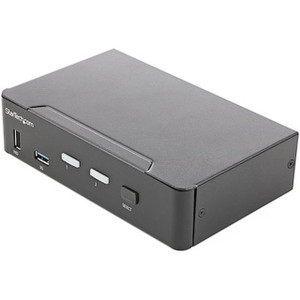
StarTech SV221HUC4K 2-Port USB-C + HDMI KVM Switch with 4K 60Hz Output
Overview
The StarTech SV221HUC4K is a compact, bus-powered 2-port KVM switch that lets a single HDMI monitor and two USB-A peripherals serve two host computers — one connecting via USB-C and one via a combination of HDMI plus Micro-USB-B. At 4K 60Hz over HDMI 2.0, it passes the full bandwidth required for sharp, fluid output on modern 4K displays without a separate power adapter cluttering the desk or rack shelf. If you're managing a dual-workstation setup — say, a primary workstation and a test laptop or secondary PC — and want to avoid duplicate monitors and keyboards, the SV221HUC4K handles that cleanly in a 13.8 × 7.0 × 1.5 cm footprint that weighs just 228 g.
For KVM switches in this class, the key questions are video fidelity, host interface flexibility, and whether bus power actually works in your cable run. This unit answers the first two well and is honest about the third — USB bus power means one fewer adapter, but you're drawing from the host's USB port, so it works best on modern machines with full-power USB ports.
Key Features
- 4K 60Hz via HDMI 2.0: Full 3840×2160 at 60 frames per second — not the 30Hz limitation common on older KVM designs. If your display is a 4K panel and your work involves detailed CAD views, color-critical creative work, or simply smooth desktop interaction, 60Hz matters. Older 4K KVMs that cap at 30Hz produce noticeable lag on cursor movement.
- Mixed-host interface support (USB-C + HDMI/Micro-USB-B): Host 1 connects via a single USB-C cable carrying both video and USB data. Host 2 uses HDMI for video and Micro-USB-B for USB peripheral data. This means a modern laptop with USB-C Thunderbolt or DisplayPort Alt Mode can share the console with a desktop that has only traditional HDMI out — a genuinely useful combination in mixed-hardware environments.
- Two USB-A console ports: Both USB-A ports on the console side run at USB 2.0 speeds (480 Mbps), which is sufficient for keyboard and mouse. USB 2.0 HID devices have no meaningful latency disadvantage vs. USB 3.x for input purposes, and the 480 Mbps ceiling won't matter for keyboard/mouse traffic.
- Bus-powered operation: No power brick required. The switch draws from the connected host via the USB connection — practical for clean desk installs and portable setups. Keep in mind that if the active host has a low-power USB port (some older docking stations limit bus current), the switch may not initialize correctly; verify host USB port power output if you encounter issues.
- Push-button port selection: Physical button switching keeps control simple and reliable. No software driver required for port switching — useful in environments where you don't want additional software dependencies or where one of the connected machines runs a non-standard OS.
- Compact, passive form factor: At 228 g and 13.8 cm wide, this sits on a desk or mounts conveniently without rack space. Operating temperature runs 5°C to 55°C with 20–80% RH (non-condensing), covering standard office and light industrial environments.
- 2-year manufacturer warranty: StarTech's standard 2-year coverage applies to the SV221HUC4K, giving you a defined support window for commercial deployments.
Integration and Compatibility
The SV221HUC4K is designed for single-monitor, dual-host setups. It does not support multi-monitor configurations — if you need two displays per workstation, look at StarTech's multi-display KVM line. For multi-monitor KVM switches, the product family expands into dual-HDMI and DisplayPort variants.
Host 1's USB-C connection requires that the source machine supports DisplayPort Alternate Mode or Thunderbolt over USB-C — a standard capability on current-generation laptops and many mini PCs. Machines that have USB-C for charging only (power delivery only, no video signal) will not work on Host 1. Confirm your laptop's USB-C port supports video output before ordering.
The USB 2.0 hub functionality at 480 Mbps is appropriate for keyboard, mouse, and basic USB peripherals. It is not suitable for high-speed storage devices or webcams requiring USB 3.x throughput — those devices will either not function correctly or will step down to USB 2.0 speeds.
For integrators building out USB-C KVM solutions for mixed laptop/desktop environments, pairing this switch with a USB-C hub on the laptop side can extend peripheral connectivity beyond the two console USB-A ports. A compact USB hub downstream of either console port keeps the desk tidy.
Frequently Asked Questions
Q: Does the SV221HUC4K support 4K at 60Hz, or is it limited to 30Hz?
A: The SV221HUC4K supports 4K (3840×2160) at 60Hz via HDMI 2.0 — not the 30Hz ceiling found on HDMI 1.4-based KVMs. Both host connections pass full 4K 60Hz signal to the single HDMI console output.
Q: My laptop only has a USB-C port. Can I use it as Host 1?
A: Yes, as long as your laptop's USB-C port supports DisplayPort Alternate Mode or Thunderbolt. USB-C ports that provide power delivery only (no video output) will not work. Check your laptop's spec sheet to confirm video-over-USB-C support before ordering.
Q: Does the SV221HUC4K require a power adapter?
A: No. It is bus-powered, drawing power from the connected host's USB port — no separate power supply needed. If you experience startup issues, verify that the host USB port delivers sufficient bus current; some older docking stations or hubs limit available power.
Q: What is the USB speed for keyboard and mouse on the console ports?
A: The two console USB-A ports operate at USB 2.0 speeds (480 Mbps). This is fully adequate for keyboards, mice, and most USB input devices. High-speed storage devices or USB 3.x peripherals will not perform at full speed through this switch.
Q: What is the warranty on the SV221HUC4K?
A: StarTech covers the SV221HUC4K with a 2-year manufacturer warranty.
Q: Can I switch between hosts without installing software on either machine?
A: Yes. Port selection is handled by a physical push button on the unit itself. No drivers or software are required to switch between the two connected hosts.
The SV221HUC4K earns its place on a desk or workbench specifically because of that HDMI 2.0 output running full 4K at 60Hz — most KVMs in this price tier still throttle at 30Hz, which is genuinely uncomfortable for extended daily use on a 4K panel. The mixed-host interface design (USB-C on one side, HDMI plus Micro-USB-B on the other) is the practical answer to a real problem: you have a new laptop and an older desktop, and you don't want two monitors.
Technical Highlights:
- HDMI 2.0 at 4K 60Hz: Passes 18 Gbps bandwidth, enabling full 3840×2160 60Hz output — twice the frame rate of HDMI 1.4-based KVMs at the same resolution. Meaningful for anyone doing detailed image work or simply running a high-refresh 4K monitor.
- Bus-powered at 480 Mbps USB 2.0: Draws from the host USB port with no external adapter. The USB 2.0 (480 Mbps) hub serves keyboard and mouse without any noticeable input lag — HID protocol overhead is trivial at those speeds.
- 228 g / 13.8 × 7.0 × 1.5 cm form factor: Fits on a desk edge, cable tray, or monitor stand without requiring rack space or a mounting solution. Operationally suited to 5°C–55°C environments, so it handles standard office conditions with margin.
Deployment Considerations:
- Confirm that the USB-C host port supports DisplayPort Alt Mode or Thunderbolt video output before ordering — USB-C power-only ports will not pass a video signal and the host will not display through the switch.
- Bus power dependency is the one real-world gotcha: hosts with restricted USB bus current (some enterprise docking stations cap bus power on downstream ports) may not power the switch reliably. Test on the actual hardware before deploying across multiple units.
Best fit for a security operator station or dual-workstation developer desk where one seat holds a USB-C laptop and a legacy HDMI desktop, both sharing a single 4K 60Hz display, keyboard, and mouse — without a second monitor or a power adapter in the cable bundle.