Product images are provided for reference and may not represent the exact model, configuration, or included components.

No Bots, Just Experts

Questions about this product? Free pre-sales support from a senior specialist — product questions, compatibility checks, BOM quotes, price confirmation — typically answered within one business day. Need camera placement or system design work? Engineering time is $175 per hour (qty 1 = 1 hour). Hardware buyers get up to one hour ($175) credited back on their order.

Description

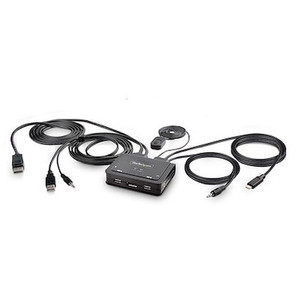
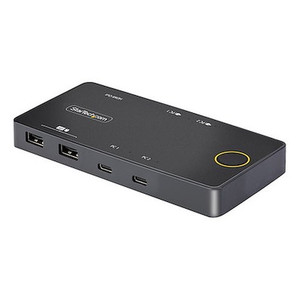
StarTech C2-H46-UAC-CBL-KVM 2-Port Hybrid USB-C HDMI KVM Switch

Overview

The StarTech C2-H46-UAC-CBL-KVM is a compact KVM switch designed to simplify workstation management by allowing you to control two computers using a single set of peripherals. This unit supports hybrid connections, integrating both USB-C (with DisplayPort Alternate Mode) and HDMI for video input, alongside USB 2.0 for peripheral control. It's ideal for environments that require seamless switching between a modern USB-C laptop and a traditional desktop or server, such as IT support desks, development labs, or multi-system workstations. The integrated 1.8m (6ft) USB-C/HDMI cable for PC1 and 1.2m (4ft) cable for PC2 minimize cable clutter. The switch supports up to 4K resolution at 60Hz, ensuring high-definition video output for demanding applications. Its bus-powered design eliminates the need for an external power adapter, further streamlining setup.

Compatibility

This KVM switch is compatible with Windows 7, 8/8.1, 10, 11 (including ARM versions), macOS 10.12 through 12, and ChromeOS. It supports PC video input via USB-C (DisplayPort Alternate Mode) and HDMI 2.0b, and DVI Single Link. The console side features HDMI for video, USB 2.0 Type-A ports for keyboard and mouse, and 3.5mm stereo audio jacks for speaker output. Host connections include USB-C, HDMI, USB 2.0 Type-A, and 3.5mm stereo audio input jacks.

Installation Notes

The C2-H46-UAC-CBL-KVM is bus-powered, drawing power directly from the connected computers via USB. Ensure that the host computers provide sufficient USB power. The operating temperature range is 0°C to 40°C (32°F to 104°F), and storage temperature ranges from -20°C to 60°C (-4°F to 140°F). Humidity should be kept between 0% and 90% RH (non-condensing).

What's in the Box

  • 1x 2-Port Hybrid USB-C HDMI KVM Switch
  • 1x USB-C/HDMI Cable (1.8m/6ft)
  • 1x USB-A to USB-A Cable (1.2m/4ft)
  • 1x Quick Start Guide
Specifications
Warranty: 2 Years
KVM Ports: 2
PC Interface: USB & USB-C
PC Video Type: USB-C (DP Alt-Mode) + HDMI
Number of Monitors: 1
Video Revision: HDMI 2.0b
DVI Support: Yes - Single Link
Maximum Data Transfer Rate: 480Mbps (USB 2.0)
Audio Specifications: Analog Stereo - 2 Channel
Storage Temperature: -20C to 60C (-4F to 140F)
Humidity: 0% ~ 90% RH (non-condensing)
Color: Black
Material: ABS
Product Length: 3.8 in [9.7 cm]
Product Width: 3.6 in [9.2 cm]
Product Height: 0.9 in [2.4 cm]
Weight of Product: 9.4 oz [265.0 g]
PC1 Cable Length: 1.2m/4ft
PC2 Cable Length: 1.8m/6ft
MTBF: 345,059 Hours
Console Interface(s: 2 - USB 2.0 Type-A, 2 - 3.5mm Stereo Female 3 pos, 1 - HDMI
Host Connectors: 1 - USB-C, 2 - 3.5mm Stereo Male 4 pos, 1 - USB 2.0 Type-A, 1 - HDMI
OS Compatibility: Windows 7, 8/8.1, 10, 11, 11 ARM, macOS 10.12 - 10.15, 11, 12, ChromeOS
LED Indicators: 1 - Solid Green, 1 - Blinking Green
Power Source: Bus Powered
Operating Temperature: 0C to 40C (32F to 104F)
Brand: StarTech
MPN: C2-H46-UAC-CBL-KVM
Type: Power Supply
Connectivity: USB
Q&A
Reviews
Have Questions?

Startech 2-Port Hybrid USB-C HDMI Cable Kvm - C2-H46-Uac-Cbl-Kvm

$81.99

RELATED PRODUCTS

System Design, Deployment & Technical Support

Support services and planning resources for commercial surveillance, access control, and infrastructure deployments.

Fixed scope • Fixed price

System Design Assistance

  • Get help validating product compatibility
  • Coverage requirements
  • Storage planning and deployment architecture before you buy.
Request Design Help

Deployment & Configuration Support

  • Access fixed-scope support for rollout planning
  • User setup guidance
  • Migration and system standardization across single-site or multi-site deployments
View Support Services

Guides, Tools & Calculators

  • PoE requirements
  • Storage retention
  • Camera selection and deployment methodology
Open Technical Resources