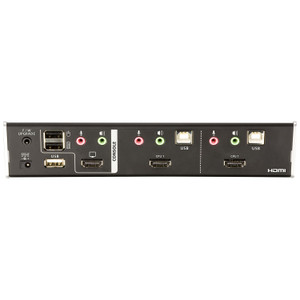
ATEN CS62KM 2-Port USB KM Switch
Overview
The ATEN CS62KM is a 2-port KM (keyboard/mouse) switch built for operators running two computers off one USB keyboard and mouse — the kind of setup common at NOC desks, security operations centers, and control rooms where an engineer needs to jump between a primary workstation and a secondary system without reaching for a second set of peripherals. Unlike a full KVM, the CS62KM doesn't switch video — it's a focused tool for sharing input devices across 2 computer connections, and it's built to sit at the desk, not buried in a rack.
Key Features
- 2 Computer Connections: Share one USB keyboard and mouse across exactly 2 host systems — the right scale for a dual-workstation operator seat, without paying for switching capacity you won't use.
- Four Port Selection Methods (Hotkey, Mouse Wheel, Mouse Cursor, Remote Port Selector): Switch active computers by keyboard hotkey, mouse wheel scroll, mouse cursor movement to screen edge, or a physical remote selector — pick whichever matches how your operators actually work, and change methods without new hardware.
- Remote Port Selector via 2.5mm Audio Jack (Female): A dedicated wired remote selector connects through a standard 2.5mm jack, letting an operator mount a physical switch button within arm's reach of the desk instead of relying only on hotkeys or mouse gestures.
- USB Keyboard/Mouse Interface: Standard USB connectivity means no proprietary cabling or adapters — plug in the keyboard and mouse you already have.
- Selected-Port Indicator (Green): A green LED confirms which of the 2 connected computers currently has control, so operators get instant visual confirmation before typing into the wrong system — a real concern when two machines share one keyboard.
- 0-80% RH Non-Condensing Humidity Tolerance: Rated to operate reliably across a wide humidity range without condensation issues, which matters for control rooms and equipment closets that aren't always climate-tight.
- Rack-Compatible Mounting: The CS62KM can be positioned within rack-adjacent equipment layouts, keeping the switch near other infrastructure rather than loose on a desk.
Integration & Compatibility
Because the CS62KM handles only keyboard and mouse switching over USB, it drops into almost any dual-PC desk setup without needing driver installs or OS-specific software — the switching logic is handled by the unit itself. Firmware on this unit is field-upgradable (current release v1.1.107), so the switch logic can be updated in the field as ATEN issues revisions, rather than requiring hardware replacement. If your environment also needs to share a monitor between the same two systems, pair the CS62KM with a matching KVM switch line, and route both machines through a shared network switch if they also need LAN segmentation at the same desk. For broader guidance on matching switch types to operator workflows, see the network and power planning guide. The CS62KM is cataloged alongside other ATEN switching and connectivity products for teams standardizing on one input-sharing platform across multiple desks, and it fits naturally into a broader security equipment buildout where control-room ergonomics matter as much as the cameras being watched.
What's in the Box
Refer to the CS62KM user manual (cs62km-user-manual-w.pdf, 3.18 MB, released 2025-07-24) for the full accessory list confirmed by ATEN for this unit.
Frequently Asked Questions
Q: How many computers can the CS62KM switch between?
A: Two. The CS62KM is a 2-port KM switch, built specifically for dual-computer desk setups sharing one USB keyboard and mouse.
Q: Does the CS62KM switch video/monitor output too?
A: No — evidence for this unit covers keyboard and mouse (KM) switching only, over USB, with no video specifications listed.
Q: What methods can I use to switch between the two connected computers?
A: Four methods: hotkey combination, mouse wheel scroll, mouse cursor movement, or a wired remote port selector connected via a 2.5mm audio jack.
Q: Can I add a physical remote button to switch computers instead of using the keyboard?
A: Yes. The CS62KM supports a remote port selector through a 1x 2.5mm female audio jack input.
Q: Is the CS62KM firmware upgradable?
A: Yes. The current firmware release is v1.1.107, distributed as cs62km-upgrade-setup-v1.1.107.zip.
Q: What operating humidity range does the CS62KM support?
A: 0-80% relative humidity, non-condensing.
The CS62KM is one of those unglamorous desk devices that quietly fixes a real annoyance — I get asked about it whenever a NOC operator is juggling two workstations with two separate keyboards. This is a 2-port KM switch, not a full KVM, and that distinction matters for how you spec it.
Technical Highlights:
- 4 switching methods: hotkey, mouse wheel, mouse cursor movement, and a wired remote selector give you flexibility to match operator habits instead of retraining people on one fixed method.
- 2.5mm remote selector jack: lets you mount a physical button at the edge of the desk — useful when an operator doesn't want to memorize a hotkey combo under pressure.
- 0-80% RH non-condensing rating: gives it a fighting chance in equipment closets or less-controlled environments, not just pristine data center floors.
Deployment Considerations:
- This is KM only — no video switching. If the operator also needs to see both machines on one monitor, you're pairing this with a separate KVM, not replacing one.
- Firmware v1.1.107 is field-upgradable, so budget a few minutes during initial setup to confirm the unit is current before deploying it into a 24/7 monitoring seat.
I'd point the CS62KM at a two-monitor security operations desk where an operator runs a VMS client on one PC and an access-control or email/reporting workstation on the second — same keyboard and mouse, instant switch, no video complexity to manage.