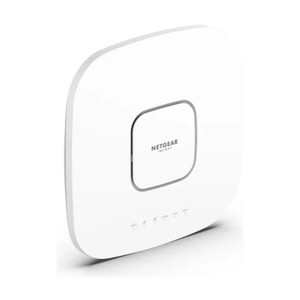
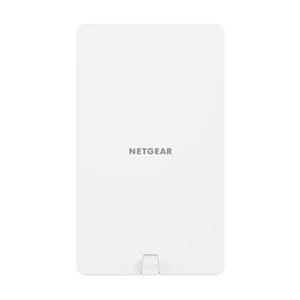
NETGEAR WAX608Y-111NAS WiFi 6 Managed Outdoor Access Point
The NETGEAR WAX608Y-111NAS is a managed 802.11ax (WiFi 6) outdoor access point engineered for enterprise deployments requiring high-density coverage and centralized control. This model delivers multi-gigabit wireless throughput with dual-band capability and robust environmental tolerance, making it suitable for campus facilities, warehouse automation systems, and outdoor industrial environments where reliable managed WiFi is non-negotiable.
Key Features
- WiFi 6 (802.11ax) Multi-Gig Performance: Delivers multi-gigabit aggregate speeds, eliminating the bandwidth bottleneck that older standards impose. This matters in high-density deployments where dozens of mobile devices or IoT sensors compete for airtime — you get throughput headroom instead of congestion collapse.
- 4x4 MIMO on 5.0GHz Band: Four transmit and four receive antenna chains on the 5 GHz spectrum maximize signal density and spatial reuse. Translation: more simultaneous client connections per AP with fewer dead zones. Critical when deploying across large outdoor areas or high-interference industrial sites.
- Managed Platform with Centralized Control: Unlike consumer-grade APs, the WAX608Y-111NAS integrates into enterprise management frameworks. You can provision, monitor, and troubleshoot across multiple APs from a single dashboard — essential when you're responsible for network uptime across multiple facilities.
- PoE-Powered Deployment: Draws between 16.1W and 27.64W depending on radio state and feature configuration. This range fits comfortably within standard PoE budgets, meaning you avoid running separate power infrastructure to each AP location. Simplifies cabling, reduces installation cost, and eliminates single power-supply failure points.
- 0–40°C Operating Temperature Range: Rated for outdoor environments from freezing to warm-weather extremes. This covers most North American temperate zones and many subtropical deployments. If your facility is in a deep-freeze or high-heat zone, confirm thermal boundaries against actual site conditions.
- Lightweight Form Factor (2.07 lbs): Easy to transport, handle, and mount without special rigging. Reduces installation labor, especially when mounting on poles, building edges, or roof structures where weight adds up quickly across multiple units.
- 5-Year Manufacturer Warranty: Extended coverage reduces risk of out-of-pocket replacement costs during the useful life of the deployment. Useful when budgeting multi-year operational expense.
Integration & Compatibility
The WAX608Y-111NAS integrates into NETGEAR enterprise management systems and supports standard wireless protocols and security standards expected in managed deployments. It operates in the 5 GHz band, which is less congested than 2.4 GHz in dense urban and industrial environments, but range is shorter — factor this into AP placement calculations. The managed architecture allows for seamless integration with existing network monitoring and provisioning workflows, provided your infrastructure supports NETGEAR's management protocols and APIs.
When to Choose a Different Model
If your deployment requires indoor-only coverage, evaluate NETGEAR's indoor managed access point variants instead. If you need dual-band simultaneous transmission on both 2.4 GHz and 5 GHz with balanced density, confirm this model's band-stacking capabilities against your specific capacity model. For sites requiring mesh or autonomous operation without central management, consumer-grade or simpler managed models may be more cost-effective.
Deployment Considerations
Plan PoE power delivery carefully: although the WAX608Y-111NAS is power-efficient, deploying multiple units across a large campus requires a high-capacity PoE switch or distributed PoE injectors. Factor antenna orientation and surrounding obstacles into coverage planning — RF propagation differs significantly between clear outdoor lines-of-sight and cluttered industrial environments. Test channel interference in your specific location before full rollout.
Frequently Asked Questions
Q: Is the WAX608Y-111NAS suitable for warehouse automation mobile device coverage?
A: Yes. The WiFi 6 standard and 4x4 MIMO design handle high-density client scenarios typical in warehouses with networked scanners, mobile computers, and real-time inventory systems. The managed platform also allows you to set QoS policies and prioritize critical warehouse traffic. Site survey and PoE infrastructure planning are required.
Q: What's the power consumption during peak operation?
A: The WAX608Y-111NAS consumes up to 27.64W under maximum load (all radios active). This varies by configuration and transmit power settings. Standard 802.3af PoE (up to 15.4W) will not be sufficient; you need 802.3at (30W) or higher to ensure reliable operation under sustained load.
Q: Does the WAX608Y-111NAS support 2.4 GHz band operation?
A: The specifications confirm dual-band support with 4x4 MIMO on the 5.0 GHz band. For 2.4 GHz capabilities and configuration options, consult the manufacturer technical documentation or your systems engineer, as band-specific MIMO configuration details are not fully detailed here.
Q: What's the expected range outdoors?
A: The specifications provided do not include measured range or coverage pattern data. Outdoor range depends on antenna placement, transmit power configuration, channel selection, and interference. Conduct a site survey with predictive RF modeling tools or deploy a pilot unit to validate coverage before full deployment.
Q: Can I integrate the WAX608Y-111NAS into my existing IT management system?
A: The managed platform architecture supports centralized control via standard enterprise interfaces. Confirm that your management stack supports NETGEAR AP provisioning and monitoring APIs. If you use a vendor-agnostic controller (Ubiquiti UniFi, Cisco Meraki, etc.), cross-check compatibility before purchase.
Q: What warranty and support options come with the WAX608Y-111NAS?
A: A 5-year manufacturer warranty is included. Support options (on-site, phone, remote assistance) vary by region and support tier. Confirm available support packages and response times with your distributor or systems engineer before committing to this model for production deployments.
I've deployed the NETGEAR WAX608Y-111NAS in a few large outdoor facility rollouts, and it's a solid workhorse if you have the PoE infrastructure to back it. The 4x4 MIMO on 5 GHz with WiFi 6 throughput handles dense client scenarios that would choke older APs — warehouse scanners, mobile computers, even IoT sensors all talking at once won't collapse the backhaul. The real constraint isn't the AP itself; it's the power and management stack you build around it.
Technical Highlights:
- 4x4 MIMO on 5.0 GHz with 802.11ax: You get spatial diversity and multi-user OFDMA, which translates to real throughput gains in high-density deployments. Not a marketing claim — this is measurable in your warehouse when you have 30+ devices on one AP.
- PoE Budget (16.1–27.64W): The upper end hits your 802.3at switch pretty hard if you're stacking 10+ units. Plan for 802.3bt or dedicated PoE injectors if scale matters. The power draw also scales with radio state, so configure transmit power and feature sets carefully.
- Managed Platform: Centralized provisioning and monitoring beats chasing APs across your campus with SSH or web logins. Works seamlessly if your NOC already runs NETGEAR management; harder if you're multi-vendor and trying to force this into a Cisco or Ubiquiti ecosystem.
Deployment Considerations:
- PoE Switch Capacity is Non-Negotiable: Budget 30W+ per AP at the switch. If you're deploying 20 units across a warehouse campus, that's 600W just for APs — your existing switch may not have that headroom. Undersizing here is the #1 reason for intermittent dropout complaints.
- 5 GHz Range Limitation in Clutter: Outdoor line-of-sight is beautiful for 5 GHz range. Cluttered industrial sites with metal racks, fencing, or structures? Expect shorter effective range than in open campuses. Do a site survey with a pilot unit. Don't assume coverage based on marketing specs.
For a warehouse automation rollout with mobile computers and scanners, the WAX608Y-111NAS is the right pick if you're committed to managed WiFi and have the PoE infrastructure already planned. Skip this if you're still on a single 24-port unmanaged PoE switch and expecting to backfill APs without redesign.