ATEN CL3108NX 8-Port 1U Rackmount LCD KVM Switch
Overview
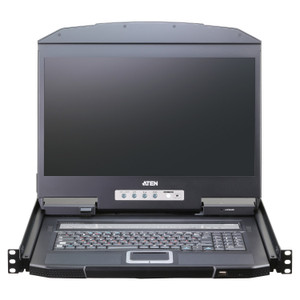
The ATEN CL3108NX is an 8-port 1U rackmount LCD KVM switch designed for data center technicians and IT architects who need direct console access to multiple servers without sacrificing rack space or scrambling for a separate monitor and keyboard cart. It ships with an integrated 19-inch widescreen LCD panel at 1366 × 768 native resolution — sharp enough for BIOS-level work and OS installs — while also supporting input signals up to 1920 × 1200 @ 60 Hz when you connect an external display for tasks demanding more screen real estate. For growing environments, the CL3108NX cascades to a maximum of 128 ports across multiple units, which means your initial 8-port investment scales without requiring a full infrastructure swap. Port selection covers three methods — OSD, hotkey, and pushbutton — giving technicians the fastest access path for their workflow, whether that's mousing through a menu, typing a sequence, or just pressing the physical button in a lights-out environment.
Key Features
- Dual Video Resolution Support (up to 1920 × 1200 @ 60 Hz): The built-in LCD runs at 1366 × 768 for efficient in-rack use, but the CL3108NX also accepts and passes input signals at full 1920 × 1200 @ 60 Hz via DDC2B — so connecting an external monitor gives you the full resolution of modern server video output. That matters when reviewing dense log output or working in graphical OS environments where 768p becomes a constraint.
- Cascade Expansion to 128 Ports: Eight ports covers a small server row, but the cascade architecture lets you chain units until you're managing 128 nodes from a single console. That's the right architecture for colocation bays and growing on-premise data centers where buying a larger KVM upfront would mean paying for capacity you don't need yet.
- Three-Method Port Selection (OSD, Hotkey, Pushbutton): OSD gives a visual menu overlay for operators who prefer mouse navigation; hotkey sequences let experienced admins switch ports without lifting their hands from the keyboard; the front-panel pushbutton handles lights-out scenarios where the screen may not yet be visible. Having all three available means the switch adapts to whoever is at the console.
- 1–255 Second Scan Interval: Auto-scan cycles through connected ports at a configurable interval anywhere from 1 to 255 seconds. Set it short for rapid status checks during an incident, or stretch it to 60–120 seconds for routine monitoring when you want a longer look at each node's console output.
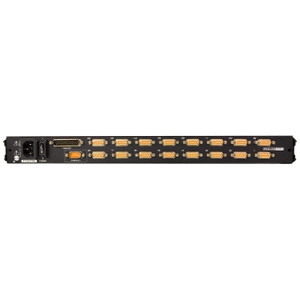
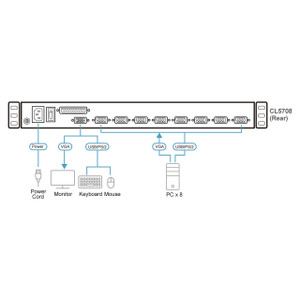
- Dual Keyboard/Mouse Support (PS/2 and USB): Supporting both PS/2 and USB keyboard and mouse connections means the CL3108NX works with legacy server hardware that predates USB console ports alongside current-generation systems. No adapters needed for mixed-vintage racks.
- 450 cd/m² Luminance: At 450 cd/m², the integrated display is bright enough to read clearly in typical data center lighting without needing to shade the screen or lean in. This is a practical spec — a dim panel on a rackmount KVM wastes time during time-sensitive maintenance windows.
- Front USB Type-A Mouse Port: The external mouse port on the front panel is USB Type-A, which means you can plug a USB mouse directly at the unit for hands-on console work without routing cables to the rear. Straightforward, but worth noting for rack layouts where rear cable access is constrained.
- Wide Input Power Range (100–240 V AC, 50–60 Hz, 1 A): Universal AC input means the CL3108NX installs without a step-down transformer in any jurisdiction and works across mixed PDU configurations in multi-tenant colocation environments.
- LED Illumination Light: The integrated LED illumination light on the unit aids keyboard visibility in dark rack environments — a minor but real quality-of-life detail during after-hours maintenance when you'd rather not illuminate the entire cold aisle.
- Firmware Upgradeable (v1.3.122, Feb 2025): The current firmware release (v1.3.122, dated 2025-02-27) confirms the unit is actively maintained. Firmware updates for KVM switches matter because they address compatibility issues with new server models and OS releases — check ATEN's site for the cl3108-cl3116-v1.3.122.zip package.
Integration & Compatibility
The CL3108NX supports both PS/2 and USB keyboard and mouse interfaces, covering the widest range of server hardware generations likely to appear in a mixed rack. The DDC2B video standard ensures the switch correctly negotiates display capabilities between the connected servers and the monitor, avoiding resolution mismatches on initial connection. For KVM switches in this class, cascade compatibility within the ATEN product line allows the CL3108NX to function as a primary or secondary unit in a larger multi-unit installation. Administrators managing a broader ATEN infrastructure should review ATEN's cascade configuration guide to confirm port-numbering and hotkey behavior across chained units. This switch belongs to the broader ATEN rackmount KVM family, which spans 8 to 32 ports with varying LCD sizes and interface options — making it straightforward to standardize on a single vendor across multiple racks. For environments planning a rack buildout, pairing this switch with a structured rack management plan ensures cable and console access is considered together. If your deployment includes IP-based remote access requirements, consider whether a KVM-over-IP solution from the same family covers those remote sessions so the CL3108NX handles local physical access only.
Frequently Asked Questions
Q: How many servers can the ATEN CL3108NX manage in total?
A: The CL3108NX directly connects 8 servers. By cascading multiple units, you can manage up to 128 ports total from a single console — useful for growing data center environments that need to scale without replacing the KVM infrastructure.
Q: Does the CL3108NX support USB and PS/2 keyboards and mice?
A: Yes. The CL3108NX supports both PS/2 and USB keyboard and mouse connections, so it works with legacy server hardware alongside current-generation systems without requiring adapters.
Q: What is the native resolution of the built-in LCD panel?
A: The integrated 19-inch LCD panel runs at 1366 × 768 @ 60 Hz natively. The switch also accepts input video signals up to 1920 × 1200 @ 60 Hz via DDC2B, which becomes the active resolution when an external monitor is connected.
Q: How do I switch between connected servers on the CL3108NX?
A: Three methods are available: OSD (on-screen display menu navigated with mouse), hotkey sequences typed at the keyboard, and a front-panel pushbutton. The scan feature can also cycle through ports automatically at a configurable interval of 1 to 255 seconds.
Q: What firmware version is current for the CL3108NX?
A: As of February 2025, the current firmware version is v1.3.122 (file: cl3108-cl3116-v1.3.122.zip, released 2025-02-27). The shared firmware package covers both the CL3108 and CL3116 models.
Q: What are the power requirements for the CL3108NX?
A: The CL3108NX accepts 100–240 V AC at 50–60 Hz, drawing a maximum of 1 A. This universal input range makes it compatible with any standard rack PDU and eliminates transformer requirements in international deployments.
The CL3108NX is the unit I'd spec for a dense 1U rackmount KVM deployment where the team needs physical console access across 8 nodes but can't commit rack space to a separate monitor shelf and keyboard tray. The 450 cd/m² panel brightness is the spec I always call out first — lower-luminance panels on rackmount KVMs look washed out in bright data center environments and slow down every maintenance task that requires careful screen reading.
Technical Highlights:
- Cascade to 128 ports: The CL3108NX's cascade architecture means you're not locked into 8 connections permanently — chain units to reach 128 managed ports while preserving a single console access point. That's a meaningful architecture decision for anyone planning rack expansion over 12–24 months.
- Dual resolution handling (1366 × 768 native / 1920 × 1200 max input): The internal display runs at 1366 × 768, but the switch passes full 1920 × 1200 @ 60 Hz DDC2B signals when an external monitor is connected. For graphical OS work or high-density log review, that external monitor option is the path to a usable workspace.
- Configurable scan interval (1–255 seconds): The granularity here is genuinely useful during incidents — set a 3-second scan to rapidly assess which nodes are showing console errors, then lock to a single port once you've found the problem. Most operators leave it at a fixed interval and never touch it, but having the full range available changes how you triage.
Deployment Considerations:
- The PS/2 and USB dual keyboard/mouse support means this switch installs cleanly in mixed-vintage racks without purchasing interface adapters — confirm your oldest target servers have at least one of these console interfaces before finalizing the order.
- Watch out: the firmware package (cl3108-cl3116-v1.3.122.zip) is shared between the CL3108 and CL3116 models. When scheduling a firmware update, confirm you've downloaded from ATEN's product page for the CL3108NX specifically — applying an incorrect package to the wrong model variant is an avoidable mistake in multi-unit deployments.
The CL3108NX is well-suited for IT server rooms and small colocation deployments where 8 direct-attached nodes is the right starting point, physical console redundancy matters, and the team needs a display that's readable without dragging in external equipment during a maintenance window.