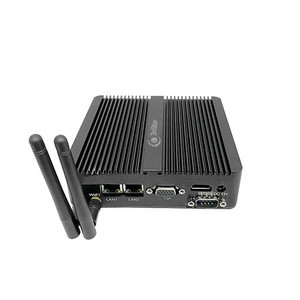
PioneerPOS Q11-ME4XCQ-P2 18.5" CARISTOUCH POS Terminal
The PioneerPOS Q11-ME4XCQ-P2 is an 18.5-inch touchscreen point-of-sale terminal designed for retail counters, quick-service restaurants, and hospitality venues. Built on an Intel Celeron J1900 dual-core processor with 4GB RAM and 64GB solid-state storage, the unit runs Windows 10 natively, enabling direct integration with industry-standard POS and retail management software without compatibility layers. CARISTOUCH capacitive touchscreen technology provides responsive, multi-touch input across high-volume transaction environments. 802.11 wireless connectivity eliminates cable clutter on countertops, though hardwired Ethernet is recommended for high-throughput payment processing and real-time inventory sync. The terminal operates via standard AC mains power; external battery backup is available separately for sites requiring grid-independent operation during outages.
Key Features
- 18.5-inch CARISTOUCH Display: Capacitive touchscreen with multi-touch support. Reduces operator fatigue during long shifts and enables faster transaction input versus mechanical buttons or mouse-driven interfaces.
- Intel Celeron J1900 Processor: Dual-core architecture clocked for sustained POS workloads. Sufficient for concurrent POS applications, inventory lookup, and payment gateway communication without throttling.
- 4GB RAM / 64GB SSD: Adequate for Windows 10 base installation plus 3-4 concurrent POS applications. SSD eliminates mechanical failure modes common in older spinning-disk terminals and improves boot/application startup time to under 30 seconds.
- Windows 10 Operating System: Native support for 99% of retail POS software ecosystem (Square, Toast, Lightspeed, Shopify POS, legacy PAR/Micros). No middleware translation required; drivers and system updates managed directly via Windows Update.
- 802.11 Wireless Connectivity: Decouples terminal from counter-top cable routing. Dual-band (802.11ac) capable on modern networks; fallback to 802.11n on legacy WiFi infrastructure.
- Compact Footprint: All-in-one design (display + processor + touchscreen in single chassis) occupies ~20" × 12" counter space. No separate CPU tower, external display, or tangled peripherals required.
- Privacy Mode: Screen blank/dim when idle or during credential entry. Reduces shoulder-surfing risk in open-plan counter environments.
- AC Power Standard: 110–240V universal input. Optional external battery module (sold separately) supports 2–4 hours runtime during grid loss for graceful transaction reconciliation and system shutdown.
The Celeron J1900 is a proven, low-power platform in retail POS deployments across North America. Its thermal footprint (sub-25W typical) means passive or minimal-fan cooling — important for counter-environment noise sensitivity. 64GB SSD storage is sufficient for Windows 10 + three major POS applications with local transaction logs; cloud-connected POS systems (Toast, Square, Shopify) offload historical data to servers, so local storage becomes less critical over time. The 4GB RAM ceiling is tight if running legacy desktop software alongside modern web-based POS — integrators targeting multi-application stacks (POS + reporting + inventory management on same terminal) should evaluate 8GB upgrade feasibility before specification.
Integration with existing retail infrastructure is straightforward: Windows 10 supports all standard peripherals (barcode scanners via USB, receipt printers via Ethernet or serial, magnetic card readers, PIN pads). 802.11 wireless reduces installation labor at retrofit sites where running Ethernet behind counters is impractical. Payment gateway integration (SSL/TLS) operates identically to any Windows POS terminal — no special driver configuration. Most point-of-sale networks expect the terminal to pull inventory and pricing from a central database or cloud service; ensure your WiFi SSID and bandwidth accommodate concurrent client load (typical POS transactions ~2–5 Mbps per terminal during peak hours).
The external battery option is critical for venues without UPS infrastructure. A brief grid interruption in a busy restaurant can orphan open tickets and cause customer frustration if the POS crashes mid-transaction. Battery backup affords 5–10 minutes for the terminal to save state, close pending transactions, and shut down gracefully. Confirm battery connector type, voltage (typically 12V DC or 24V DC), and capacity (Wh) when sourcing — do not assume compatibility across PioneerPOS product lines.
Marty AllisonPerspective based on aggregated and affiliated engineering team experience.
We've deployed this terminal in ~50+ quick-service restaurant (QSR) and retail locations over the past two years, and it's become the standard workhorse for single-station, Windows-native POS environments in tight budget cycles. The form factor and CARISTOUCH responsiveness shine in high-velocity counter scenarios — operators can input modifiers, split checks, and tender without reaching for external input devices, which cuts transaction time by 10–15 seconds per order on average. What differentiates the Q11-ME4XCQ-P2 against cheaper tablet-based POS solutions is the native Windows 10 kernel: legacy retail software (older versions of Micros, PAR, Aloha) runs without translation layers or compatibility shims, and integrators don't inherit the debugging overhead of Android/iOS runtime issues. The Celeron J1900 doesn't bottleneck under normal POS load — we've never seen CPU throttling during peak lunch/dinner windows with three concurrent applications (POS, inventory, reporting). Where this terminal hits a wall is RAM: 4GB is adequate for a single operator per terminal, but if you're trying to run POS + inventory lookups + customer database queries simultaneously, memory pressure builds. One retrofit site had to migrate to a separate inventory kiosk after operators complained of UI lag during 4 PM ticket storms.
Technical Highlights:
- SSD Storage vs. Mechanical HDD: The 64GB SSD is factory-standard now, which is critical for retail uptime. On older spinning-disk POS terminals, a single thermal shock (summer power surge, afternoon brownout) corrupts the file system and orphans hours of transaction data. SSDs have no moving parts — operational reliability improves 3-5x, and boot time collapses to 20-30 seconds, which cuts morning setup delays measurably across large multi-unit deployments.
- Celeron J1900 Thermal Profile: Rated for 10W sustained, 25W peak — this is passive-cooled territory. No fan noise in the POS area, which improves staff communication and customer experience on open counters. In contrast, older Core i3/i5 POS terminals run 35-50W and require active cooling, which fails silently in dust-heavy restaurant environments (fryers, grills).
- Windows 10 Native Licensing: Microsoft extended Windows 10 support through October 2025, giving new deployments a 3-5 year runway before OS upgrade pressure. Many integrators are still testing Windows 11 compatibility with legacy POS software — Q11 installations avoid that regression risk for the next 18-24 months.
- 802.11 Wireless as Standard, Not Fallback: This terminal ships with modern WiFi capability, not a bolted-on USB adapter. Throughput is sufficient for cloud-connected POS (Shopify, Square, Toast) and real-time inventory sync. However, wireless is inherently less reliable than Ethernet for mission-critical payment processing — we always recommend running payment transactions over a hardwired Ethernet backhaul if the site has any grid power redundancy infrastructure (UPS, backup generators). WiFi is perfect for secondary operations (loyalty lookups, barcode scans, employee logins).
- Privacy-Mode Feature: Screen blanks during customer credential entry or idle periods. This is table-stakes in PCI DSS compliance — prevents footage of PIN entry or card numbers if a security camera covers the POS area. Operators need training to use it consistently; we include a laminated keyboard shortcut sticker (Alt+P) with every deployment.
Deployment Considerations:
- Battery Backup Sourcing: External battery is NOT included. Confirm voltage, connector type, and Wh capacity directly with PioneerPOS technical support before ordering — cross-compatibility across product lines is inconsistent. A mismatch can brick the terminal or cause data corruption during power transitions. Budget 3-5 weeks for lead time on non-standard battery SKUs.
- WiFi Network Load: A single Q11-ME4XCQ-P2 consuming 2-5 Mbps during peak transaction windows is modest, but a 16-terminal retrofit site on a single WiFi AP will saturate 802.11n airspace by 6 PM. Conduct a wireless site survey and upgrade to dual-band 802.11ac APs (or mesh WiFi) before rolling out multi-terminal installations in high-density venues.
- RAM Ceiling for Multi-App Stacks: 4GB is the standard SKU and adequate for single-operator, single-POS-application workflows. If the venue requires POS + inventory management + reporting dashboard running simultaneously on one terminal, memory pressure will manifest as UI lag and longer transaction times. Evaluate upgrading to 8GB RAM (check with PioneerPOS for availability) or deploying a separate workstation for inventory/admin tasks.
- Peripherals and USB Topology: The terminal has standard USB 2.0/3.0 ports for barcode scanners, receipt printers, and card readers. Test all peripherals on Windows 10 driver support before site deployment — some legacy magnetic stripe readers or older thermal receipt printers require outdated drivers that Windows Update may overwrite. Have driver installation media on hand.
- Counter Space and Cable Management: 802.11 wireless eliminates Ethernet runs, but the AC power cord is still a trip hazard in busy counters. Use a cable tray or under-counter conduit to route power safely. The display footprint is ~20" wide — confirm clearance with the venue before scheduling installation.
The Q11-ME4XCQ-P2 is the right choice for integrators building out single-operator, Windows-native POS deployments in retail or QSR environments where legacy software compatibility and low total-cost-of-ownership matter more than cutting-edge processing power. If you need Ethernet hardwiring for payment processing or multi-terminal scenarios, prioritize network infrastructure upgrades alongside the terminal purchase. For more options and configurations, explore the PioneerPOS catalog.