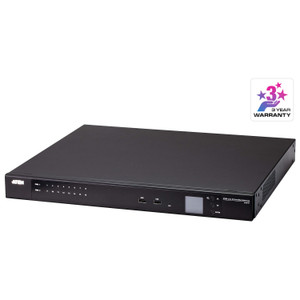
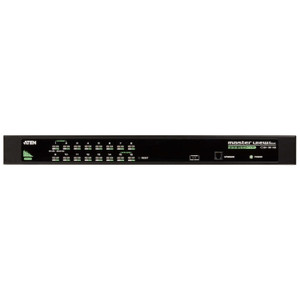
ATEN KH1516AI 16-Port Multi-Interface CAT5 KVM over IP Switch
Overview
The ATEN KH1516AI is a 16-port, rack-mounted KVM over IP switch built for IT and data center administrators who need consolidated, remote control of servers and network gear across a facility — or across the globe. With support for both PS/2 and USB keyboard and mouse interfaces, the KH1516AI fits legacy and modern server hardware without forcing a wholesale infrastructure upgrade. Browse the full ATEN KVM and console management line for companion units and accessories.
Where it earns its place is scalability: a single KH1516AI manages 16 ports directly, but daisy-chain up to 31 additional units and you're controlling 256 nodes from a single IP address and management interface — a meaningful reduction in per-server remote access overhead in dense deployments. If you're speccing a KVM switch for a mid-to-large server room, that headroom matters when the rack count grows.
Key Features
- 16 Direct Ports, 256-Node Daisy-Chain Scalability: Start with 16 servers and expand to 256 nodes by chaining up to 31 additional ATEN KVM units — without adding new IP management addresses or reconfiguring access control. This is the right architecture for phased data center buildouts where today's 16-server footprint becomes next year's 80.
- Dual Remote Resolution Options: The non-FHD version delivers 1600×1200 @ 60Hz; the FHD version pushes 1920×1200 @ 60Hz — wide-format clarity that matters when you're reading console text, reviewing BIOS output, or diagnosing boot errors on a small remote screen. Blurry remote KVM sessions are an operational hazard; the 1920×1200 ceiling on the FHD variant eliminates that.
- PS/2 and USB Keyboard/Mouse Support: Dual interface compatibility means the KH1516AI connects to both legacy PS/2 servers and modern USB-only hardware on the same unit. You don't need to segment your KVM infrastructure by server generation — one switch handles the full mix.
- OSD, Hotkey, and Pushbutton Port Selection: Three independent methods to switch between ports — on-screen display for menu-driven navigation, hotkeys for fast keyboard-driven cycling during active work sessions, and physical pushbutton for direct local console access. In practice, this means local and remote operators aren't blocked waiting on each other to release the KVM focus.
- Laptop USB Console (LUC) Port: The single USB Mini-B female LUC port lets a technician plug in a laptop directly as a local console — useful during initial rack commissioning, firmware recovery, or any scenario where the primary network path is unavailable. No dedicated crash cart required.
- Gigabit Network Interface on FHD Version: The FHD variant supports 100/1000 Mbps (non-FHD is 10/100 Mbps). If your server room network is already Gigabit and you're pushing high-resolution remote sessions, the FHD version removes the bandwidth ceiling that would otherwise degrade console responsiveness under load.
- Configurable Scan Interval (1–255 seconds): Automated sequential port scanning with a user-defined dwell time from 1 to 255 seconds per port. In server monitoring workflows, this means you can configure a slow scan (say, 30 seconds per server) to visually sweep all 16 nodes for alert states without manual input — a practical audit tool during off-hours.
- Universal AC Input: The 100–240 VAC, 50/60 Hz, 1A power input means the KH1516AI deploys in any country's rack environment without a step-down transformer or region-specific power supply. Relevant for global enterprise deployments or equipment shared between facilities.
- Controlled Humidity Rating: Rated for 0–80% RH non-condensing — standard data center envelope. Not rated for open industrial or outdoor environments, but covers the full range of conditioned server room and IDF/MDF closet conditions.
- Active Firmware Maintenance: The IP Card firmware (v1.6.155, released January 2023) and Local firmware (v1.7.163, released March 2026) confirm that ATEN is actively maintaining this platform. Current firmware patches address security vulnerabilities and compatibility issues — a non-trivial factor when remote-access KVM equipment is on your network perimeter.
Integration and Compatibility
The KH1516AI uses CAT5 cabling to connected servers via KVM adapter cables (sold separately), keeping the switch itself rack-clean with no bulky cable runs directly at the unit. Port selection via OSD gives administrators a structured interface for naming, organizing, and accessing servers — useful in mixed-OS environments where clear labeling prevents misrouted console sessions. The USB Mini-B LUC port is compatible with standard laptop USB connections for direct local management.
For environments running a mix of server generations, the simultaneous PS/2 and USB keyboard/mouse support avoids the need to standardize on a single interface type. Pair the KH1516AI with appropriate KVM adapter cables and accessories matched to your server console port types (PS/2 or USB) for a clean installation.
Network integration uses standard 10/100 or 100/1000 Mbps Ethernet depending on variant — the FHD version's Gigabit interface fits directly into modern managed switch infrastructure. For data center planners reviewing network switch capacity, the FHD KH1516AI's Gigabit uplink deserves a dedicated port on your access-layer switch rather than sharing bandwidth with storage or high-throughput traffic.
Frequently Asked Questions
Q: How many servers can the KH1516AI manage in total?
A: The KH1516AI directly manages 16 servers. By daisy-chaining additional compatible ATEN KVM units, the total expands to a maximum of 256 nodes under a single management interface.
Q: What is the maximum remote display resolution supported?
A: The FHD version supports up to 1920×1200 @ 60Hz for remote sessions. The non-FHD version supports up to 1600×1200 @ 60Hz.
Q: Does the KH1516AI support both PS/2 and USB servers?
A: Yes. The KH1516AI supports both PS/2 and USB keyboard and mouse interfaces, allowing it to connect to legacy PS/2 servers and modern USB-only servers on the same switch.
Q: What network speed does the KH1516AI support?
A: This depends on the variant. The non-FHD version supports 10/100 Mbps. The FHD version supports 100/1000 Mbps (Gigabit), which is better suited for high-resolution remote console sessions over fast networks.
Q: Can the KH1516AI be accessed locally without a network connection?
A: Yes. The unit includes a Laptop USB Console (LUC) port (USB Mini-B female) that allows direct local console access by connecting a laptop — useful during initial setup, firmware recovery, or when the network path is unavailable.
Q: What are the available methods for switching between connected servers?
A: The KH1516AI provides three port selection methods: On-Screen Display (OSD) menu navigation, keyboard hotkeys, and a physical pushbutton on the unit itself.
The spec I keep coming back to on the KH1516AI is the 256-node daisy-chain ceiling — that's not a number you see on entry-level KVM gear. When you're doing a multi-phase data center buildout and don't want to rip and replace your console infrastructure every time the rack count doubles, having that headroom baked into the architecture from day one is the right call.
Technical Highlights:
- 256-Node Daisy-Chain: Chain up to 31 additional units for 256 total nodes — scales through multiple rack expansion phases without adding new IP management endpoints or reconfiguring access policies.
- FHD Remote Resolution (1920×1200 @ 60Hz): Wide-format remote console at full 60Hz — readable BIOS text, legible console output, and enough vertical resolution to work comfortably in split-pane terminal sessions without eye strain.
- Active Firmware Support (Local v1.7.163, March 2026): The platform received a firmware update as recently as March 2026, which is a meaningful indicator that security patches and compatibility fixes are still being issued — important for a device sitting on your management network.
Deployment Considerations:
- The FHD and non-FHD variants are not interchangeable on network speed — if your remote console sessions feel sluggish, verify you're running the FHD version (100/1000 Mbps) rather than the non-FHD (10/100 Mbps) before troubleshooting elsewhere.
- CAT5 adapter cables to individual servers are sold separately — budget for the correct adapter type (PS/2 or USB) per server before deployment, and confirm adapter compatibility with your specific server console port configuration.
The KH1516AI is the right fit for a data center or server room environment where the current 16-server footprint is expected to grow, the server mix includes both legacy PS/2 and modern USB hardware, and remote management access needs to survive network path failures via the onboard LUC port.