Product images are provided for reference and may not represent the exact model, configuration, or included
components.
Build a complete system in one click
Manufacturer-verified compatible cameras, recorders, mounts, accessories, and licenses for this product.
Build Your Complete System
Manufacturer-verified compatible cameras, recorders, mounts, accessories, and licenses for this product. Adjust quantities and add the entire bundle to your cart in one click.
ItemQtyStatusPrice
Mounts & Accessories recommended
Recorders, NVRs & Storage recommended
Licenses & Software where applicable
Services & Training optional
$0.00$0.00$0.00$0.00$0.00$0.00
No Bots, Just Experts
Questions about this product? Free pre-sales support from a senior specialist — product questions, compatibility checks, BOM quotes, price confirmation — typically answered within one business day. Need camera placement or system design work? Engineering time is $175 per hour (qty 1 = 1 hour). Hardware buyers get up to one hour ($175) credited back on their order.
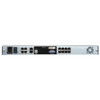
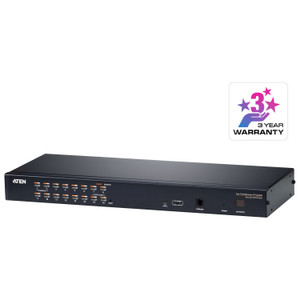
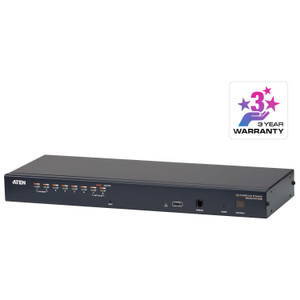
ATEN KL1108VN 8-Port Dual Rail LCD KVM over IP Switch
Overview
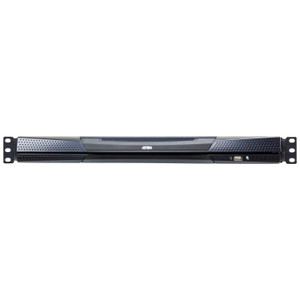
The ATEN KL1108VN is a rack-mount, dual-rail LCD KVM over IP switch that gives you direct console access to up to 8 servers from a built-in 17-inch LCD panel — and extends that access to one remote user simultaneously over IP. If you manage a server room where you need both a local crash cart and a remote out-of-band management path without deploying separate crash carts or remote management cards on every server, this is the architecture to consider. The KL1108VN ships as a self-contained 1U appliance: the LCD display, keyboard, and touchpad fold into the chassis so the unit occupies minimal rail depth when not in active use.
For larger environments, cascading up to 16 compatible ATEN KVM switches expands the addressable server count to 128 nodes — all managed from the same single point of access. That means one remote IP session can reach any server in the cascade without repatching or walking the floor.
Key Features
8 KVM Ports, Cascade to 128: The base unit handles 8 directly connected servers. Cascade up to 16 compatible ATEN switches and the addressable pool grows to 128 — a meaningful scale path for mid-size data centers that need room to grow without replacing the head unit. For KVM switches at this price point, built-in cascade is a real differentiator.
Dual-Rail Local Console + 1 Remote IP User: One local user works directly at the rack via the integrated LCD, keyboard, and touchpad. One remote user connects simultaneously over IP — both sessions are independent. This matters in hybrid ops environments where a local tech and a remote admin may need concurrent access without stepping on each other.
PS/2 and USB Keyboard/Mouse Support: The KL1108VN accepts both PS/2 and USB keyboard/mouse input from connected servers, so you can integrate legacy and modern hardware on the same switch without adapters for each host. Mixed-generation server estates get full coverage.
OSD, Hotkey, and Pushbutton Port Selection: Three methods to switch between connected servers — on-screen display menus, keyboard hotkeys, or physical pushbuttons on the panel. In practice, hotkeys handle most switching during remote sessions; the pushbuttons serve the local tech who needs to grab a port without touching the OSD.
Adjustable Scan Interval (1–255 Seconds): The built-in scan mode cycles through active ports at an interval you set — anywhere from 1 second to 255 seconds. For monitoring server POST screens during maintenance windows or watching multiple consoles during a patch cycle, this gives you a configurable sweep without manual switching.
250 cd/m² LCD Luminance: The integrated display is rated at 250 candelas per square meter — adequate for typical data center ambient lighting. Not a high-brightness panel, so if the rack bay gets significant overhead lighting or the unit is positioned at an angle with glare, factor that in before finalizing the physical placement.
Universal Power Input (100–240V AC, 50–60Hz): The single IEC 60320/C14 power inlet accepts 100–240V at 50–60 Hz, drawing up to 1A. That covers every standard rack PDU voltage worldwide — relevant if this unit is going into a colocation facility or a multi-region deployment where power standards differ.
Status Lock LEDs (Num, Caps, Scroll): Green indicator LEDs for Num Lock, Caps Lock, and Scroll Lock are on the panel face. Small detail, but when you're troubleshooting a remote keyboard state issue without a monitor, the physical LED state on the local console gives you ground truth.
Operating Humidity 0–80% RH Non-Condensing: Standard data center humidity tolerance. Non-condensing is the key qualifier — if you're deploying in a facility that runs cool and has humidity control, this is fine. Don't install in a space prone to condensation events.
Firmware Upgradeable (Current: v2.0.192): The unit supports in-field firmware upgrades; the current release is v2.0.192 (dated 2026-05-29). Keeping firmware current on IP-accessible KVM switches is not optional in security-conscious environments — patch cycles should be part of your standard maintenance schedule for this device.
Integration and Compatibility
The KL1108VN connects to servers via Cat5 cable runs using ATEN KVM adapter cables (sold separately) — the specific adapter required depends on the server's interface (PS/2 or USB). For the server management side, the IP remote access function operates over standard Ethernet; no proprietary client is needed for basic connectivity, though ATEN's browser-based or client-based remote console tools provide the full feature set including macro management and port logging.
Cascading requires compatible ATEN KVM switches in the same product family. If you're planning a cascade deployment, confirm compatible model numbers directly with ATEN before purchasing the downstream switches — cascade compatibility is not universal across all ATEN KVM product lines.
The ATEN KVM switch lineup includes both higher-port-count variants and non-LCD rack KVM options; if the integrated LCD is not a requirement and you prefer a smaller 1U footprint, evaluate the non-LCD models in the same family. Conversely, if you need more than one simultaneous remote user session, the KL1108VN's single remote user limit is a hard constraint — look at ATEN's multi-user KVM over IP platform for that use case.
Power is delivered via a single IEC C14 inlet — standard for rack PDU connectivity. No redundant power supply is included; for high-availability environments, factor that into your risk assessment. A quality rack PDU with outlet-level monitoring is the practical complement here.
Frequently Asked Questions
Q: How many servers can the KL1108VN manage directly, and can that be expanded?
A: The KL1108VN provides 8 direct KVM ports. By cascading up to 16 compatible ATEN KVM switches, the total addressable server count expands to 128 nodes — all managed from the single head unit.
Q: Can two users access the KL1108VN simultaneously?
A: Yes. The KL1108VN supports one local user at the integrated LCD console and one remote user over IP at the same time. The two sessions are independent, so a local technician and a remote administrator can work concurrently without interrupting each other.
Q: What cabling does the KL1108VN use to connect to servers?
A: The KL1108VN uses Cat5 cabling between the switch and servers, with ATEN KVM adapter cables (purchased separately) at the server end. Adapter type depends on whether the server uses PS/2 or USB interfaces.
Q: What are the power requirements for the KL1108VN?
A: The unit accepts 100–240V AC at 50–60 Hz through a single IEC 60320/C14 inlet, drawing a maximum of 1A. It is compatible with standard rack PDU voltages worldwide.
Q: How is port switching performed on the KL1108VN?
A: Port selection can be done three ways: via the on-screen display (OSD), keyboard hotkeys, or physical pushbuttons on the front panel. A built-in scan mode cycles through ports at a configurable interval between 1 and 255 seconds.
Q: What is the latest firmware version for the KL1108VN?
A: As of the most recent release date in evidence, the current firmware version is v2.0.192 (released 2026-05-29), available as kl1108v-kl1116v-v2.0.192.zip.
ATEN 8-PORT CAT 5 Dual Rail LCD KVM Over IP Switch 1 Local / 1 Remote User Access - KL1108VN
$3,705.00
$2,179.99
Save
$1,525.01
Send Laura a Message
Senior Specialist · Typically replies within 1 business day
Message sent!
A representative will reply to your email within one business day.
Build a complete system in one click
Manufacturer-verified compatible cameras, recorders, mounts, accessories, and licenses for this product.
Build Your Complete System
Manufacturer-verified compatible cameras, recorders, mounts, accessories, and licenses for this product. Adjust quantities and add the entire bundle to your cart in one click.