


Product images are provided for reference and may not represent the exact model, configuration, or included
components.
Overview
SKU:
SG-RS5X6-HMTRA-01
UPC:
267579985984
Condition:
New
Availability:
Usually ships in 24 hours
Warranty
1-Year Limited Warranty

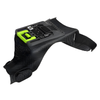
Zebra SG-RS5X6-HMTRA-01 RS5100/RS6100 Slim Hand Mount Right
Zebra SG-RS5X6-HMTRA-01 Slim Hand Mount Right Overview The Zebra SG-RS5X6-HMTRA-01 is a right-hand ergonomic mounting accessory engineered specifical…
Zebra SG-RS5X6-HMTRA-01 RS5100/RS6100 Slim Hand Mount Right
$68.99
Your recommended setup
Review items below — quantities update pricing automatically.
Item
Qty
Status
Price
Optional Add-Ons recommended
Services optional
Bundle Summary
Bundle Subtotal:
$0.00
Optional Add-Ons:
$0.00
Services:
$0.00
Total:
$0.00
Overview
SKU:
SG-RS5X6-HMTRA-01
UPC:
267579985984
Condition:
New
Availability:
Usually ships in 24 hours
Warranty
1-Year Limited Warranty
Description

Zebra SG-RS5X6-HMTRA-01 Slim Hand Mount Right
Overview
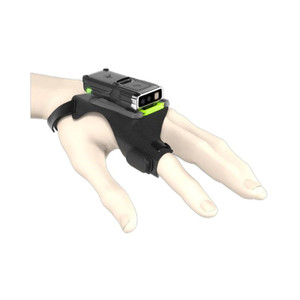
The Zebra SG-RS5X6-HMTRA-01 is a right-hand ergonomic mounting accessory engineered specifically for Zebra RS5100 and RS6100 rugged mobile computers. This slim form factor mount secures the device during extended handheld scanning operations in warehouses, logistics facilities, and field service environments where operators need reliable positioning without sacrificing portability. The SG-RS5X6-HMTRA-01 (often searched as SG RS5X6 HMTRA 01) is designed to keep the device stable during rapid barcode capture and multi-hour shift cycles.
Key Features
- Right-Hand Ergonomic Design: The mount is configured for right-handed operation, positioning the barcode scanner trigger and display at natural reach angles — reduces operator fatigue during full-shift scanning sessions and improves throughput in high-volume picking and receiving roles.
- Slim Profile: Maintains the portability of the RS5100/RS6100 — the device doesn't become unwieldy in a holster or hand-carry scenario, which is critical for personnel who move between workstations or work in compact warehouse aisles.
- Secure Retention: Holds the mobile computer firmly in hand, minimizing accidental drops on concrete floors — a realistic concern in fast-paced environments where operators are juggling devices, merchandise, and paperwork simultaneously.
- RS5100 and RS6100 Compatibility: Built to exact mechanical specifications for these two models, eliminating guesswork around fit and compatibility that can delay deployment across an entire shift or facility.
- Repeatable Positioning: Once configured, scanning angles and trigger access remain consistent across multiple operators — standardizes scan-success rates and reduces training time when handoff shifts occur.
- Rugged Material Construction: Engineered to withstand the impact and environmental stresses of warehouse and logistics operations, matching the durability expectation of the RS5100/RS6100 devices themselves.
Deployment Context
The SG-RS5X6-HMTRA-01 is purpose-built for operations that rely on the RS5100 or RS6100 for barcode capture, inventory management, or package routing. Typical deployments include receiving docks (where operators scan inbound merchandise continuously), order fulfillment centers (where pickers or packers use the device as a primary input tool), and last-mile delivery or field service teams (where the device must be gripped securely but remain light enough for all-day carry). For teams running left-handed workflows, Zebra manufactures a left-hand variant; confirm which configuration matches your operator demographics before ordering in bulk.
Integration and Compatibility
Install the SG-RS5X6-HMTRA-01 directly onto supported RS5100 or RS6100 units — no firmware updates, wireless pairing, or software configuration required. The mount does not interfere with device charging, scanning optics, or network connectivity. If your RS5100/RS6100 inventory includes both left- and right-handed users, order the corresponding left-hand mount variant separately to avoid mix-ups during issue or redeployment.
What's in the Box
The SG-RS5X6-HMTRA-01 ships as a single right-hand mount assembly, ready to install on compatible RS5100 or RS6100 units. No additional brackets, straps, or tools are required for attachment. Refer to the Zebra documentation or your system integrator for installation instructions specific to your hardware configuration.
Frequently Asked Questions
Q: Is the SG-RS5X6-HMTRA-01 compatible with both RS5100 and RS6100?
A: Yes. The mount is engineered for both RS5100 and RS6100 models and will not fit other Zebra mobile computer series. Verify your device model before ordering.
Q: Can I use this mount if I'm left-handed?
A: No. The SG-RS5X6-HMTRA-01 is configured for right-hand operation only. Zebra manufactures a corresponding left-hand variant; order that model if your team includes left-handed operators.
Q: Does the mount interfere with charging or scanning functionality?
A: No. The slim design does not obstruct the charging port, barcode scanner window, or network connectivity. The device functions normally when mounted.
Q: Will the SG-RS5X6-HMTRA-01 work with protective cases or extended batteries?
A: Mount fitment depends on the specific case or battery configuration applied to your RS5100/RS6100. Consult Zebra's compatibility matrix or your integrator to confirm whether aftermarket accessories may affect mount performance.
Q: What is the warranty coverage on this mount?
A: The SG-RS5X6-HMTRA-01 carries standard Zebra accessory warranty. Check your purchase documentation or contact the distributor for specific warranty terms.
Q: How do I install the SG-RS5X6-HMTRA-01?
A: Installation is straightforward and requires no tools. Follow the setup instructions included with the mount or reference the Zebra support portal for step-by-step guidance.
Ted Perry
The Zebra SG-RS5X6-HMTRA-01 is a straightforward but essential accessory if your team deploys RS5100 or RS6100 units in high-volume, all-day scanning roles. The right-hand ergonomic design is not a luxury—it's a practical response to operator fatigue and consistency in warehouse environments where scanning throughput directly affects shift productivity.
Technical Highlights:
- Right-Hand Ergonomics: Positions trigger and display at natural reach angles, reducing repetitive strain during multi-hour picking, receiving, or sorting cycles—particularly valuable if your facility runs 10+ hour shifts or backlog scanning sessions.
- Slim Retention Profile: Maintains device portability without adding bulk, meaning operators can move freely between stations or carry the device into compact aisles without the mount creating a fatigue liability—a real factor in tight warehouse layouts.
- Mechanical Precision Fit: Built to exact RS5100/RS6100 specifications, eliminating tolerance issues that can arise when operators try aftermarket solutions designed for "similar" models—consistency in handheld scanning is directly tied to barcode read success rates.
Deployment Considerations:
- Handedness Matters: The SG-RS5X6-HMTRA-01 is right-hand only. If your team has left-handed operators (even a small percentage), you must order the left-hand variant separately. Mixing mount types across a shift or location creates confusion during device hand-offs.
- Aftermarket Compatibility Watch: If operators are already using extended batteries, protective cases, or third-party slings, test the SG-RS5X6-HMTRA-01 fitment on a sample unit before rolling out across the facility. Thickness variations in cases can affect mount retention.
This mount is purpose-built for logistics and warehouse operations that treat the RS5100/RS6100 as a primary scanning tool. It's not decorative—it directly supports operator comfort and scanning consistency during the hours that matter most. Deploy it if your team is running high-throughput receiving, order fulfillment, or field service workflows; otherwise, a generic holster solution may suffice.
Specifications
Product Type:
Accessory - Hand Mount
Form Factor:
Hand Mount
warranty:
1-Year Limited Warranty
Have Questions?
Ask an Expert.
Videos Hide Videos Show Videos
-

A closer look at the Zebra RS5100 Enterprise Hand Mount
When it comes to a hand mount for wearable scanners, today’s w...
-
How- to video | RS5100/RS6100 | Wearable Scanners | Zebra
Learn how to effectively manage your Zebra RS5100 and RS6100 w...
-
Zebra RS5100 Single Finger Bluetooth Ring scanner
THE ‘GO-EVERYWHERE’ FEATHERWEIGHT AND RUGGED RING SCANNER Fina...
Your recommended setup
Review items below — quantities update pricing automatically.
Item
Qty
Status
Price
Optional Add-Ons recommended
Services optional
Bundle Summary
Bundle Subtotal:
$0.00
Optional Add-Ons:
$0.00
Services:
$0.00
Total:
$0.00
RELATED PRODUCTS


System Design, Deployment & Technical Support
Support services and planning resources for commercial surveillance, access control, and infrastructure deployments.
Fixed scope • Fixed price
System Design Assistance
- Get help validating product compatibility
- Coverage requirements
- Storage planning and deployment architecture before you buy.
Deployment & Configuration Support
- Access fixed-scope support for rollout planning
- User setup guidance
- Migration and system standardization across single-site or multi-site deployments
Guides, Tools & Calculators
- PoE requirements
- Storage retention
- Camera selection and deployment methodology