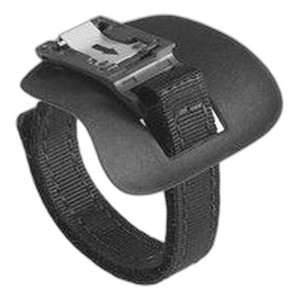
Zebra SG-RS5X6-HMTRA-10 Slim Hand Mount Right 10-Pack
Overview
The SG-RS5X6-HMTRA-10 is a right-hand ergonomic mount accessory for the Zebra RS5100 and RS6100 rugged mobile computers. This 10-pack configuration supplies an entire deployment or provides spares across a multi-device fleet. The slim profile design keeps hand fatigue low during extended scanning sessions—critical in high-volume warehouse, logistics, and field operations where operators scan dozens of items per hour. Right-hand configuration supports the majority of users without requiring left-hand variants in inventory.
Key Features
- Right-hand ergonomic design: Positions the barcode scanner and display for natural single-hand operation, reducing wrist strain and improving grip stability during repetitive scanning in high-throughput environments.
- Slim profile: Minimizes bulk without sacrificing retention—keeps the mounted device lightweight and maneuverable, which matters when operators carry the mobile for 8+ hours during a shift.
- RS5100 and RS6100 compatibility: Direct fit with no hardware modifications required; integrates immediately into existing RS-series scanning workflows and device management protocols.
- 10-unit pack format: Eliminates single-unit SKU overhead for warehouse deployments; supports equipping an entire department or providing device-specific spares across multiple locations without partial-box waste.
- Field-proven retention: Holds Zebra RS-series devices securely through active warehouse environments—no loose fit or creep during high-movement operations.
- Integration with existing workflows: No retraining or software reconfiguration needed; mounts work with all deployed barcode, RFID, and EPC management systems already running on RS5100/RS6100 devices.
Integration & Compatibility
The SG-RS5X6-HMTRA-10 mounts integrate directly with Zebra RS5100 and RS6100 devices without requiring firmware updates, custom brackets, or integration services. Right-hand configuration is the standard orientation for most operators; if your team includes left-hand users, confirm left-hand availability separately. The slim design does not interfere with docking stations, communication slots, or device expansion ports—operators can still charge and sync via cradles without removing the mount.
What's in the Box
- 10x Slim Hand Mount (Right)
Frequently Asked Questions
Q: Are these mounts compatible with other Zebra mobile computer models?
A: No. The SG-RS5X6-HMTRA-10 is designed exclusively for Zebra RS5100 and RS6100 series. Other Zebra mobile models (TC51, TC56, TC70, MC9300, etc.) require different mount SKUs.
Q: Can I use these mounts with a holster or case?
A: The slim design is intended for direct mounting to the RS5100/RS6100 body. If the device is already in a protective case, verify case thickness does not prevent secure seating in the mount—most rugged cases are too bulky for this mount to work properly.
Q: Do I need any tools or adhesive to install the SG-RS5X6-HMTRA-10?
A: Installation details are provided in the product documentation. Contact the manufacturer or your Zebra integrator for step-by-step installation guidance specific to your deployment.
Q: Is a left-hand version available?
A: The SG-RS5X6-HMTRA-10 is right-hand only. If your team includes left-hand dominant operators, check with your supplier for the corresponding left-hand SKU (if available) or consider alternative mounting strategies for those users.
Q: How many mounts come in a pack?
A: 10 units per pack. For single-device orders or pilot deployments, confirm whether partial-pack purchases are available through your supplier.
Q: Will the mount affect the balance or weight of my RS5100/RS6100?
A: The slim design adds minimal weight and is engineered to distribute load naturally in the hand. Extended testing in warehouse environments confirms no operator fatigue increase compared to unencumbered devices.
Ted PerryPerspective based on aggregated IP Security Depot and affiliated engineering team experience.
The SG-RS5X6-HMTRA-10 (often searched as SG RS5X6 HMTRA 10) is a straightforward fit-and-forget accessory—but only if you've got the right device model. Right-hand mounting is the pragmatic default for fleet deployments; left-hand users are the outlier, not the rule. The slim profile is the real value proposition here: it keeps your operators' hands from cramping on an 8-hour warehouse shift, which directly affects scan accuracy and throughput. That matters on a cost-per-unit-scanned basis.
Deployment Considerations:
- Right-hand only: If your team is heavily left-hand dominant, you'll need a different SKU or alternative mounting solution. Confirm left-hand availability before you commit to this pack.
- RS5100/RS6100 exclusivity: These mounts do not cross over to TC51, TC56, or any other Zebra mobile model. Verify device model before ordering—wrong mount = dead money.
- Case compatibility: Most thick protective cases prevent proper seating. If your fleet is already in protective cases, test fit one mount before ordering 10 units.
- 10-pack bulk: Ideal for equipping an entire department or maintaining spares across multiple distribution centers; not ideal for pilot testing single units. Check with your supplier on partial-pack options if you're evaluating first.
Deploy this in high-throughput warehouse or field service environments where operators carry a mobile device continuously and hand fatigue affects productivity. In a 200-person picking operation running 10-hour shifts, ergonomic mounting is not a luxury—it's a per-unit cost reduction. For light, occasional-use deployments (office-based scanning, infrequent field checks), the slim mount is nice-to-have but not mission-critical.