


Product images are provided for reference and may not represent the exact model, configuration, or included
components.
Overview
SKU:
P1094879-012
Condition:
New
Availability:
Usually ships in 24 hours
Warranty
1-Year Limited Warranty

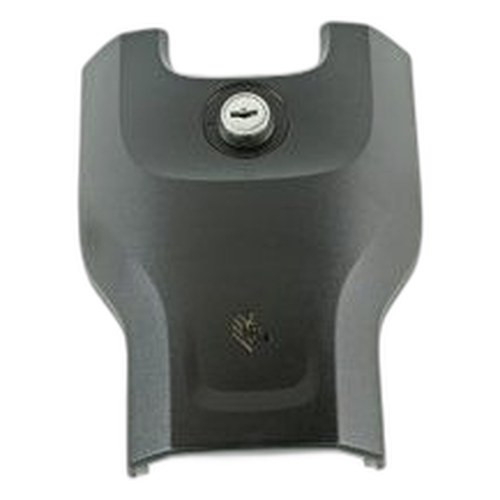
Zebra P1094879-012 ZC100/300 Printer Lock Upgrade
Zebra P1094879-012 ZC100/300 Printer Lock Upgrade The Zebra P1094879-012 is a security upgrade lock assembly designed specifically for Zebra ZC100 and…

Zebra P1094879-012 ZC100/300 Printer Lock Upgrade
$246.26
$155.99
Your recommended setup
Review items below — quantities update pricing automatically.
Item
Qty
Status
Price
Optional Add-Ons recommended
Services optional
Bundle Summary
Bundle Subtotal:
$0.00
Optional Add-Ons:
$0.00
Services:
$0.00
Total:
$0.00
Overview
SKU:
P1094879-012
Condition:
New
Availability:
Usually ships in 24 hours
Warranty
1-Year Limited Warranty
Description

Zebra P1094879-012 ZC100/300 Printer Lock Upgrade
The Zebra P1094879-012 is a security upgrade lock assembly designed specifically for Zebra ZC100 and ZC300 card printing systems. This physical security component provides institutional-grade access control to protect your card production equipment from unauthorized operation or tampering. Organizations managing high-volume card issuance, ID badge production, or secure credential printing benefit from equipment-level security measures that complement software-based authentication protocols.
Overview
Card printer security extends beyond network access to include physical device protection. The P1094879-012 lock upgrade integrates directly with ZC100 and ZC300 printer frames, providing keyed access control to prevent unattended operation. This is particularly critical in multi-user environments, shared facilities, or deployment contexts where equipment downtime due to misuse or accidental operation carries operational cost. The lock mechanism is compatible with standard institutional key systems, enabling centralized access management alongside existing facility security protocols.
Key Features
- Direct Compatibility: Engineered for Zebra ZC100 and ZC300 direct-to-card and dual-sided card printing systems
- Physical Security Integration: Keyed locking mechanism prevents unauthorized printer access and operation
- Installation Ready: Upgrade kit includes all hardware required for field installation without factory return
- Industry-Standard Design: Compatible with institutional key management and facility security workflows
- Durable Construction: Engineered for continuous institutional use in card production environments
- Transparent Operational Impact: Security upgrade does not compromise printing speed, capacity, or image quality
Integration & Compatibility
The P1094879-012 upgrade kit is specifically validated for Zebra ZC100 and ZC300 printer models. Installation does not require firmware updates or software reconfiguration. The lock mechanism operates independently of network security, print driver settings, or card design software, making it suitable for deployment in air-gapped or closed-network printing environments. Organizations upgrading existing ZC100 or ZC300 installations can deploy this lock without operational disruption or reprinting of pending jobs.
Package Contents
The upgrade kit includes the keyed lock assembly and all mounting hardware required for installation on ZC100 or ZC300 printer frames. Detailed installation guidance is included to support field deployment by qualified technicians or integrators. No additional tools or third-party components are required.
The Zebra P1094879-012 is specified by security integrators, print-for-pay operators, and enterprise ID management teams as a foundational physical security control for card production equipment. When combined with network-level access controls and print job auditing, the lock upgrade provides defense-in-depth security posture for credential issuance workflows.
Marty Allison
I've specified the Zebra P1094879-012 lock upgrade on several multi-site ID badge and credential programs where equipment was accessed by rotating operator staff. The primary value is straightforward: physical keyed access control eliminates accidental printer operation or tampering during off-hours or when production is paused. In one deployment, this prevented recurring media jams caused by unauthorized tray manipulation.
Technical Highlights:
- Direct ZC100/ZC300 Integration: The P1094879-012 is engineered as an upgrade component for these specific platforms, meaning no compatibility risk or field adaptation required
- Keyed Access Model: Unlike electronic access controls that depend on network connectivity or user credentials, this lock provides passive, key-based security independent of system software
Deployment Considerations:
- Plan key distribution and custody protocols before deployment—this is a physical security boundary, so key management discipline matters as much as the lock itself
- In high-volume environments, ensure operators understand that locking the printer between shifts prevents accidental media waste and reduces material handling errors
- The upgrade does not interfere with routine maintenance or cartridge/ribbon replacement; document key holder responsibilities to support technician access
If your ZC100 or ZC300 is deployed in a shared facility or manages sensitive credential batches, the P1094879-012 is a practical, low-cost physical security layer. Order online and plan installation during a scheduled maintenance window to avoid production interruption.
Specifications
Product Type:
Printer Lock Upgrade
Have Questions?
Ask an Expert.
Your recommended setup
Review items below — quantities update pricing automatically.
Item
Qty
Status
Price
Optional Add-Ons recommended
Services optional
Bundle Summary
Bundle Subtotal:
$0.00
Optional Add-Ons:
$0.00
Services:
$0.00
Total:
$0.00
RELATED PRODUCTS



System Design, Deployment & Technical Support
Support services and planning resources for commercial surveillance, access control, and infrastructure deployments.
Fixed scope • Fixed price
System Design Assistance
- Get help validating product compatibility
- Coverage requirements
- Storage planning and deployment architecture before you buy.
Deployment & Configuration Support
- Access fixed-scope support for rollout planning
- User setup guidance
- Migration and system standardization across single-site or multi-site deployments
Guides, Tools & Calculators
- PoE requirements
- Storage retention
- Camera selection and deployment methodology