ATEN VC182 VGA to HDMI Converter with Scaler
The ATEN VC182 is a compact VGA-to-HDMI signal converter with an integrated scaler, built for integrators who need to bridge legacy analog video sources to modern HDMI displays without a separate scaling processor. It accepts a standard VGA (HDB-15) video signal alongside analog stereo audio and composite audio inputs, then outputs a single HDMI signal at up to 1920x1200 or 1080p — covering virtually every display resolution in commercial use today. If you're migrating a control room, boardroom, or training facility from older PC hardware or signal infrastructure to HDMI-native displays, the VC182 handles both the format conversion and resolution scaling in one box.
Key Features
- 13-step output scaler (up to 1920x1200 / 1080p): The VC182 covers the full range from 640×480 up through 1920×1200 and 1080p — so whether the destination display is a legacy 4:3 projector, a widescreen 16:9 monitor, or a 16:10 panel, you select the correct output without any external scaler or display-side workaround. This matters on installs where display inventory is mixed and you can't control what gets swapped in later.
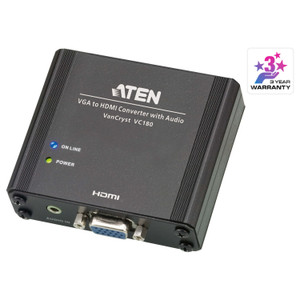
- VGA (HDB-15) input — one connector, maximum compatibility: The female HDB-15 blue connector accepts the analog VGA output from any PC, laptop, or legacy source equipment built in the last 30 years. No adapters required for standard D-sub VGA cables. This is the right pick when the source side is fixed — BIOS/POST screens, older industrial PCs, or presentation switchers that don't carry HDMI out.
- Analog stereo audio input (3.5mm Mini Stereo Jack): Audio travels alongside video on a standard 3.5mm stereo jack — the same connection used on virtually every PC headphone/line output. The VC182 embeds this audio into the HDMI output stream, so the receiving display or AV receiver gets a single HDMI cable carrying both signals. This eliminates a separate audio run to the display.
- Composite audio input (RCA): A secondary RCA (yellow) composite input provides a second audio path, giving integrators flexibility to route audio from a different source device into the HDMI output. Useful in mixed-signal AV racks where the video source and audio source are separate units.
- 100 Ω impedance (signal input): The 100 Ω input impedance is matched to standard VGA source outputs, which prevents signal reflections that can cause ghosting or noise on the image — a relevant detail when running longer VGA cable runs before conversion.
- DC jack power input: The VC182 draws power from a DC jack (external power supply), keeping it self-contained and independent of the display or source for power. There is no bus-power from VGA or HDMI, so verify the power supply is present and accounted for during installation — it is not optional.
- Operating humidity 20–90% RH non-condensing: The rated humidity envelope covers standard indoor commercial environments — server rooms, AV closets, conference rooms. It is not rated for condensing conditions, so avoid installations near HVAC discharge points or in unconditioned spaces that see wide temperature swings.
Integration and Compatibility
The VC182 fits into any workflow where the video source outputs analog VGA and the destination display accepts HDMI. Common deployment scenarios include legacy PC workstations feeding HDMI-only display arrays, training room AV systems retrofitting older presentation hardware, and control room consoles with mixed analog/digital signal infrastructure. The integrated scaler means you do not need the display to handle resolution matching — the VC182 presents the output at the resolution you select, which is particularly useful with commercial displays that handle off-spec input signals poorly.
For larger signal distribution needs across the ATEN catalog, the VC182 pairs with ATEN's KVM and AV signal conversion product lines. If your project involves distributing a converted signal to multiple displays, pair the VC182 upstream of an HDMI distribution amplifier. For installs where both keyboard/video/mouse and signal conversion are needed at the same endpoint, review ATEN's broader KVM switch lineup for integrated options. When planning multi-display AV infrastructure, an AV-over-IP distribution architecture may be worth evaluating for scale beyond a few endpoints.
Frequently Asked Questions
Q: What output resolutions does the VC182 support?
A: The VC182 scales to 13 output resolutions: 640×480, 800×600, 1024×768, 1280×1024, 1360×768, 1400×1050, 1600×1200, 1440×900, 1680×1050, 1920×1080 (1080p), 1920×1200, 720p, and 1080p — covering 4:3, 16:9, and 16:10 aspect ratios.
Q: Does the VC182 carry audio over the HDMI output?
A: Yes. The VC182 accepts analog audio via a 3.5mm Mini Stereo Jack and a composite RCA input, then embeds the audio into the HDMI output stream. A single HDMI cable to the display carries both video and audio.
Q: What type of VGA connector does the VC182 use?
A: It uses a standard HDB-15 female connector (the blue 15-pin D-sub VGA connector), compatible with any standard VGA cable.
Q: Does the VC182 require external power?
A: Yes. The VC182 uses a DC jack for power input — it is not bus-powered from VGA or HDMI. Ensure the appropriate power supply is present and connected during installation.
Q: Is the VC182 suitable for outdoor or industrial environments?
A: The VC182 is rated for 20–90% relative humidity, non-condensing, which covers standard indoor commercial environments. It is not rated for outdoor, condensing, or harsh industrial conditions.
Q: Can the VC182 be used with a VGA source that outputs POST/BIOS screens?
A: Yes. Because it operates at the hardware signal level — converting analog VGA to HDMI — it passes video from the moment the source outputs a signal, including BIOS/POST screens that pre-date operating system display drivers. This makes it viable for server console access and legacy workstation monitoring.
The VC182 comes up regularly on projects where the source hardware is locked — think embedded industrial PCs, legacy KVM-attached workstations, or presentation systems that the client won't replace — but the display side has already moved to HDMI-only. The built-in scaler supporting 13 output resolutions up to 1920x1200 means you're not relying on the display's own scaling engine, which on commercial-grade panels can produce soft or misaligned output when fed an off-native-resolution signal. That scaler flexibility is the main reason to specify the VC182 over a passive VGA-to-HDMI dongle.
Technical Highlights:
- 13-resolution output scaler to 1920×1200: Covers every standard commercial display resolution including 4:3 (1600×1200), 16:10 (1920×1200), and 16:9 (1080p) — the VC182 presents a native-resolution signal to the display rather than forcing the panel to scale, which keeps sharpness consistent across mixed display deployments.
- Dual audio inputs (3.5mm + RCA composite): Embedding both a stereo mini jack and a composite RCA audio path into the HDMI output means you can route audio from either the PC headphone out or a separate line-level device — useful in AV racks where video and audio originate from different equipment.
- 100 Ω input impedance: Properly matched to standard VGA source outputs, reducing signal reflection risk on longer analog cable runs before the conversion point — relevant in large-format AV closets where the source PC may be 15–20 feet from the converter.
Deployment Considerations:
- The VC182 requires an external DC power supply — confirm the supply is included or separately sourced before installation. There is no bus power from either the VGA or HDMI connections.
- The humidity rating of 20–90% RH non-condensing is adequate for server rooms and AV closets but rules out unconditioned spaces or anywhere near condensation-prone HVAC returns. Plan the mounting location accordingly.
The VC182 is the practical pick for boardroom and training-room retrofits where legacy VGA-output PCs need to feed HDMI displays and you cannot swap the source hardware — the integrated scaler and dual audio inputs mean the conversion is clean without additional processing equipment in the signal chain.