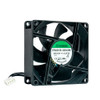
QNAP FAN-4CM-R01 40mm Replacement Cooling Fan
Overview
The QNAP FAN-4CM-R01 is a 40x40x25mm, 12V, 4-pin replacement cooling fan designed for QNAP NAS enclosures that ship with this unit from the factory — including the rack-mount TS-464eU. When a fan fails or degrades in a production NAS, replacing it with the correct OEM part (FAN-4CM-R01, also searched as FAN 4CM R01) ensures the thermal profile of the enclosure remains within design spec. Third-party fans of the same physical size frequently differ in speed curve, connector pinout, or PWM signaling, which can cause firmware fan-error alerts, unintended throttling, or missed fault detection. Sourcing the exact manufacturer part eliminates that guesswork.
Key Features
- 40x40x25mm form factor: matches the exact bay footprint of compatible QNAP enclosures — no shimming, no bracket modification, drop-in swap.
- 12V DC operation: aligns with the NAS internal power rail; no voltage adapter or regulator required.
- 4-pin connector: supports PWM speed control, allowing QNAP's thermal management firmware to regulate fan RPM dynamically based on drive and CPU temperatures rather than running at fixed high speed — which matters for noise-sensitive office or lab deployments.
- OEM-sourced replacement: factory-new, genuine part — not an aftermarket equivalent — so fan-curve and fault-reporting behavior matches what QNAP's QTS firmware expects.
Integration & Compatibility
The FAN-4CM-R01 is confirmed as a package component of the TS-464eU (Intel Celeron N5095 rack-mount NAS). Verify your specific enclosure model's spare parts list or service manual before ordering — QNAP produces multiple 40mm fan variants with differing connector types and speeds across its product line. A 4-pin PWM connector on this part means it will not function correctly in a 3-pin (voltage-controlled) fan header without a passive adapter, and PWM-to-voltage adapters can defeat closed-loop speed reporting.
Frequently Asked Questions
Q: Which QNAP NAS models use the FAN-4CM-R01?
A: The FAN-4CM-R01 is confirmed as a factory component of the QNAP TS-464eU. Check your enclosure's official spare parts list to confirm compatibility before ordering.
Q: Is this a 3-pin or 4-pin fan?
A: 4-pin. This connector supports PWM speed control, allowing QNAP firmware to adjust fan speed dynamically based on thermal load.
Q: What are the physical dimensions of the FAN-4CM-R01?
A: 40x40x25mm — a standard 40mm fan form factor at 25mm depth.
Q: Can I use a generic 40mm fan instead of the FAN-4CM-R01?
A: Physically it may fit, but third-party fans often differ in PWM signaling or speed curve, which can trigger firmware fan-error alerts or cause incorrect thermal management in QTS.
The FAN-4CM-R01 is one of those parts that only matters when something goes wrong — but when a fan fails in a production NAS mid-shift, the 40x40x25mm, 12V, 4-pin spec on this unit is exactly what separates a clean swap from a firmware headache. I've seen integrators drop in a generic 40mm fan and spend two hours chasing a phantom fan-error alert in QTS because the PWM curve didn't match.
Technical Highlights:
- 4-pin PWM connector: lets QTS firmware close the loop on fan speed — the NAS can ramp up cooling under heavy RAID rebuild load and back off during idle, rather than blasting at fixed RPM.
- 12V operating voltage: direct compatibility with QNAP's internal power rail — no adapter, no voltage mismatch risk during installation.
- 40x40x25mm OEM form factor: confirmed factory fit in the TS-464eU; no mechanical modification needed for the swap.
Deployment Considerations:
- Before ordering, cross-reference this part number against your specific QNAP enclosure's spare parts documentation — QNAP uses several 40mm variants with different speed ratings and pinouts across its line.
- A 4-pin PWM fan will not report correctly if installed in a 3-pin voltage-controlled header; confirm your enclosure header type before the swap, or you risk losing fan fault detection entirely.
Best fit: a hot-aisle rack environment running a TS-464eU under continuous RAID workload where losing fan telemetry is not an option and a same-day OEM replacement matters more than sourcing a cheaper generic part.