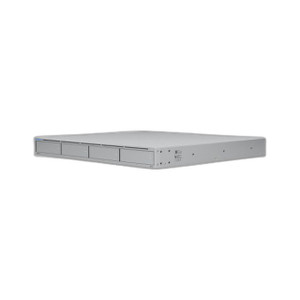
Ubiquiti UCI Mounting Hardware
Overview
The UCI mounting hardware enables secure, standard 1U rack integration of the Ubiquiti UCI cable modem into enterprise network cabinets. This accessory is designed for integrators deploying the UCI as part of a UniFi-managed broadband infrastructure, where reliable cable internet connectivity underpins critical business operations. Proper mounting ensures the UCI remains stable during thermal cycling and vibration — factors that matter in data centers, network closets, and telecom equipment rooms where airflow and accessibility are priorities.
Key Features
- 1U Rack Profile: Matches the UCI's 1U form factor, allowing flush integration into standard 19-inch racks alongside switches, firewalls, and other network appliances. Eliminates the need for shelving adapters and keeps cable management clean.
- Wired Connectivity Support: Hardware does not interfere with the UCI's 2.5 GbE uplink port or DOCSIS 3.1 WAN interface, ensuring unobstructed cable runs and airflow around port connectors.
- Tool-Free Installation: Standard mounting ears and brackets simplify deployment — no specialized fasteners required beyond typical M5 or M6 rack screws.
- Thermal Compatibility: Preserves ventilation clearance around the UCI chassis, critical for passive cooling in 24/7 broadband gateway deployments where ambient cabinet temperatures can exceed 35°C.
- Cable Management: Structured mounting reduces cable sag and stress on connector ports, extending the operational life of RJ-45 and coaxial interfaces under thermal and mechanical stress.
- Standard Compliance: Hardware adheres to EIA-310-D rack mounting specifications, ensuring interoperability with all commercial and enterprise-grade equipment racks.
Compatibility
This mounting kit is purpose-built for the Ubiquiti UCI cable modem. It supports integration into any standard 19-inch (nominal) four-post or two-post rack frame rated for the UCI's weight (approximately 3.5 lbs). The hardware does not modify the UCI's electrical characteristics, port access, or UniFi Cloud Gateway management interface — the UCI functions identically whether mounted in a rack or placed on a shelf. Consult your rack specifications to confirm available mounting space and weight-bearing capacity before installation.
Deployment Context
Rack mounting the UCI is recommended in any installation where multiple network appliances share a single cabinet — typical in branch offices, retail locations, and small-to-medium enterprise sites running UniFi infrastructure. Wall-mounted or shelf-based alternatives are acceptable if rack space is unavailable, but rackmounting delivers superior thermal performance and cable organization, particularly in environments where the UCI must operate continuously and ambient temperatures fluctuate seasonally.
Frequently Asked Questions
Q: Will this mount work with non-Ubiquiti cable modems?
A: No. This hardware is designed specifically for the UCI form factor and port layout. Other cable modems, even if they are 1U, may have different mounting boss positions or connector placement, preventing proper installation.
Q: Do I need a rack to use the UCI?
A: No. The UCI can operate on a shelf, desktop, or wall-mounted surface without this mounting kit. Racking is optional but recommended for cable management and thermal performance in multi-appliance deployments.
Q: What tools are required for installation?
A: Standard M5 or M6 rack screws and a Phillips or hex screwdriver. No specialized tools needed.
Q: Does the mount reduce airflow around the UCI?
A: No. The mounting ears are designed to preserve vertical and horizontal clearance around the UCI chassis, allowing ambient airflow through the equipment rack.
Q: Can I remove the mount after installation?
A: Yes. The hardware fastens with standard rack screws and can be removed or repositioned without damage to the UCI if deployment needs change.
Ted PerryPerspective based on aggregated IP Security Depot and affiliated engineering team experience.
From a systems integration standpoint, the UCI mounting hardware is a straightforward but essential accessory if your broadband gateway sits in a rack alongside other network infrastructure. The UCI itself is a compact 1U cable modem — roughly 17.5 inches wide and 1.75 inches tall — so proper rackmounting becomes a cable and thermal management question rather than a cost issue.
Technical Highlights:
- 1U EIA-310-D Compliance: Ensures the UCI sits flush with standard 19-inch racks, eliminating the need for non-standard shelving or adapters that waste rack space and complicate future hardware swaps.
- Port Accessibility: The mounting design preserves access to the UCI's 2.5 GbE uplink and DOCSIS 3.1 WAN port without requiring removal of adjacent equipment — a genuine timesaver during troubleshooting or cable reconfiguration.
- Thermal Profile: Rackmounting allows hot air to rise naturally through the cabinet without pooling around the modem. In a warm server room or data center, this passive cooling benefit extends the UCI's operating life by reducing thermal stress on internal components.
Deployment Considerations:
- Verify your rack has available 1U space and adequate weight capacity — the UCI weighs approximately 3.5 lbs, not a concern for most modern racks, but worth confirming if you're working with legacy or load-limited enclosures.
- Plan cable runs from the DOCSIS 3.1 WAN port to your cable drop and from the 2.5 GbE port to your UniFi gateway or core switch before mounting. Racking the UCI first and then threading cables is possible but awkward.
- If you're deploying multiple UCI units for redundancy or geographic distribution, racking them vertically consumes less horizontal space and simplifies cable bundling compared to shelf mounting.
This accessory is a logical choice for network integrators building out branch-office or retail broadband infrastructure where the UCI is the WAN edge device. If your deployment is a single modem in a closet or a temporary test installation, shelf mounting saves the hardware cost. But for any permanent, production multi-appliance environment, the UCI mount earns its place in the bill of materials.