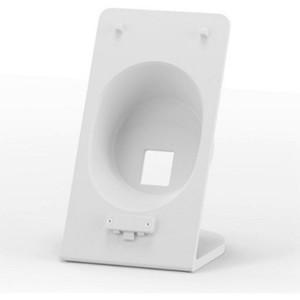
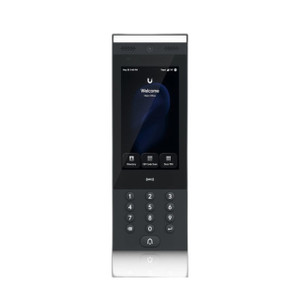
Ubiquiti UA-INTERCOM-VIEWER-3 Secondary Display Unit
Overview
The Ubiquiti UA-INTERCOM-VIEWER-3 is a tablet-form display unit designed to extend Ubiquiti UniFi Access intercom functionality across residential and commercial properties without requiring a dedicated hardware intercom at every location. This secondary viewer operates alongside UniFi Access Intercom systems and G2-generation hardware, weighing just 0.4 lb and delivering flexible wall or desk placement. The UA-INTERCOM-VIEWER-3 (often searched as UA INTERCOM VIEWER 3) integrates directly into your UniFi Access controller infrastructure, enabling cost-effective distribution of call visibility and door unlock capability across multi-location deployments.
Key Features
- Tablet Form Factor (0.4 lb): Lightweight design enables flush wall mounting or desk placement in reception areas, security command centers, or secondary access points — no heavy hardware installation overhead, and repositioning takes minutes rather than hours.
- Real-Time Intercom Feed Visibility: Displays live calls from any linked entry point, letting occupants or staff monitor and respond to access requests from multiple locations simultaneously — reduces missed calls and speeds response times in multi-zone deployments.
- Touch-Based Door Control: Operators accept calls, unlock doors, and manage access directly from the tablet interface — eliminates the need for separate intercoms at secondary gates, side entrances, or interior checkpoints.
- UniFi Intercom & G2 Compatibility: Works with both original UniFi Access Intercom units and newer G2 hardware, meaning you can deploy viewers incrementally as you upgrade systems — no forced equipment replacement.
- Secure Network Integration: Connects via standard Ethernet to your UniFi Access controller, operating within the same encrypted protocol stack supporting your cameras and access hardware — no separate authentication VLAN or firewall rules for most setups.
- Controller-Based Commissioning: Assign the UA-INTERCOM-VIEWER-3 to intercom groups or door zones directly from your UniFi Access controller interface — no firmware customization or manual provisioning required beyond standard controller duties.
Integration & Compatibility
The UA-INTERCOM-VIEWER-3 requires an active UniFi Access controller and compatible network backbone. Deployment integrates with your existing access control systems and camera infrastructure, allowing a single controller to manage entry hardware, viewer displays, and security cameras from one dashboard. Standard VESA-compatible mounts and wall-mount enclosures apply — no proprietary brackets. PoE injectors or standard power delivery (depending on your dock configuration) supply network and power simultaneously, simplifying cable runs in retrofit installations.
Deployment Scenarios
In residential multi-unit buildings, a primary intercom guards the main entrance while secondary viewers in property management offices, amenity spaces, or secondary gates distribute call visibility without duplicating hardware costs. Commercial deployments benefit from placement in reception areas, security command centers, conference facilities, or warehouse loading docks — allowing staff to monitor and respond to access requests from operational zones away from entry doors. Campus and hospitality environments extend intercom reach across distributed buildings: a central intercom at the main gate pairs with viewers in administrative offices, security stations, and guest services, reducing per-location capital expense while maintaining unified control.
Frequently Asked Questions
Q: Does the UA-INTERCOM-VIEWER-3 work as a standalone intercom, or only as a secondary display?
A: The UA-INTERCOM-VIEWER-3 functions exclusively as a secondary viewer. You must have at least one primary UniFi Access Intercom unit or G2 hardware to receive calls and trigger door unlock — the viewer displays the call but does not originate intercom traffic.
Q: What network connection does the UA-INTERCOM-VIEWER-3 require?
A: The unit connects via standard Ethernet to your UniFi Access controller. Depending on your dock configuration, power is supplied via PoE injector or standard AC/DC adapter — confirm your dock type before specifying power delivery.
Q: Can I deploy multiple UA-INTERCOM-VIEWER-3 units on the same UniFi Access controller?
A: Yes. The controller can manage multiple viewer instances simultaneously, assigning each to different intercom groups or door zones. This is the core use case for large properties and distributed campuses.
Q: Does the UA-INTERCOM-VIEWER-3 require any firmware updates or special configuration beyond UniFi Access controller provisioning?
A: No. Once added to the controller and assigned to relevant intercom groups, the unit operates without firmware customization. Standard controller software updates apply.
Q: Is the tablet form factor suitable for outdoor mounting?
A: The UA-INTERCOM-VIEWER-3 is optimized for indoor or covered outdoor environments. For full weather exposure (rain, direct sun, extreme temperature swings), verify your mounting enclosure provides adequate environmental protection — the tablet itself is not rated for sustained outdoor duty.
Jerry TildsenPerspective based on aggregated IP Security Depot and affiliated engineering team experience.
The UA-INTERCOM-VIEWER-3 addresses a real pain point in scaled access deployments: you need call visibility at multiple locations, but installing full intercom hardware at every secondary entrance drives capital and integration costs through the roof. This tablet viewer sidesteps that problem cleanly. At 0.4 lb, it mounts anywhere standard VESA fixtures apply — reception desk, security office, warehouse loading dock — without the footprint or installation labor of dedicated intercom hardware.
Technical Highlights:
- Lightweight Tablet Form (0.4 lb): Repositioning or adding new viewer locations requires minutes, not days — meaningful when your property layout changes or you're adding coverage to a newly occupied floor.
- Multi-Zone Call Distribution: One primary intercom can feed multiple viewers across different zones or buildings, all coordinated through a single UniFi Access controller — eliminates the per-location cost of secondary hardware.
- Backward & Forward Compatibility: Works with original UniFi Access Intercoms and G2 hardware, so you're not locked into one generation — budget flexibility when rolling out upgrades over time.
Deployment Considerations:
- The UA-INTERCOM-VIEWER-3 is a secondary display only — you must pair it with at least one primary intercom unit to receive calls. Solo deployments won't work.
- Network connectivity and power delivery depend on your dock configuration — verify whether you're using PoE or standard AC/DC before ordering infrastructure (switches, injectors, outlets).
- Indoor/covered outdoor only — if your deployment includes full weather exposure, budget for a protective wall enclosure to manage temperature swings and moisture.
This is the right choice for multi-zone residential properties, office campuses, and hospitality layouts where you want call visibility at secondary locations but don't want to replicate full intercom hardware everywhere. Paired with a phased UniFi Access rollout, viewers scale far more cost-effectively than hardware-per-location strategies.