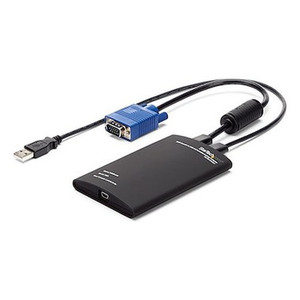
StarTech NOTECONS02X Laptop-to-Server KVM Console Adapter
Overview
The StarTech NOTECONS02X is a USB-powered laptop-to-KVM console adapter built for field technicians and IT staff who need direct, crash-cart-style access to headless servers, ATMs, kiosks, and embedded systems — without hauling a dedicated console or hunting for a monitor and keyboard. Plug it into a laptop USB port, connect the integrated VGA and USB cables to the target machine, and you have full keyboard, video, and mouse control running through your laptop screen in seconds. No power brick, no software installation on the target host, no network dependency.
At 8.6 oz (244 g) with a 16.4-inch integrated cable, the NOTECONS02X slips into a laptop bag alongside everything else you're already carrying. That form factor is the point: this is a tool for the technician doing rounds across a rack room, a data center floor, or a retail back office — not a permanent fixture.
Key Features
- USB Bus-Powered Operation: Draws all power from the laptop's USB port — no separate power supply needed. That eliminates one more thing to carry and removes the risk of a lost power adapter killing a service call.
- 1920x1200 @ 60 Hz VGA Output: Supports the full native resolution of most server console ports, including legacy BIOS screens and pre-OS environments where DisplayPort or HDMI doesn't exist. You get a clean, full-resolution picture without scaling artifacts.
- Integrated 416 mm (16.4 in) Cable: The fixed cable keeps the connection short and tidy at the target machine's rear panel — no loose cable to manage, no gender changers to carry. Long enough to reach around most 1U rack shelves comfortably.
- USB 2.0 Host Interface (480 Mbps): Keyboard and mouse signals travel over USB 2.0, which is more than sufficient for KVM control data. Compatible with any laptop USB-A port manufactured in the last 15+ years.
- USB Mini-B Console Connector (5-pin): The single USB Mini-B connection to the laptop handles both video capture and HID (keyboard/mouse) data over one cable — fewer connections means fewer failure points at the bench.
- Three LED Status Indicators: Dedicated LEDs for User Console/USB Link, Host/Server VGA Link, and Host/Server Keyboard/Mouse USB Link give you immediate visual confirmation of which layer has connected successfully. When a server won't respond, you can tell instantly whether the problem is the video signal, the USB HID link, or the console connection itself — without guessing.
- Compact Physical Profile (4.9 x 3.5 x 0.9 in): The unit is roughly the footprint of a deck of cards and under an inch thick. It stacks flat in any laptop bag pocket without adding meaningful bulk.
- Operating Range 0°C to 40°C: Rated for standard indoor environments including server rooms, retail back offices, and data center floor temperatures. Storage range extends to -40°C / 70°C, so leaving it in a car or equipment case overnight won't damage it.
- 80% RH Humidity Rating: Handles the condensation-prone environments you'll encounter in basement comms rooms and unconditioned equipment closets without issue.
- Single-User, Single-Port Design: This is a one-technician, one-machine tool — not a multi-user KVM switch. That simplicity means there is no configuration, no switching latency, and no shared-access complexity to debug on a service call.
Integration and Compatibility
The NOTECONS02X connects to any VGA-equipped host — servers, ATMs, kiosks, network appliances, or embedded industrial controllers — through the standard 15-pin HD D-Sub VGA connector and a USB Type-A port for keyboard/mouse emulation. The host side requires no driver installation or software agent; the adapter presents itself as a standard HID device. On the laptop (console) side, a driver or companion application is typically required to render the captured video on screen — verify compatibility with your laptop OS before deployment.
The adapter handles analog VGA signals up to 1920x1200, covering virtually all server baseboard management interfaces and legacy BIOS environments. It is not designed for DisplayPort, HDMI, or DVI host connections; if your target machines have migrated to digital-only video output, a different adapter family is required.
For teams managing mixed environments — some machines with modern iDRAC/iLO remote access, others still relying on physical console ports — the NOTECONS02X fills the gap for the machines that haven't been upgraded, without requiring a dedicated crash cart.
Frequently Asked Questions
Q: Does the NOTECONS02X require any software or drivers on the target server?
A: No. The target host sees a standard USB HID keyboard and mouse — no agent or driver installation is required on the server side. A driver or application on the laptop (console) side is typically required to display the captured VGA signal.
Q: What is the maximum video resolution supported?
A: The NOTECONS02X supports analog VGA resolutions up to 1920x1200 at 60 Hz, which covers most server BIOS and OS console interfaces.
Q: Is the NOTECONS02X USB bus-powered, or does it need a separate power supply?
A: It is fully USB bus-powered — it draws power directly from the laptop's USB port. No external power supply or wall adapter is needed.
Q: What does each LED indicator on the NOTECONS02X represent?
A: There are three LEDs: one confirms the User Console/USB link to the laptop, one confirms the Host/Server VGA video link, and one confirms the Host/Server Keyboard/Mouse USB link. Each layer can be verified independently for faster fault isolation.
Q: What is the warranty on the NOTECONS02X?
A: The NOTECONS02X carries a 2-year manufacturer warranty.
Q: Can the NOTECONS02X connect to hosts with HDMI or DisplayPort outputs?
A: No. The NOTECONS02X is designed exclusively for analog VGA (15-pin HD D-Sub) host connections. It is not compatible with HDMI, DisplayPort, or DVI host video outputs.
The detail that matters most on the NOTECONS02X in a real service scenario is the three-LED status array. When you're standing behind a rack and a server isn't responding, those three indicators — VGA link, USB HID link, console link — tell you in about two seconds whether you have a video signal problem, a USB enumeration failure, or a cable seating issue. That's faster than opening a terminal and running diagnostics blind, and it matters when you're on a service call with a time commitment.
Technical Highlights:
- 1920x1200 VGA Ceiling: Covers the full resolution range of legacy server console ports — including BIOS splash screens and pre-OS environments that don't negotiate DisplayPort or HDMI — so you're not squinting at a downscaled 1024x768 image when the OS isn't up yet.
- USB Bus-Powered (no wall adapter): 100% of operating power comes from the laptop's USB port. On a service call across 20 rack units, that's 20 fewer power-strip conflicts and zero adapter-hunt delays.
- 416 mm Integrated Cable: Fixed at 16.4 inches — short enough to stay controlled at the back of a 1U server, long enough to clear most rack cable management arms. The integrated design removes the connector failure point you get with a detachable pigtail.
Deployment Considerations:
- Verify laptop-side driver or application compatibility with your specific OS before deploying across a field team — the host side needs nothing, but the console (laptop) side does require software to render the captured VGA feed.
- The NOTECONS02X is a single-port, single-user device rated for 0°C to 40°C operating temperatures — it is not designed for permanent rack installation or shared multi-technician access. If your environment needs persistent out-of-band access, a networked KVM or IPMI/BMC solution is the right path instead.
The NOTECONS02X is the right tool for a field technician or IT generalist servicing ATMs, retail kiosks, or legacy rack servers that still rely on physical VGA console ports — environments where you need fast, no-configuration access on-site and can't justify a dedicated crash cart for every service zone.