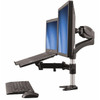
StarTech ARMUNONB Laptop and Monitor Dual-Display Desk Mount Arm
Overview
The StarTech ARMUNONB is a dual-arm desk mount that raises both a monitor and a laptop off the work surface simultaneously — freeing up desk real estate and letting you configure a proper two-screen workflow without a second standalone display. The arm accommodates monitors from 15" up to 27" and holds a laptop tray that measures 12.6" x 9.4", making it compatible with the majority of 13" to 15" notebooks in commercial use. If you're fitting out a trading desk, a security operations workstation, a dispatch console, or a hybrid-work hot-desk environment, this is the mount to evaluate before committing to a more complex VESA solution.
The ARMUNONB ships in an all-black aluminum construction — lightweight enough to reposition without tools yet rigid enough to hold up to 17.6 lb (8 kg) total across both arms without drift or sag over a full shift.
Key Features
- 22.0" Monitor Arm Extension: The main display arm reaches up to 22 inches from the desk clamp pivot. That's enough clearance to push a 27" monitor back past a keyboard, a docking station, and still have clean line-of-sight — useful on deeper workstations (30"+ desks) without the display feeling out of reach.
- 15.0" Laptop Arm Extension: The dedicated laptop arm extends to 15 inches, positioning the notebook at a usable secondary-display angle beside or below the main monitor. This keeps the laptop's built-in screen accessible without stacking it on a riser or blocking the primary view.
- 17.6 lb (8 kg) Maximum Weight Capacity: That ceiling covers virtually any 27" commercial display (most weigh 10–14 lb) combined with a standard business notebook. If you're mounting an ultrawide panel above 27" or a heavy all-in-one, confirm individual arm weight distribution — this spec applies across the combined assembly.
- Full 360° Display Rotation and ±90°/+85° Tilt: The monitor head rotates a full 360°, so portrait mode for document review or coding is a tool-free adjustment. Tilt range of -90° to +85° handles everything from a near-flat reading angle to nearly vertical — practical when ceiling glare or seated height varies between users on a hot-desk setup.
- 180° Swivel Pivot: The arm swivels 180° at the base, letting you swing the monitor to face a colleague or rotate the display out of the way during in-person meetings without disconnecting cables.
- VESA 75x75 mm and 100x100 mm Compatibility: Both standard VESA hole patterns are supported — covers the full range of monitors you're likely to deploy in a commercial environment. If your display uses a proprietary mount, confirm VESA compliance before ordering.
- Aluminum Construction, 10.8 lb Assembly Weight: The aluminum chassis keeps the arm itself at 10.8 lb — substantial enough to feel stable, light enough that repositioning a workstation doesn't require two people. No plastic flex or wobble under a heavy panel.
- Desk Clamp Mount, Up to 3.3" Table Thickness: The clamp fits desks up to 3.3" thick — covers standard office desks, sit-stand frames, and most commercial workstation surfaces. No drilling required. Not compatible with glass tops or desks with lip profiles that block a bottom clamp jaw.
- 12.6" x 9.4" Laptop Tray: The tray dimensions fit most 13" to 15" notebooks. Confirm your laptop's footprint before ordering — oversized gaming notebooks or larger than 15" workstation laptops may exceed the tray area.
- 5-Year Warranty: A five-year manufacturer warranty on a desk mount is above average for this category — relevant for facilities managers standardizing across multiple workstations who need a predictable replacement window.
Integration and Compatibility
The ARMUNONB works with any monitor that has a standard 75x75 mm or 100x100 mm VESA mounting pattern — which covers the vast majority of commercial flat-panel displays from Dell, HP, LG, Samsung, and comparable manufacturers. Monitors with proprietary base attachments that do not expose a VESA pattern are not compatible without an adapter plate (not included). The desk clamp secures without tools to surfaces up to 3.3" thick; verify your desk edge profile allows full jaw engagement before deployment. The laptop tray is fixed-dimension (12.6" x 9.4"), so measure your notebook before ordering if you're running anything larger than a standard 15" business laptop.
For monitor mounts across a range of configurations, including single-arm, dual-monitor, and wall-mount options, evaluate whether a fixed or articulating arm better fits your workstation layout. If you're building out a StarTech workspace accessories stack, the ARMUNONB pairs naturally with cable management accessories to keep the desk surface clean after mounting.
Security operations centers and dispatch environments running a network video recorder alongside a monitoring workstation will find the dual-arm configuration useful for keeping the NVR management interface on the laptop screen while primary camera feeds run on the main display — without adding a second desk-mounted display stand.
For workstations where ergonomics and screen positioning directly affect operator alertness over long shifts, pairing this arm with a height-adjustable desk frame or rack console solution gives full height and depth control across both displays.
Frequently Asked Questions
Q: What is the maximum monitor size the ARMUNONB supports?
A: The ARMUNONB supports monitors from 15" up to 27". Confirm your display falls within this range and has a compatible VESA 75x75 mm or 100x100 mm mounting pattern before purchasing.
Q: What is the weight limit for the ARMUNONB?
A: The combined maximum weight capacity across both arms is 17.6 lb (8 kg). This covers most 27" commercial monitors paired with a standard business notebook. Verify the combined weight of your monitor and laptop does not exceed this figure.
Q: Will the desk clamp fit my workstation?
A: The ARMUNONB clamp accommodates desk surfaces up to 3.3" thick. It is not compatible with glass desktops or desks with edge profiles that prevent full jaw engagement. No drilling is required for installation.
Q: What size laptop fits the ARMUNONB tray?
A: The laptop tray measures 12.6" wide by 9.4" deep. This fits most 13" to 15" business notebooks. Laptops with larger footprints — including 17"+ workstation models — may not fit securely in the tray.
Q: What is the warranty on the ARMUNONB?
A: The ARMUNONB carries a 5-year manufacturer warranty.
Q: Can the monitor be rotated to portrait orientation on the ARMUNONB?
A: Yes. The monitor mount supports full 360° display rotation, so switching between landscape and portrait mode requires no tools.
The ARMUNONB's 22-inch monitor arm extension is the spec that earns it a place in security operations center buildouts — most competing arms in this category top out at 17 to 19 inches, which forces the display uncomfortably close on a deep console desk. With the ARMUNONB, you get enough reach to position a 27" panel at a comfortable focal distance even when the desk runs 36" front-to-back.
Technical Highlights:
- 360° Display Rotation: Full portrait mode capability without tools — useful for SOC operators who switch between widescreen camera grid views and long-form incident logs on the same screen without reattaching the display.
- 17.6 lb (8 kg) Combined Capacity: Covers a 27" commercial display (typically 10–13 lb) plus a 15" business laptop (typically 3–5 lb) without exceeding the arm's structural rating — no calculation guesswork for standard hardware.
- 3.3" Max Table Thickness Clamp: Handles most sit-stand desk frames and standard office surfaces without requiring a grommet or through-desk mount — keeps installation to under 10 minutes in a hot-desk rollout.
Deployment Considerations:
- The 12.6" x 9.4" laptop tray is a hard dimension — measure your notebook chassis before committing, particularly if your environment runs ruggedized or larger-format laptops that exceed standard 15" footprints.
- The clamp jaw maxes out at 3.3" thickness, which excludes some solid-wood executive desks and double-layer fabricated tops. Check the desk edge profile in your target environment before bulk ordering.
The ARMUNONB is the right call for dispatch consoles, security monitoring workstations, and hybrid hot-desk rows where operators need both a primary large-format display and their laptop screen in a defined, stable position across an eight-hour shift — without permanent hardware modifications to the furniture.