ATEN CS1798 8-Port USB HDMI KVM Switch
The ATEN CS1798 is a rack-mount, 8-port USB HDMI KVM switch built for server rooms, control rooms, and AV-over-IP environments where a single operator console needs to manage multiple systems without sacrificing video fidelity. Supporting resolutions up to 1920 x 1200 @ 60Hz, the CS1798 delivers sharp, full-bandwidth HDMI output — critical when monitoring high-resolution dashboards, configuring servers, or reviewing surveillance workstation feeds. If you're managing eight or fewer hosts today but anticipate growth, the cascade architecture means you won't be ripping out this switch when your rack count doubles.
Overview
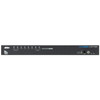
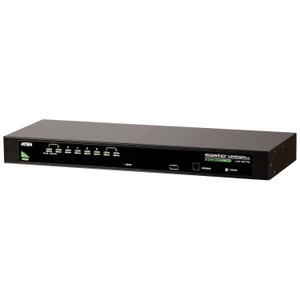
The CS1798 consolidates up to eight USB-connected computers under a single HDMI monitor, USB keyboard, and USB mouse. Port selection can be handled three ways — on-screen display (OSD), keyboard hotkey, or front-panel pushbutton — so operators can switch hosts without taking their hands off the keyboard or reaching behind a rack. The eight orange LED indicators on the front panel give an at-a-glance view of which ports are online and which is currently selected, useful in dense rack environments where visual confirmation matters. For integrators building out KVM switch infrastructure, the CS1798 fits cleanly into standard 1U rack deployments.
Key Features
- 1920 x 1200 @ 60Hz HDMI Video: Full WUXGA resolution at 60Hz means the switch keeps pace with high-refresh workstation monitors. Whether you're running a SCADA console, a multi-window VMS display, or a developer workstation, you won't see resolution or frame-rate degradation at the console end. The CS1798 also supports 1920 x 1080 @ 60Hz for standard 1080p displays.
- Cascade to 512 Ports: Daisy-chaining multiple CS1798 units extends the managed port count to 512 — a meaningful ceiling for large data centers or broadcast facilities that need centralized KVM access without deploying a separate IP-KVM infrastructure. This makes the CS1798 a viable long-term investment even as host counts grow.
- Three-Mode Port Selection (OSD / Hotkey / Pushbutton): The OSD provides a visual menu for port navigation; hotkey sequences allow switching without ever touching the physical unit; the front-panel pushbutton handles quick physical switching. Having all three options in one unit means the switch adapts to different operator workflows without configuration trade-offs.
- USB Hub — Front and Rear: Two USB Type-A female ports (one front panel, one rear panel) provide peripheral pass-through for USB drives, card readers, or dongles without requiring the operator to crawl behind the rack. The front-panel port is particularly useful in NOC or control room environments where peripheral swaps happen regularly.
- Scan Interval 1–255 Seconds: The auto-scan function cycles through connected hosts at a configurable interval — defaulting to 5 seconds but adjustable anywhere from 1 to 255 seconds. Slower scan rates suit monitoring use cases where each screen needs dwell time; faster rates support quick status checks across all hosts.
- Firmware Upgrade via Slide Switch: Field firmware upgrades are handled via a dedicated slide switch, avoiding the need for software-side intervention or disassembly. This simplifies maintenance in locked-down environments where installing upgrade utilities on the console PC isn't permitted.
- USB Keyboard and Mouse: The CS1798 uses USB for both keyboard and mouse connections at the console — no legacy PS/2 adapters required. Modern workstations and servers with USB-only I/O connect without adapters or compatibility workarounds.
- Operating Humidity 0–80% RH Non-Condensing: Standard data center and server room environments fall comfortably within this range, so the CS1798 doesn't require special environmental conditioning beyond normal rack cooling.
Integration and Compatibility
The CS1798 connects to host computers via USB (keyboard/mouse) and HDMI (video), making it broadly compatible with modern workstations, servers, and embedded systems that provide USB and HDMI ports. The console side likewise uses USB peripherals and a single HDMI monitor output. Cascade configurations require additional CS1798 units interconnected per ATEN's daisy-chain wiring scheme, scaling managed ports in multiples of eight up to the 512-port ceiling. For environments already using ATEN KVM and connectivity products, the CS1798 integrates into existing ATEN switch hierarchies. Integrators building out rack-mount switch infrastructure should verify that all connected host machines provide accessible HDMI and USB ports, as the switch does not support DisplayPort or VGA natively.
Frequently Asked Questions
Q: How many computers can the CS1798 manage total when cascaded?
A: In a cascade configuration, the CS1798 supports up to 512 ports by daisy-chaining multiple units together. Each individual CS1798 manages 8 directly connected hosts.
Q: What video resolutions does the CS1798 support?
A: The CS1798 supports 1920 x 1080 @ 60Hz and 1920 x 1200 @ 60Hz over HDMI. Both resolutions are delivered at 60Hz refresh, covering standard 1080p and WUXGA monitors.
Q: How do I switch between connected computers on the CS1798?
A: The CS1798 offers three switching methods: on-screen display (OSD) menu, keyboard hotkey sequences, and front-panel pushbutton. All three methods are available simultaneously — use whichever fits your workflow.
Q: Does the CS1798 have USB ports for peripheral devices?
A: Yes. The CS1798 includes two USB Type-A female hub ports — one on the front panel and one on the rear panel — for connecting USB peripherals such as drives or card readers without reaching behind the rack.
Q: Can I configure the auto-scan interval on the CS1798?
A: Yes. The scan interval is configurable from 1 to 255 seconds, with a default of 5 seconds. This allows you to tune dwell time per host to match your monitoring or auditing workflow.
Q: How is firmware updated on the CS1798?
A: Firmware upgrades are performed using a dedicated slide switch on the unit, eliminating the need for software installation on the console PC and simplifying maintenance in controlled or locked-down environments.
The CS1798 is one of those workhorses I keep specifying for mid-size server rooms and NOC builds — specifically because the cascade architecture gets you to 512 managed ports without swapping out your core switch. The 1920 x 1200 @ 60Hz HDMI output is the detail that separates it from budget 8-port alternatives; WUXGA matters when your operators are running multi-pane VMS or SCADA dashboards and need every pixel legible.
Technical Highlights:
- Cascade to 512 Ports: Daisy-chaining CS1798 units scales managed hosts in multiples of eight up to 512 — plan your cascade wiring before rack build-out to avoid having to re-cable the console side later.
- 1920 x 1200 @ 60Hz: WUXGA at full 60Hz refresh means this switch won't become the bottleneck when you upgrade console monitors — most 8-port HDMI KVMs cap at 1080p.
- Dual USB Hub Ports (Front + Rear): The front-panel USB-A port is genuinely useful in live NOC environments — operators can swap USB media without reaching behind the rack mid-shift.
Deployment Considerations:
- All connected hosts must have accessible HDMI and USB ports — the CS1798 does not support DisplayPort or legacy VGA, so plan adapter requirements before deployment if your host mix is older hardware.
- Cascade configurations require careful port-count planning: each additional CS1798 in the chain adds 8 managed hosts, but you'll need to account for the inter-unit cabling and switch port overhead before assuming you can hit the 512-port ceiling in a single rack.
For a NOC or operations center managing 8 to 64 servers under a single console — particularly where WUXGA monitor support and field-serviceable firmware upgrades are requirements — the CS1798 is a well-matched fit.