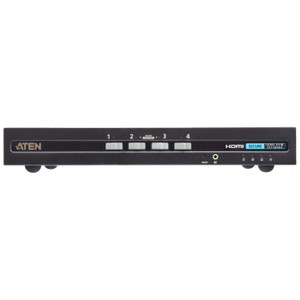
ATEN CS1794 4-Port HDMI KVM Switch with USB Hub
Overview
The ATEN CS1794 is a 4-port HDMI KVM switch built for IT administrators, AV integrators, and operations teams who need to manage up to four computers from a single keyboard, monitor, and mouse — without juggling cables or multiple displays. Supporting video resolutions up to 1920 x 1200 @ 60Hz, the CS1794 handles full HD workloads including 1080p surveillance management stations, digital signage control, and multi-server rack environments. Two USB Type-A ports — one on the front panel, one on the rear — extend peripheral access directly from the switch, so you're not hunting for ports behind equipment. If you're managing a small server rack or a centralized security operations desk, this is a purpose-built tool rather than a workaround.
Key Features
- 4 Computer Connections: Connect and control four separate computers from one console. For a security operations center running a dedicated NVR, a management workstation, a backup server, and an access control PC, that's four systems on one desk without four keyboards and four monitors — a real reduction in clutter and switching overhead. Explore the full ATEN KVM and switching catalog for multi-port and enterprise-scale options.
- HDMI Video at 1920 x 1200 @ 60Hz: Full support for both 1920 x 1080 (standard 1080p) and 1920 x 1200 (WUXGA) resolutions at 60Hz. WUXGA gives you the extra vertical pixels that matter on wider displays used in control rooms — more rows visible in a VMS grid view or a spreadsheet without scrolling.
- Dual-Mode Port Selection — Hotkey and Pushbutton: Switch between connected computers via five front-panel pushbuttons or keyboard hotkey sequences. Hotkey switching is faster in heads-down workflows; pushbutton gives operators a clear physical confirmation of which system is active. Having both means you're not locked into one method depending on who's at the desk.
- Dual USB Hub Ports (Front + Rear): Two USB Type-A female ports — one front-panel, one rear-panel — act as a shared USB hub across the active computer. Plug in a USB drive or programming dongle on the front for quick access; use the rear port for a permanently attached peripheral that stays out of sight. This is more practical than a KVM with a single hub port buried in the back.
- Auto-Scan with Configurable Interval: Built-in auto-scan cycles through connected computers at an interval you set between 1 and 99 seconds (default: 5 seconds). For unattended monitoring applications — checking four servers on a duty cycle or confirming all nodes are up — this removes the need for manual switching during routine checks. Pair it with a KVM switch compatible display for a clean monitoring loop.
- USB Keyboard and Mouse Support: Both keyboard and mouse connect via USB, which means broad compatibility with modern peripherals without requiring PS/2 adapters. Standard USB HID devices work out of the box — no driver installation required on most operating systems.
- Firmware Upgradeable (v1.4.134): The CS1794 ships with firmware v1.4.134 (released 2023-04-14), and the upgrade package CS1792-94-v1.4.134.zip confirms the device supports field firmware updates. That matters in managed environments where security patches or compatibility fixes need to be applied without hardware replacement.
- 0–80% Non-Condensing Humidity Rating: Rated for up to 80% relative humidity (non-condensing), so it's suitable for server rooms and control spaces that aren't climate-perfect — typical of facilities that manage HVAC on a budget. Non-condensing is the key qualifier: avoid environments with rapid temperature swings that cause condensation.
Integration and Compatibility
The CS1794 connects four computers via HDMI and USB, making it straightforward to integrate with any modern workstation, server, or mini-PC with HDMI output. USB keyboard and mouse compatibility covers virtually all HID-class devices. The dual USB hub allows shared peripheral access across whichever computer is currently selected, useful for passing USB dongles, drives, or programming tools between systems without physically moving them. For rack-based deployments, the unit is designed for rack mounting — confirm your rack has available 1U space and appropriate cable management. If you're building out a surveillance management station and need guidance on pairing with an NVR or video management server, see our network video recorder category and IP camera selections for compatible systems. For PoE infrastructure supporting your connected devices, PoE switches are worth reviewing alongside this switch.
Frequently Asked Questions
Q: How many computers can the CS1794 control simultaneously?
A: The CS1794 supports up to 4 computers, all controlled from a single HDMI display, USB keyboard, and USB mouse. Only one computer is active at a time — you switch between them via hotkey or front-panel pushbutton.
Q: What video resolutions does the CS1794 support?
A: The CS1794 supports 1920 x 1080 @ 60Hz (standard 1080p) and 1920 x 1200 @ 60Hz (WUXGA). It does not support 4K/UHD resolutions — if you need 4K output, consider a higher-specification HDMI KVM in the ATEN lineup.
Q: Can the CS1794 auto-cycle through connected computers?
A: Yes. The built-in auto-scan function cycles through all active ports at a configurable interval between 1 and 99 seconds. The factory default is 5 seconds per port.
Q: What types of USB peripherals does the USB hub on the CS1794 support?
A: The CS1794 provides two USB Type-A female ports (one front panel, one rear panel) that function as a shared hub. Standard USB HID peripherals and USB storage devices are supported. The hub follows whichever computer port is currently selected.
Q: Can the CS1794 firmware be updated in the field?
A: Yes. The CS1794 supports firmware upgrades — the current release is v1.4.134, dated 2023-04-14. The upgrade file is CS1792-94-v1.4.134.zip, available from ATEN directly.
Q: Is the CS1794 rack-mountable?
A: Yes, the CS1794 is designed for rack mounting. Verify available rack unit space and cable management provisions in your rack before installation.
The CS1794 fills a specific gap in small-to-mid security operations environments: you need console access to four separate systems — NVR, access control server, workstation, backup node — without a full IP KVM infrastructure. The WUXGA ceiling of 1920 x 1200 @ 60Hz is the spec I'd lead with here, because it's what separates this unit from stripped-down 1080p-only switches when your operators are running wide-format displays with VMS grids that use every pixel of that extra vertical space.
Technical Highlights:
- Dual-mode port selection: Both hotkey sequences and five front-panel pushbuttons are available simultaneously — no configuration required to enable one vs. the other. In shift-change environments where different operators have different preferences, this matters more than it sounds.
- Configurable auto-scan (1–99 sec): The scan interval default of 5 seconds is fine for casual monitoring but too fast for reading status dashboards. Set it to 15–30 seconds for duty-cycle monitoring of server health displays — that's a real workflow improvement, not a checkbox feature.
- Firmware v1.4.134 (2023-04-14): Field-upgradeable via the shared CS1792-94 package, which means the CS1794 and its 2-port sibling share a firmware branch — useful to know if you're standardizing on ATEN KVM across a mixed deployment.
Deployment Considerations:
- The USB hub ports follow the active computer selection — peripherals connected to the hub are only accessible on the currently selected port. Plan your USB dongle and storage workflows accordingly; you can't share a USB device across two computers simultaneously.
- Humidity tolerance tops out at 80% non-condensing. That's adequate for most server rooms, but facilities with poor HVAC control or near exterior walls in humid climates should verify ambient conditions before rack installation.
This is the right unit for a four-node security operations rack where the team needs WUXGA console access, field firmware control, and a USB hub for shared peripheral access — specifically in environments that don't yet justify the cost and complexity of an IP-based KVM solution.