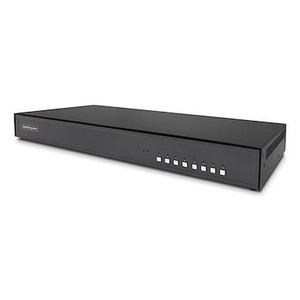
StarTech CK4-P108 8-Port DisplayPort 4K Secure KVM Switch
Overview
The StarTech CK4-P108 is an 8-port DisplayPort KVM switch built specifically for high-security environments where NIAP Protection Profile for Peripheral Sharing Devices 4.0 certification is a hard requirement — not a nice-to-have. If you're managing workstations across multiple classification levels in a government, defense, or intelligence facility, this is the unit that clears the compliance bar. It handles up to 4K 60Hz video over DisplayPort, switches up to eight connected computers from a single console, and does it all in a metal 1U chassis rated for standard rack or desk deployment.
Unlike commodity KVM switches that retrofit security features, the CK4-P108 is designed from the ground up around NIAP PSD 4.0, which means the hardware-enforced isolation between connected hosts is baked in — not bolted on. For environments where cross-contamination between network domains is a career-ending event, that distinction matters. Explore the full StarTech switching and connectivity line if you need companion hardware for your secure console infrastructure.
Key Features
- NIAP PSD 4.0 Certification: This is the current-generation U.S. government security standard for peripheral sharing devices. Certification at this level means the switch has passed independent lab testing for data isolation between ports — mandatory for many classified and sensitive-but-unclassified (SBU) environments. If your RFP or ATO requires NIAP 4.0, the CK4-P108 satisfies it.
- 4K 60Hz DisplayPort Output: Full 4K resolution at 60Hz over a single DisplayPort connection means no resolution compromises at your console — you get the full native resolution of a 4K monitor without dropping to 30Hz. This matters for operators doing detailed document review, geospatial analysis, or high-resolution imagery work where pixel density directly affects task performance.
- 8-Port Host Capacity: Eight USB Type-B host connections and eight DisplayPort female inputs let you consolidate eight workstations to a single keyboard, mouse, monitor, and audio setup. That's a meaningful desk-space and cabling reduction in a multi-domain console environment, and it keeps your operator footprint tight in space-constrained SCIFs or server rooms.
- Console Interface — USB 2.0 + Audio: The console side provides three USB 2.0 Type-A ports (keyboard, mouse, and a spare peripheral), one DisplayPort output, and a 3.5mm stereo audio jack. Each of the eight host connections also includes a dedicated 3.5mm stereo audio port, so per-host audio isolation is maintained at the hardware level — not managed by software.
- Metal Chassis, 1U Form Factor: At 17.0 × 6.7 × 1.8 inches and 6.3 lb, the CK4-P108 fits a standard 1U rack slot or sits flat on a console desk. Metal construction matters in government environments where RFI/EMI shielding and physical durability are part of the requirement set — plastic-chassis switches typically don't pass the same scrutiny.
- LED Port Indicators: LED indicators give the operator an immediate, unambiguous visual confirmation of which host port is active. In a multi-domain environment, knowing which network you're currently operating on is not optional — the hardware LEDs provide that confirmation without relying on any software state.
- 19.7 ft Maximum Cable Length: Supported cable runs up to 19.7 feet give you enough flexibility to separate the KVM console from the host workstations across a desk cluster or short rack run, without requiring active extenders that would add latency or introduce additional hardware into the security boundary.
- Operational Temperature 0°C to 40°C: The rated operating range covers standard climate-controlled office and data center environments. The storage range extends to -20°C to 60°C, so transit and warehouse storage don't require special handling beyond standard equipment precautions.
Integration and Compatibility
The CK4-P108 connects to host computers via standard USB 2.0 Type-B cables and DisplayPort cables — no proprietary connectors, no special drivers required on the host side for basic HID and video function. The console side accepts any USB HID keyboard and mouse, and any DisplayPort monitor capable of 4K 60Hz. If you're sourcing cables separately, pair with quality DisplayPort 1.4 cables to ensure 4K 60Hz signal integrity across the full 19.7-foot run. For organizations deploying this as part of a broader secure KVM switch infrastructure, the per-port audio isolation and NIAP 4.0 compliance make it directly compatible with multi-domain console architectures used across DoD and IC programs. Consult your KVM switch selection guide to verify your specific cable, monitor, and host OS combinations before procurement.
This switch does not include built-in CAC/smart card reader support at the console — verify your specific PIV/CAC workflow requirements before specifying this unit if smart card authentication at the KVM level is a requirement. USB peripheral ports on the console side are limited to HID-class devices in NIAP-compliant configurations; mass storage and other device classes are typically blocked by design in certified units.
Frequently Asked Questions
Q: Is the CK4-P108 NIAP PSD 4.0 certified?
A: Yes. The CK4-P108 carries NIAP Protection Profile for Peripheral Sharing Devices version 4.0 certification — the current-generation U.S. government standard for secure KVM and peripheral sharing equipment. This is verified by the regulatory approvals listed for this SKU.
Q: What is the maximum video resolution and refresh rate supported?
A: The CK4-P108 supports up to 4K (3840×2160) at 60Hz over DisplayPort. This applies to the console output — connected monitors must be capable of 4K 60Hz via DisplayPort to take advantage of the full resolution.
Q: How many computers can the CK4-P108 support simultaneously?
A: The CK4-P108 supports up to 8 host computers connected via the 8 USB Type-B and 8 DisplayPort female host ports. Only one host is active at the console at any given time.
Q: Does the CK4-P108 support audio switching between hosts?
A: Yes. Each of the 8 host ports includes a dedicated 3.5mm stereo audio connection, and the console provides a 3.5mm stereo output. Audio switches with the active port selection, maintained at the hardware level.
Q: What is the warranty on the CK4-P108?
A: The CK4-P108 carries a 3-year manufacturer warranty.
Q: Can the CK4-P108 be rack-mounted?
A: The CK4-P108 measures 17.0 × 6.7 × 1.8 inches and fits a standard 1U rack space. Verify rack mount hardware availability separately if ears are not included in your specific package configuration.
The spec that defines everything about the CK4-P108 is the NIAP PSD 4.0 certification — and if that's on your requirements list, most of your other questions about this switch answer themselves. I've seen programs get held up at ATO review because the integrator specified a NIAP 3.0 unit when the current standard was already 4.0. The CK4-P108 closes that gap, and it does it with 4K 60Hz DisplayPort throughput that doesn't force your analysts onto a degraded display just to clear the security bar.
Technical Highlights:
- NIAP PSD 4.0: Current-generation certification means hardware-enforced isolation between all 8 host ports — cross-domain data leakage via the KVM path is architecturally prevented, not just policy-controlled.
- 4K 60Hz DisplayPort: Full-rate 4K at the console means no resolution penalty for operators — critical for imagery, geospatial, or document-intensive workflows where a 30Hz or 1080p-capped output would be a workflow liability.
- Per-Port 3.5mm Audio on All 8 Hosts: Hardware-level audio isolation across all eight host connections means audio switching follows port selection without any software arbitration — one less attack surface in a multi-domain console setup.
Deployment Considerations:
- Cable runs are rated to 19.7 feet — plan your console-to-host distances within that envelope; active extenders beyond that limit would need to be evaluated separately for NIAP compliance impact on your overall boundary.
- USB peripheral ports in a NIAP-certified configuration are typically restricted to HID-class devices by design — don't spec this unit if operators need to mount USB storage or non-HID peripherals at the console without understanding that those device classes are likely blocked.
The CK4-P108 is the right call for a multi-domain workstation console in a SCIF, classified lab, or DoD facility where the security assessor will specifically check for NIAP 4.0 on the KVM hardware. It's not the unit for a general-purpose IT room where the compliance requirement doesn't exist — in that scenario you'd be paying for certification overhead you won't use.