

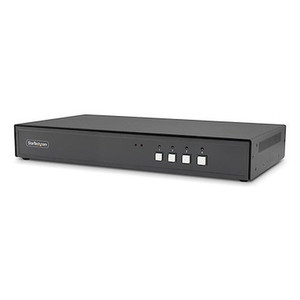
StarTech Secure 4-PORT KVM Switch Displayport 4K - CK4-PS104C
Usually Ships in 2-3 Weeks
Free shipping over $499
$3,934.99

Manufacturer-verified compatible cameras, recorders, mounts, accessories, and licenses for this product. Adjust quantities and add the entire bundle to your cart in one click.
Questions about this product? Free pre-sales support from a senior specialist — product questions, compatibility checks, BOM quotes, price confirmation — typically answered within one business day. Need camera placement or system design work? Engineering time is $175 per hour (qty 1 = 1 hour). Hardware buyers get up to one hour ($175) credited back on their order.
The StarTech CK4-P102C is a two-port, NIAP Protection Profile 4.0-certified desktop KVM switch built for environments where physical security of multi-system workstations is a non-negotiable requirement. Government agencies, defense contractors, intelligence facilities, and secure enterprise IT deployments rely on NIAP-certified KVM switches to prevent data leakage between systems operating at different classification levels — and the CK4-P102C is designed specifically to meet that bar. The all-metal housing keeps this switch durable enough for permanent desk installations, and the DisplayPort video path supports resolutions up to 4K at 30Hz, so operators aren't trading display quality for security compliance.
If you're speccing a workstation console for a controlled access environment and need to switch between two isolated computers from a single keyboard, mouse, and monitor setup, the CK4-P102C (often searched as CK4 P102C) belongs on the short list.
The CK4-P102C connects two DisplayPort-equipped computers to a single DisplayPort monitor, keyboard, and mouse. Console-side USB 2.0 Type-A connectors are standard, so any USB HID keyboard and mouse will work without driver installation. The third USB port accommodates peripheral devices such as CAC/PIV card readers, which are standard issue in federal workstation environments.
Cable length planning: host cables up to 6 meters are supported, which covers most desk-to-rack and desk-to-tower configurations. For longer runs, you'll need active DisplayPort extension — passive cables beyond 6 meters may not meet the switch's signal requirements. Verify your host systems have native DisplayPort output; adapters from HDMI or USB-C to DisplayPort may introduce compatibility variables that could affect NIAP compliance posture — check with your security officer before using active adapters in classified environments.
For organizations sourcing StarTech KVM and connectivity solutions across multiple workstations, the CK4-P102C fits within a broader secure KVM switch procurement strategy. Pairing with a high-quality KVM cable set rated to the full 6-meter run ensures consistent signal at 4K. For multi-monitor or higher-port-count requirements, review other models in the NIAP-certified KVM line before finalizing your spec.
Q: What NIAP certification level does the CK4-P102C carry?
A: The CK4-P102C is certified to NIAP Protection Profile for Peripheral Sharing Switches version 4.0 — the current applicable U.S. government standard for secure KVM use in classified and sensitive environments.
Q: How many computers can I connect to the CK4-P102C?
A: Two computers via dedicated DisplayPort female host connectors. Each host is on an isolated data path; the switch does not bridge signals between connected systems.
Q: What is the maximum supported display resolution?
A: The CK4-P102C supports up to 4K at 30Hz over DisplayPort on the single-monitor console output.
Q: Can I connect a CAC or PIV smart card reader to the CK4-P102C?
A: Yes. The console interface provides three USB 2.0 Type-A ports — keyboard and mouse use two, leaving a third available for a CAC/PIV reader or other USB HID peripheral without requiring a hub.
Q: What is the warranty on the CK4-P102C?
A: StarTech covers the CK4-P102C with a 3-year manufacturer warranty.
Q: What is the maximum cable length from the switch to the host computers?
A: Host cables up to 19.7 feet (6 meters) are supported. Passive DisplayPort cables beyond this length may not maintain reliable signal at 4K resolution.

The spec that defines the CK4-P102C is NIAP PP 4.0 — not 3.0, not an older iteration. In federal procurement, that version number is the difference between an approvable product and a rejected one. I've seen integrators bring in NIAP 3.0 devices thinking they'd pass a classified facility ATO review, and they didn't. The CK4-P102C meets the current 4.0 bar, which matters if you're working with DoD, IC community agencies, or any federal customer running a modern Risk Management Framework process.
Technical Highlights:
Deployment Considerations:
The CK4-P102C is the right device for a two-system classified workstation console in a secure operations center or sensitive compartmented information facility — specifically where NIAP PP 4.0 is a procurement requirement and DisplayPort is the video standard on the installed computers.

Manufacturer-verified compatible cameras, recorders, mounts, accessories, and licenses for this product. Adjust quantities and add the entire bundle to your cart in one click.


Looking for more StarTech products? Shop the full StarTech catalog →
Support services and planning resources for commercial surveillance, access control, and infrastructure deployments.
Fixed scope • Fixed price