
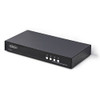
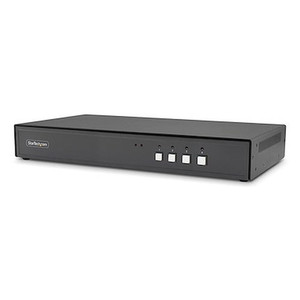
StarTech Secure 4-PORT KVM Switch Displayport 4K - CK4-PS104C
Usually Ships in 2-3 Weeks
Free shipping over $499
$3,934.99


Manufacturer-verified compatible cameras, recorders, mounts, accessories, and licenses for this product. Adjust quantities and add the entire bundle to your cart in one click.
Questions about this product? Free pre-sales support from a senior specialist — product questions, compatibility checks, BOM quotes, price confirmation — typically answered within one business day. Need camera placement or system design work? Engineering time is $175 per hour (qty 1 = 1 hour). Hardware buyers get up to one hour ($175) credited back on their order.
The StarTech CK4-P104C is a four-port, single-monitor KVM switch designed specifically for high-security environments where isolation between connected hosts is a compliance requirement, not just a preference. Built to NIAP Protection Profile for Peripheral Sharing Devices version 4.0 — one of the most demanding KVM security standards in government and defense procurement — the CK4-P104C is the right hardware when your security policy prohibits uncontrolled data paths between classified or sensitive workstations. If you're specifying KVM equipment for a SCIF, a cleared contractor facility, or any workspace subject to federal data handling requirements, NIAP PSD 4.0 compliance is the specification that separates this switch from commodity desktop KVMs. For broader context on KVM switches and how secure models differ from standard units, that category page is worth reviewing before finalizing your spec.
The unit ships in an all-metal enclosure (black, 12.6 in × 6.7 in × 1.8 in, 4.2 lb), which contributes to both EMI shielding and the physical robustness expected in rack-adjacent or desktop-deployed government hardware. StarTech's full product catalog includes a range of KVM and connectivity solutions, but the CK4-P104C occupies the secure-switch segment of that lineup.
The CK4-P104C (often searched as CK4 P104C) is designed for direct integration into secure desktop environments. The four DisplayPort host inputs connect to workstation GPU outputs; the USB Type-B host connectors wire to host USB ports. No software drivers are required for basic KVM switching — this is intentional in NIAP-compliant designs, as driver-based switching introduces software attack surfaces that PSD 4.0 prohibits. Switching between hosts is handled via the physical controls on the unit itself.
Because this switch targets secure KVM deployments in government and defense environments, CAC/smart card readers connected to the console USB Type-A port will enumerate correctly on the selected host, which is the standard authentication workflow in federal workstation environments. Verify your specific CAC reader compatibility against your agency's approved hardware list — the switch passes USB HID-class devices, but some proprietary reader implementations may require additional validation.
For environments where multiple operators need simultaneous access to different host sets, a multi-user KVM architecture using multiple CK4-P104C units assigned to individual operators is a common design pattern. Each switch is independently cabled and isolated — there is no cross-switch data path, which is the architecture your ISSO will want to see documented.
Power is drawn from the connected hosts via USB — no external power supply is required in standard configurations, simplifying the power planning at the workstation desk. Confirm your host USB ports can supply adequate current for the switch and console peripherals before finalizing the installation design.
Q: What does NIAP PSD 4.0 certification mean for the CK4-P104C?
A: NIAP PSD 4.0 (National Information Assurance Partnership, Protection Profile for Peripheral Sharing Devices, version 4.0) is a U.S. government security certification that validates strict hardware-level isolation between connected hosts. Certified devices must prevent data leakage between ports, enforce unidirectional data paths for video, and implement anti-tamper controls on keyboard and mouse channels. The CK4-P104C's PSD 4.0 certification makes it eligible for use in classified and sensitive government environments where non-certified KVMs are prohibited.
Q: How many monitors can the CK4-P104C support?
A: The CK4-P104C supports a single DisplayPort monitor at the console. It is a single-head KVM switch — all four connected hosts share one monitor, one keyboard, and one mouse. If your operators require dual-monitor setups, you would need a multi-head secure KVM model.
Q: Does the CK4-P104C require software drivers to operate?
A: No. NIAP PSD 4.0-compliant KVM switches are designed to operate without software drivers on the connected hosts. Driver-free operation is a security requirement of the standard, as driver-based switching introduces software attack surfaces that PSD 4.0 prohibits. Switching between hosts is handled via the physical controls on the unit.
Q: Can I connect a CAC/smart card reader to the CK4-P104C?
A: The console side provides three USB 2.0 Type-A ports — one is typically used for keyboard, one for mouse, leaving a third available for a CAC reader or similar USB HID peripheral. The switch passes USB HID-class devices to the selected host, which is the standard workflow for smart card authentication in federal environments. Verify your specific reader model against your agency's approved hardware list.
Q: What is the maximum cable length supported by the CK4-P104C?
A: The rated maximum cable length is 19.7 ft (6 m) for DisplayPort connections. This covers standard workstation-to-monitor distances in most operations center desk configurations.
Q: What is the warranty on the CK4-P104C?
A: The CK4-P104C carries a 3-year manufacturer warranty.

The spec that defines the CK4-P104C's entire reason for existing is NIAP PSD 4.0 — not the DisplayPort 4K output, not the four-port capacity, but the certification. I've seen integrators try to substitute uncertified KVMs in sensitive government environments to save cost, and it never clears the ISSO review. If the statement of work or the facility security officer's checklist calls out NIAP PSD 4.0, the CK4-P104C is what goes on the BOM. There is no workaround.
Technical Highlights:
Deployment Considerations:
This switch is the correct specification for a SCIF or cleared contractor facility where operators are switching between workstations of different classification levels and the facility security officer requires documented NIAP PSD 4.0 compliance on the peripheral sharing device. It is not the right tool for a standard IT help desk or a conference room AV switcher — that use case does not justify the cost or the cabling complexity.

Manufacturer-verified compatible cameras, recorders, mounts, accessories, and licenses for this product. Adjust quantities and add the entire bundle to your cart in one click.


Looking for more StarTech products? Shop the full StarTech catalog →
Support services and planning resources for commercial surveillance, access control, and infrastructure deployments.
Fixed scope • Fixed price