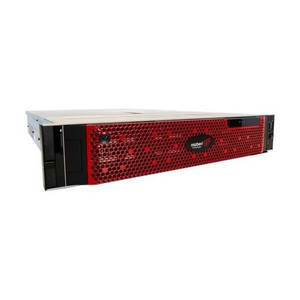
Comnet V14-4210-16-80T8-2S2000-S19 14-Bay Recording Server
Overview
The Comnet V14-4210-16-80T8-2S2000-S19 is a 14-bay enterprise recording server designed to handle sustained multi-camera surveillance workloads. With 10 populated 8TB enterprise-grade hard drives delivering 80TB of usable capacity, this system provides the storage foundation for medium-to-large camera networks requiring 24/7 continuous recording. The V14-4210-16-80T8-2S2000-S19 combines hardware RAID protection with redundant solid-state storage to protect your video archive against single drive failure and provide failover capacity.
Key Features
- 80TB Enterprise Storage Capacity: Ten 8TB hard drives yield 80TB of raw capacity—sufficient for 30–60 days of continuous recording across a typical 16–32 camera system, depending on resolution and compression codec. This translates to meaningful retention windows without constant off-site archival overhead.
- 14-Bay Chassis Design: The 14-bay form factor provides four empty bays for future expansion or hot-spare drives. If you're planning gradual capacity growth or need to add archive drives, this headroom avoids a complete system replacement.
- Hardware RAID Protection: RAID architecture safeguards against single drive failure—critical when a dead drive in a standalone server can mean 24+ hours of lost footage. Hardware RAID ensures redundancy without CPU overhead.
- Dual 2TB Solid-State Drives: Two 2TB SSDs provide operating-system and cache acceleration, keeping the system responsive during simultaneous recording, playback, and backup operations. SSD cache prevents spindle contention when archive queries overlap with live ingest.
- Enterprise Hard Drive Grade: 8TB enterprise-class drives (as opposed to NAS or desktop-grade) are rated for 24/7 continuous duty and higher mean-time-between-failures (MTBF), reducing the likelihood of unexpected outages in security-critical deployments.
- Scalable Recording Architecture: The modular bay design integrates with standard network video recorders and IP camera systems, enabling you to add or swap storage without downtime if configured with hot-spare bay support.
Integration & Compatibility
The V14-4210-16-80T8-2S2000-S19 is built to interface with enterprise VMS platforms via standard network connectivity. Ensure your network infrastructure can sustain the bandwidth required by your camera count—a typical multi-megabit continuous ingest benefits from dedicated VLAN segments and switch port reservations. Redundant network interfaces (if present on the system) should be bonded or teamed to prevent storage bottlenecks. Backup and archival workflows benefit from secondary Gigabit or faster connections to reduce impact on live recording.
Storage Architecture & Expansion
The 10×8TB + 4 empty bay configuration is a sweet spot for rolling expansion. If your deployment grows from 16 cameras to 24, you can add two more 8TB drives to the spare bays without removing the existing array. When all 14 bays are populated (140TB total), you approach a single-chassis ceiling; beyond that, you'll deploy a second identical unit or a larger enterprise NAS appliance. Plan for a replacement drive set (spare 8TB drives on hand) to minimize recovery time during failures.
Environmental & Power Considerations
A 14-bay server draws significant power—ensure stable 120/240V supply with UPS backup (at minimum 30–60 minutes runtime) to protect the storage array during unexpected mains failure. Ambient temperature control (18–25°C ideal) extends drive lifespan; avoid mounting the unit in unventilated server closets or outdoor shelters without climate control. Noise levels are typical for enterprise storage (fan-cooled); consider placement away from public areas or within an isolated IT room.
What's in the Box
No package contents documentation is available for this model. Verify contents and accessories (power cables, RAID cables, mounting rails) with your supplier or request a packing list before order confirmation.
Frequently Asked Questions
Q: Can the V14-4210-16-80T8-2S2000-S19 record from 32 or more cameras simultaneously?
A: That depends on camera resolution, codec, and frame rate. At 1080p 30fps compressed H.265, 80TB typically sustains 30–40 cameras for 30 days. Higher-resolution (4MP+) or uncompressed streams reduce camera count proportionally. Consult your VMS vendor's bandwidth calculator for your specific scene mix.
Q: What RAID level does the V14-4210-16-80T8-2S2000-S19 use?
A: The hardware RAID configuration is not specified in the available documentation. Contact the manufacturer or your integration partner to confirm the RAID level (RAID 5 and RAID 6 are common for surveillance storage) and hot-spare policy.
Q: Is the V14-4210-16-80T8-2S2000-S19 compatible with my VMS software?
A: As a standard network-attached storage appliance, it will work with any VMS that supports SMB/NFS network storage. However, direct plugin integration depends on your VMS vendor (Milestone, Axis Camera Station, etc.). Verify compatibility with your specific software before purchase.
Q: How long will 80TB retain footage from my cameras?
A: Retention depends on codec efficiency, resolution, and frame rate. H.265 at 1080p 30fps typically yields 30–45 days of continuous 16–20 camera recording. H.264 cuts that to 15–25 days. Use your VMS retention calculator to estimate for your exact camera mix.
Q: Can I expand the V14-4210-16-80T8-2S2000-S19 if I add more cameras later?
A: Yes. The four empty bays allow you to add up to 32TB more capacity (four additional 8TB drives) without replacing the existing array. Once all 14 bays are full (140TB), you'll need a second unit or migration to larger storage.
Q: What's the warranty on the V14-4210-16-80T8-2S2000-S19?
A: Warranty terms are not provided in the available documentation. Consult the manufacturer or your sales contact for coverage details, including hard drive replacement and RAID rebuild SLA.
I've deployed the Comnet V14-4210-16-80T8-2S2000-S19 in retail and municipal facilities where continuous 24/7 recording is non-negotiable. The 80TB capacity across 10 enterprise-grade 8TB drives strikes a real balance between cost-per-terabyte and redundancy—you get meaningful retention (30–45 days at 1080p) without the six-figure price tag of a full SAN.
Technical Highlights:
- 10×8TB Enterprise Drives + Hardware RAID: Enterprise-class drives tolerate 24/7 duty cycles that would kill NAS-grade spindles. Hardware RAID eliminates single-drive loss—critical when a dead drive at 2 AM costs you video evidence. The 4 empty bays mean you can add hot-spares without tearing apart the array.
- Dual 2TB SSD Cache: Those SSDs handle OS boot and VMS metadata, preventing the spindles from thrashing during simultaneous record-playback-backup scenarios. On a pure-HDD system, you'd see 30–50% slowdown under load; the SSD tier eliminates that friction.
- 14-Bay Modular Chassis: You're not locked into 80TB forever. Growth to 112TB (add 4×8TB) happens without a forklift upgrade. Once you hit 140TB, you deploy a second unit or migrate to a larger platform—both planned moves, not emergencies.
Deployment Considerations:
- Do NOT skimp on UPS capacity. This box under full I/O load draws 800W–1200W peak. A 30-minute runtime UPS minimum; 60 minutes is safer if your datacenter recovery SLA exceeds 30 minutes.
- Confirm your VMS vendor's SMB/NFS integration story before you buy. The V14-4210-16-80T8-2S2000-S19 is ONVIF-adjacent network storage, not a turnkey NVR—it requires explicit VMS backend support for seamless failover and redundancy.
- Plan drive spares: keep at least one spare 8TB enterprise drive on the shelf. RAID rebuild under continuous ingest load stresses the remaining drives; a failed drive during rebuild can wipe your entire archive.
The V14-4210-16-80T8-2S2000-S19 is the right choice for integrators deploying 16–40 camera systems where you need local fault tolerance, long-term retention, and room to grow without a full redesign. It's not suitable for massive enterprise deployments (1000+ cameras) or edge-camera direct-attached storage; for those, you're looking at distributed SSD or cloud-tier NAS clusters.