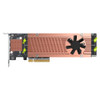
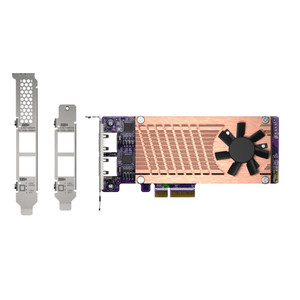
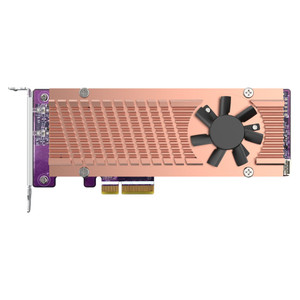
Product images are provided for reference and may not represent the exact model, configuration, or included components.

Overview

SKU: QM2-4P-384
UPC: 885022015429
Condition: New
Write a Review

QNAP Quad M.2 PCIE SSD Expansion Card - QM2-4P-384

QNAP QM2-4P-384 Quad M.2 NVMe PCIe Gen3 SSD Expansion CardOverviewThe QM2-4P-384 is a quad-slot M.2 NVMe SSD expansion card for QNAP NAS systems, desi…

$200.99
Ships same business day
In stock

Quantity:

Adding to cart… The item has been added
Compatibility guidance available for your deployment
Senior specialists for pre and post-sales support
Authorized sourcing and documentation support
Shipping and lead-time confirmation before install

Laura Bennett, IPSD Senior Specialist

Talk to Laura

200+ hrs training • U.S - based

Senior Specialist • 877-277-7147

QNAP Quad M.2 PCIE SSD Expansion Card - QM2-4P-384

$200.99

Overview

SKU: QM2-4P-384
UPC: 885022015429
Condition: New

No Bots, Just Experts

Questions about this product? Free pre-sales support from a senior specialist — product questions, compatibility checks, BOM quotes, price confirmation — typically answered within one business day. Need camera placement or system design work? Engineering time is $175 per hour (qty 1 = 1 hour). Hardware buyers get up to one hour ($175) credited back on their order.

Description

QNAP QM2-4P-384 Quad M.2 NVMe PCIe Gen3 SSD Expansion Card

Overview

The QM2-4P-384 is a quad-slot M.2 NVMe SSD expansion card for QNAP NAS systems, designed to add four M.2 2280 PCIe NVMe drives to units that otherwise lack dedicated NVMe bays. The card connects via PCIe Gen3 x8, delivering enough bandwidth headroom to run all four slots simultaneously without saturating the interface — relevant when you're configuring SSD caching for a high-workload NAS or building a dedicated all-flash caching pool to accelerate spinning-disk volumes. Deployments that benefit most: surveillance NAS nodes with heavy concurrent write streams, or enterprise NAS used for virtualization where latency on random I/O is the bottleneck. Once installed, QTS and QuTS hero expose the drives for SSD caching, a caching pool, or an auto-tiering volume — no extra licensing step required.

Compatibility

Designed for QNAP NAS models with a compatible PCIe expansion slot. The card accepts four M.2 2280 form-factor NVMe SSDs only (PCIe Gen3 x4 per slot); M.2 SATA drives are not supported. Verify your NAS model's PCIe slot width and available lanes before ordering — the card occupies a PCIe Gen3 x8 slot. Compatible with the QNAP NAS lineup supporting QTS or QuTS hero firmware with SSD cache or auto-tiering features enabled. For pairing with a QNAP network attached storage system optimized for surveillance workloads, cross-reference QNAP's compatibility list for your specific NAS model and chassis. Bracket options support both low-profile (default, included) and full-height chassis installations — confirming your chassis clearance before installation avoids a wasted trip.

Installation Notes

The card ships with a low-profile bracket pre-installed; a full-height bracket is also included for standard ATX-style NAS chassis. Seat the card firmly into the PCIe Gen3 x8 slot and secure the bracket before inserting M.2 SSDs — installing drives before seating the card risks misalignment. NVMe SSDs are not included. After physical installation, initialize drives through the QTS or QuTS hero storage management interface to assign them to a cache or tiering role. For guidance on sizing your SSD cache relative to working-set data, review a storage planning resource before committing drive capacity.

Specifications
Connector Type: 4 x M.2 2280 PCIe (Gen3 x 4) NVMe SSD
PCIe Interface: PCIe Gen3 x8
Bracket Type: Low-profile, Full-height
Brand: QNAP
MPN: QM2-4P-384
Type: Mounting Bracket
Q&A
Reviews
Have Questions?

RELATED PRODUCTS

System Design, Deployment & Technical Support

Support services and planning resources for commercial surveillance, access control, and infrastructure deployments.

Fixed scope • Fixed price

System Design Assistance

  • Get help validating product compatibility
  • Coverage requirements
  • Storage planning and deployment architecture before you buy.
Request Design Help

Deployment & Configuration Support

  • Access fixed-scope support for rollout planning
  • User setup guidance
  • Migration and system standardization across single-site or multi-site deployments
View Support Services

Guides, Tools & Calculators

  • PoE requirements
  • Storage retention
  • Camera selection and deployment methodology
Open Technical Resources