QNAP TVS-872N-I3-8G-US 8-Bay NAS with Intel Core i3 and DDR4 Memory
Overview
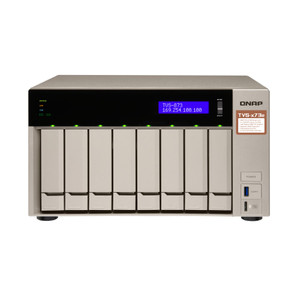
The TVS-872N-I3-8G-US is an 8-bay network-attached storage appliance from QNAP's TVS-872N series, built on a 64-bit x86 Intel Core i3 processor with Intel UHD Graphics 630. It ships with 8 GB of DDR4 RAM installed and supports up to 32 GB across two SODIMM slots — the right platform when you need a capable, upgradeable NAS for SMB file services, surveillance recording, or virtualization workloads without jumping to a full rack-mount server.
The unit carries 5 GB of onboard flash memory with dual-boot OS protection, so a corrupted system volume doesn't strand your deployment — QNAP QTS can fail over to the secondary boot partition while you restore the primary. That's a meaningful operational safeguard in always-on environments like retail back offices or remote branch sites.
Key Features
- Intel Core i3 (64-bit x86): x86 architecture means you can run full VMs, Docker containers, and x86-native applications directly on the NAS — no cross-compilation, no ARM compatibility gaps. Critical if you're deploying a VMS like Milestone or Genetec alongside file storage on the same appliance.
- Intel UHD Graphics 630: The onboard GPU enables hardware transcoding for 4K media streams, offloading video decode from the CPU. In a surveillance context, this matters when you're pulling live streams to a monitoring workstation without pegging the processor.
- Up to 32 GB DDR4 (2 x SODIMM): Starting at 8 GB installed, you have headroom to double or quadruple RAM as workloads grow. Running concurrent VMs or heavy RAID rebuilds on a 32 GB ceiling is realistic; 8 GB is adequate for pure NAS duties but will constrain VM density.
- 8 x 3.5-inch Drive Bays: Eight full-size bays support enterprise SATA/SAS HDDs up to whatever per-drive density your budget allows. At 20 TB per drive, that's 160 TB raw — enough for multi-camera 30-day retention at high bitrates without tiering to external expansion.
- 5 GB Flash / Dual-Boot OS Protection: The dual-boot arrangement means firmware corruption or a bad update doesn't brick the device. In unmanned deployments (remote sites, IDF closets), recovery without a truck roll is the spec that actually matters.
- QNAP TVS-872N Series Platform: As part of the broader QNAP NAS and storage lineup, the TVS-872N-I3-8G-US slots into a well-supported ecosystem with a mature software stack (QTS), active package center, and long-term hardware support for legacy installations. Explore the full range of network-attached storage solutions to compare capacity tiers.
Integration and Compatibility
The x86 architecture and QNAP QTS OS make this unit broadly compatible with third-party NVR software and VMS platforms that publish Linux/x86 packages. If you're pairing it with IP cameras over a managed network, review your PoE switch capacity and VLAN segmentation plan — the NAS itself connects via standard Ethernet (port count and speeds are not specified in available evidence; confirm in the full datasheet before finalizing a network design). For storage expansion, QNAP's JBOD expansion units attach via the TVS-872N's expansion interfaces, though specific expansion port types should be verified against the manufacturer's hardware spec page before procurement.
Frequently Asked Questions
Q: How much RAM does the TVS-872N-I3-8G-US ship with, and can it be upgraded?
A: It ships with 8 GB of DDR4 RAM installed across two SODIMM slots and supports a maximum of 32 GB (2 x 16 GB modules). Upgrading RAM is straightforward and recommended if you plan to run virtual machines or multiple simultaneous services.
Q: What processor does the TVS-872N-I3-8G-US use?
A: It runs an Intel Core i3 processor with 64-bit x86 architecture and Intel UHD Graphics 630 for hardware GPU acceleration.
Q: How many drives can the TVS-872N-I3-8G-US hold?
A: Eight 3.5-inch drive bays. Drive type compatibility (SATA/SAS) and maximum tested capacity per bay should be confirmed on QNAP's hardware compatibility list for your specific drive model.
Q: What is dual-boot OS protection on the TVS-872N-I3-8G-US?
A: The 5 GB onboard flash memory stores two independent copies of the QTS operating system. If one boot partition becomes corrupted — from a failed update or power loss during write — the unit can boot from the secondary partition, avoiding a full device failure in unmanned or remote installations.
Q: Is the TVS-872N-I3-8G-US suitable for IP camera surveillance recording?
A: The x86 platform and 8-bay capacity make it technically capable of running QNAP's QVR Pro NVR software or third-party VMS packages alongside RAID storage. Actual camera channel limits depend on the VMS license and available RAM/CPU headroom — verify channel counts with your VMS vendor before sizing.
The TVS-872N-I3-8G-US is the unit I'd recommend to integrators who need a converged storage-plus-compute node in a mid-size deployment but can't justify a dedicated server rack. The Intel Core i3 with UHD Graphics 630 handles hardware transcoding without burning CPU cycles — that gap matters when you're streaming archived footage to an investigator's workstation at the same time your RAID array is rebuilding.
Technical Highlights:
- 64-bit x86 Architecture: Full x86 means Docker containers and Linux-native VMS agents (Milestone, Genetec, QVR Pro) install without compatibility shims — a real time-saver on commissioning day.
- 32 GB DDR4 Ceiling (2 x SODIMM): Ships at 8 GB, upgradeable to 32 GB. If you're running two or more VMs alongside NAS services, budget the RAM upgrade into your BOM upfront — 8 GB will constrain VM density quickly.
- Dual-Boot OS Protection (5 GB Flash): Two independent QTS boot partitions mean a bad firmware push doesn't require a site visit to recover. For remote installs, this is the spec that prevents a $200 service call over a $0 update failure.
Deployment Considerations:
- Confirm your network switch has sufficient throughput to match the NAS's Ethernet port speeds — network specs are not fully detailed in available evidence, so pull the full hardware datasheet from QNAP's site before finalizing the design.
- Drive compatibility matters: not all HDDs are on QNAP's HCL. Validate your chosen drives against the TVS-872N compatibility list before ordering to avoid RAID instability warnings post-install.
Best fit for a small-to-mid enterprise branch office or retail surveillance backroom where you need 8-bay RAID storage, optional VM hosting, and hardware GPU assist — all in a single appliance that doesn't require a dedicated rack.