Product images are provided for reference and may not represent the exact model, configuration, or included components.

Overview

SKU: QM2-2P410G2T
UPC: 885022022410
Condition: New
Availability: Usually Ships in 2-3 Weeks
Write a Review

QNAP QM2 Series 2 X PCIE 2280 M.2 SSD Slots PCIE - QM2-2P410G2T

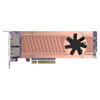
QNAP QM2-2P410G2T Dual M.2 NVMe + 10GbE PCIe Expansion CardOverviewThe QM2-2P410G2T is a PCIe Gen4 x8 expansion card that simultaneously adds two M.2 …

$695.99

Quantity:

Adding to cart… The item has been added
Compatibility guidance available for your deployment
Senior specialists for pre and post-sales support
Authorized sourcing and documentation support
Shipping and lead-time confirmation before install

Laura Bennett, IPSD Senior Specialist

Talk to Laura

200+ hrs training • U.S - based

Senior Specialist • 877-277-7147

QNAP QM2 Series 2 X PCIE 2280 M.2 SSD Slots PCIE - QM2-2P410G2T

$695.99

Overview

SKU: QM2-2P410G2T
UPC: 885022022410
Condition: New
Availability: Usually Ships in 2-3 Weeks

No Bots, Just Experts

Questions about this product? Free pre-sales support from a senior specialist — product questions, compatibility checks, BOM quotes, price confirmation — typically answered within one business day. Need camera placement or system design work? Engineering time is $175 per hour (qty 1 = 1 hour). Hardware buyers get up to one hour ($175) credited back on their order.

Description

QNAP QM2-2P410G2T Dual M.2 NVMe + 10GbE PCIe Expansion Card

Overview

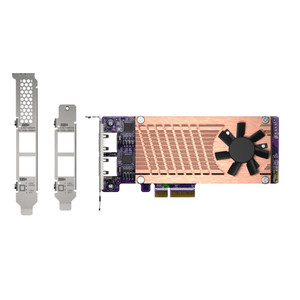
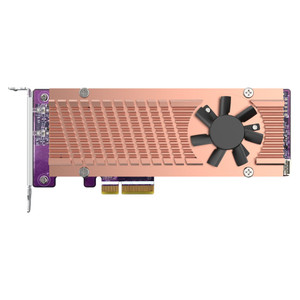
The QM2-2P410G2T is a PCIe Gen4 x8 expansion card that simultaneously adds two M.2 2280 NVMe SSD slots and two 10GBASE-T Multi-Gigabit network ports (10G/5G/1G/100M auto-negotiation) to compatible QNAP NAS units — no driver installation required. If your NAS lacks built-in 10GbE or you need SSD cache capacity without sacrificing a drive bay, the QM2-2P410G2T solves both in a single PCIe slot. The dual-port AQC113C network controller supports multi-speed negotiation, so it works on existing 2.5GbE or 5GbE switches without a forklift upgrade. This is the card to consider when deploying NAS-based storage in high-throughput environments — surveillance recording, video editing workgroups, or backup targets pulling from fast LAN segments.

Compatibility

Installs in QNAP NAS models with an available PCIe Gen4 x8 slot. The TS-x77 and TVS-x82(T) series require installation in the System Zone PCIe slot (PCIe slot 1 specifically) — other slots on those platforms are not supported for this card. SSD compatibility depends on the QNAP M.2 SSD compatibility list; verify your intended NVMe drive model against that list before ordering. For environments pairing this card with a managed 10GbE switch, the AQC113C controller's multi-gigabit auto-negotiation means you can connect at 2.5G or 5G today and step up to full 10G without replacing the card. If you are sourcing NVMe drives for caching or tiering alongside this card, confirm 2280 (22mm × 80mm) form factor — 2242 or 2260 drives will not seat correctly.

Installation Notes

No driver installation is required on supported QNAP QTS/QuTS hero platforms — the card is recognized natively. Power and slot bandwidth are drawn entirely from the host PCIe bus; no auxiliary power connector is needed. On TS-x77 and TVS-x82(T) series, slot placement is mandatory (slot 1 only) — installing in any other slot on those platforms is unsupported. Verify your NAS chassis has a physical x8 or wider PCIe slot before purchase; an x16 physical slot will accept the card electrically, but an x4 slot will not provide adequate bandwidth for simultaneous dual-SSD and dual-10GbE operation.

Specifications
M.2 Slots: 2 x PCIe 2280
PCIe Interface: Gen4 x8
Network Ports: 2 x 10GbE RJ45
Network Controller: AQC113C
Brand: QNAP
MPN: QM2-2P410G2T
Type: Network Switch
Q&A
Reviews
Have Questions?

RELATED PRODUCTS

System Design, Deployment & Technical Support

Support services and planning resources for commercial surveillance, access control, and infrastructure deployments.

Fixed scope • Fixed price

System Design Assistance

  • Get help validating product compatibility
  • Coverage requirements
  • Storage planning and deployment architecture before you buy.
Request Design Help

Deployment & Configuration Support

  • Access fixed-scope support for rollout planning
  • User setup guidance
  • Migration and system standardization across single-site or multi-site deployments
View Support Services

Guides, Tools & Calculators

  • PoE requirements
  • Storage retention
  • Camera selection and deployment methodology
Open Technical Resources