Product images are provided for reference and may not represent the exact model, configuration, or included components.

Overview

SKU: 0DT60002
UPC: 654518212235
Condition: New
Availability: Special Order · Usually Ships in 2-3 Weeks
Write a Review 38% OFF

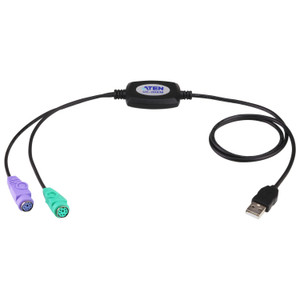
Eaton PS/2 to USB Converter TAA - 0DT60002

Eaton 0DT60002 PS/2 to USB Converter TAAOverviewThe Eaton 0DT60002 is a PS/2 to USB converter designed to bridge legacy PS/2 peripherals (keyboards, m…

$161.12 $99.99 SAVE $61
Special Order
Ships in 2-3 Weeks

Quantity:

Adding to cart… The item has been added
Compatibility guidance available for your deployment
Senior specialists for pre and post-sales support
Authorized sourcing and documentation support
Shipping and lead-time confirmation before install

Laura Bennett, IPSD Senior Specialist

Talk to Laura

200+ hrs training • U.S - based

Senior Specialist • 877-277-7147

Eaton PS/2 to USB Converter TAA - 0DT60002

$161.12
$99.99

Overview

SKU: 0DT60002
UPC: 654518212235
Condition: New
Availability: Special Order · Usually Ships in 2-3 Weeks

No Bots, Just Experts

Questions about this product? Free pre-sales support from a senior specialist — product questions, compatibility checks, BOM quotes, price confirmation — typically answered within one business day. Need camera placement or system design work? Engineering time is $175 per hour (qty 1 = 1 hour). Hardware buyers get up to one hour ($175) credited back on their order.

Description

Eaton 0DT60002 PS/2 to USB Converter TAA

Overview

The Eaton 0DT60002 is a PS/2 to USB converter designed to bridge legacy PS/2 peripherals (keyboards, mice) into modern USB-enabled systems. This is a passive adapter — no drivers required, no external power — meaning it plugs directly into a USB port and presents the connected PS/2 device as a USB HID (Human Interface Device) to the host. Deploy this when you have working PS/2 input devices but need to integrate them into surveillance control stations, KVM switches, or commercial systems that have phased out PS/2 ports in favor of USB.

Compatibility

The 0DT60002 works with any standard PS/2 keyboard or mouse (6-pin mini-DIN connector) and is compatible with USB 1.1, USB 2.0, and USB 3.0 ports. It integrates with Eaton Minicom KVM switches and other commercial-grade control systems that require legacy PS/2 input support. If you are retrofitting existing surveillance control rooms or NOCs with newer hardware that lacks PS/2 ports, this adapter eliminates the need to replace functional peripherals. Verify your host system's USB port availability — the converter draws minimal bus power and does not require a powered USB hub.

Installation Notes

Plug the USB end into any available USB Type-A port on your host system; connect your PS/2 keyboard or mouse to the 6-pin PS/2 connector on the adapter. No configuration is necessary — the operating system will enumerate the device as a standard USB HID input device. The converter is passive and does not support PS/2 power-save features, so connected peripherals will receive power only while the host is active. If your PS/2 device uses proprietary macro or multimedia key mappings, verify compatibility before deployment in production environments — standard keyboard and mouse functions (characters, cursor movement, buttons) are universally supported.

Specifications
Brand: Eaton
MPN: 0DT60002
Connectivity: USB
Q&A
Reviews
Have Questions?

RELATED PRODUCTS

System Design, Deployment & Technical Support

Support services and planning resources for commercial surveillance, access control, and infrastructure deployments.

Fixed scope • Fixed price

System Design Assistance

  • Get help validating product compatibility
  • Coverage requirements
  • Storage planning and deployment architecture before you buy.
Request Design Help

Deployment & Configuration Support

  • Access fixed-scope support for rollout planning
  • User setup guidance
  • Migration and system standardization across single-site or multi-site deployments
View Support Services

Guides, Tools & Calculators

  • PoE requirements
  • Storage retention
  • Camera selection and deployment methodology
Open Technical Resources