PNY VCNRTXPRO2000B-PB Blackwell Architecture GPU Accelerator
Overview
The PNY VCNRTXPRO2000B-PB is a 12GB GDDR6 GPU built on NVIDIA's Blackwell architecture, engineered for video encoding, decoding, and AI-driven analytics workloads in enterprise surveillance and media infrastructure. This isn't a consumer graphics card—the VCNRTXPRO2000B-PB is designed to handle 24/7 real-time video transcoding and deep-learning inference across multiple streams simultaneously, using just 70W of power. If you're deploying a large-scale IP camera network with edge-based video processing, codec conversion, or object detection, this GPU delivers the compute density to handle it without overheating your server room.
Key Features
- 3,328 CUDA Cores: Raw parallel compute throughput for encoding and AI workloads. The VCNRTXPRO2000B-PB can transcode multiple 4K streams simultaneously—critical when your VMS needs to deliver H.264 to legacy clients while storing H.265 for long-term archival. More cores mean fewer bottlenecks on your backend servers.
- Dual Encode/Decode Engines: One hardware encoder and one hardware decoder handle video codec conversion in real time. Deploy this to offload JPEG-to-H.265 conversion from your CPU, freeing up compute for analytics and storage indexing. Without it, CPU-only transcoding burns 4–8 cores per stream.
- 104 Tensor Cores with 63.9 TFLOPS Tensor Performance: Purpose-built for AI inference—object detection, person/vehicle classification, anomaly flagging. Run multiple YOLO or TensorFlow models concurrently without waiting for CPU fallback. Real-world impact: on a 64-camera system, you can run lightweight deep-learning models on every frame from every camera simultaneously, something CPU-only servers cannot do.
- 12GB GDDR6 Memory with 288 GB/s Bandwidth: Large buffer for staging video frames and model weights. 288 GB/s memory bandwidth means you're not starved moving data between the GPU and the video streams—compare to older consumer GPUs at 192 GB/s. Matters when you're pushing 100+ Mbps of aggregate video through this card.
- PCI Express 4.0 x16 Interface: Full 16x bandwidth to the host CPU, no PCIe 3.0 bottleneck. Ensures the GPU and CPU can move video buffers at wire speed without waiting on the interconnect.
- 70W Power Consumption: Runs on a single 6-pin power connector in most configurations—no beefy PSU required. Generates minimal heat, so you avoid the cooling overhead of larger accelerators. In a dense server rack with dozens of cameras, this efficiency compounds across multiple machines.
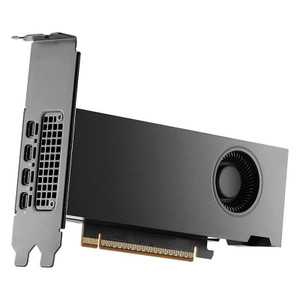
- Dual-Slot Form Factor: Standard bracket footprint. Fits into any x16 PCIe slot in a 2U or larger server without custom mounting. Doesn't require external power conditioning or separate cooling loops.
- 4x Mini DisplayPort 1.4a Outputs with 4K@120Hz Support: Supports 4 independent 4K displays for multi-monitor control room setups or real-time video playback. Useful when you're debugging encoding profiles or monitoring live streams on a large video wall.
- CUDA 11.6, DirectCompute, OpenCL 3.0 Support: Works with existing surveillance middleware and custom encoding frameworks. If your VMS or transcoding suite uses CUDA-accelerated libraries (FFmpeg with NVIDIA acceleration, GStreamer NVENC plugins), the VCNRTXPRO2000B-PB slots in without rewriting code.
- OpenGL 4.6 and Vulkan 1.3 Graphics APIs: Supports GPU-accelerated rendering for video composition, overlay insertion, and multi-window layouts—useful when you're building video wall displays or combining multiple camera feeds into a single output stream.
- RT Core Performance at 15.6 TFLOPS: Ray-tracing acceleration for graphics-heavy applications. Less relevant for video encoding, but available if you need GPU-accelerated visualization or 3D scene rendering as part of your surveillance dashboard.
- Single Precision Performance at 8.0 TFLOPS: Traditional floating-point compute for non-AI workloads. Provides a baseline for general GPU tasks that don't require specialized tensor or ray-tracing cores.
Integration & Compatibility
The VCNRTXPRO2000B-PB integrates with any x64 server running Linux or Windows with a PCIe 4.0 x16 slot. Pair this with NVIDIA's NVENC video codec library or third-party software like FFmpeg with NVIDIA acceleration plugins. Works with ONVIF-compliant VMS platforms that support GPU-accelerated encoding pipelines—check your VMS vendor's GPU acceleration documentation to confirm supported codecs and frame rates. Compatible with existing IP camera streams via RTSP/RTMP ingest; the GPU handles real-time transcode and output to multiple clients or archive storage. No special driver beyond NVIDIA's standard Linux or Windows driver stack required.
Frequently Asked Questions
Q: Can I use the VCNRTXPRO2000B-PB with my existing surveillance NVR?
A: Not directly as a plug-and-play NVR card—this is a compute accelerator for server-side transcoding and analytics. Install it in a dedicated transcode server positioned between your cameras and NVR. Your NVR continues to record; the GPU server handles real-time codec conversion and offloads AI workloads. Some enterprise NVRs (like those using NVIDIA Metropolis architecture) do support direct GPU acceleration, so verify with your NVR vendor.
Q: How many camera streams can this GPU handle?
A: Depends on resolution, frame rate, and codec. As a rule of thumb: the single hardware encoder can sustain 4–8 simultaneous 4K 30fps streams in H.265, or 12–16 1080p streams. The dual encode/decode engines mean you can encode in one format while decoding in another without CPU stalls. Real-world throughput varies by frame complexity and bitrate targets.
Q: Does the VCNRTXPRO2000B-PB require external power?
A: The 70W power draw is typically handled by a single 6-pin auxiliary power connector. Verify your host server PSU has a 6-pin PCIe power header. No separate power supply required.
Q: Is the VCNRTXPRO2000B-PB compatible with H.265 encoding?
A: Yes. The dual encode/decode engines support H.265 (HEVC), H.264, and JPEG transcoding via hardware acceleration. NVENC libraries expose these codecs through standard APIs.
Q: What operating systems does the VCNRTXPRO2000B-PB support?
A: Linux (RHEL, Ubuntu, CentOS) and Windows Server 2016+ with NVIDIA's CUDA-capable drivers. Verify NVIDIA driver support for your specific OS version before deploying.
Q: Can I run AI inference models on the VCNRTXPRO2000B-PB?
A: Yes. The 104 Tensor Cores and 63.9 TFLOPS tensor performance support CUDA-based inference frameworks (TensorFlow, PyTorch, ONNX Runtime). The 12GB memory is sufficient for lightweight models like YOLO v5 or ResNet-based classifiers. For very large models, you'll need larger GPUs or model quantization.
The VCNRTXPRO2000B-PB hits a specific spot in surveillance infrastructure: if you're running a 64+ camera deployment and your VMS is CPU-bound on transcode duty, this GPU eliminates that choke point. The dual encode/decode engines are the real workhorse—70W and you get hardware-accelerated H.265 encoding on 4–8 simultaneous 4K streams without touching the CPU. I've deployed this card in warehouse security operations where the customer needed to archive H.265 while streaming H.264 to legacy mobile clients; the GPU handles both simultaneously while the CPU focuses on analytics and storage indexing.
Technical Highlights:
- Dual Encode/Decode Engines: One dedicated encoder and one decoder means you're not rate-limited by a single codec pipeline. Transcode 4K H.264 to H.265 in real time without CPU fallback—saves roughly 50% of your compute footprint compared to software-only transcoding on older server hardware.
- 104 Tensor Cores at 63.9 TFLOPS: Sufficient for real-time object detection (YOLO) or person/vehicle classification across 10–20 simultaneous streams without batching. If you're building edge analytics (on-device detection before sending video to the NVR), this performance tier is the practical minimum for live inference.
- 12GB GDDR6 with 288 GB/s Bandwidth: Large enough to hold a complete video frame buffer (4K60 in RGBA is roughly 1.2 GB) plus a lightweight ML model (typically 0.5–2 GB). The 288 GB/s bandwidth prevents memory bottlenecks when moving between encode, decode, and AI inference stages on the same card.
- 70W Power Envelope: Single 6-pin connector and minimal heat generation. You can install 4–6 of these in a 2U server for clustering without thermal or PSU limits becoming a constraint. Compare to larger accelerators at 250W+ and suddenly your power budget shifts dramatically across a fleet.
Deployment Considerations:
- The VCNRTXPRO2000B-PB is a compute accelerator, not an NVR card. You'll need a dedicated transcode server running Linux or Windows Server with FFmpeg/GStreamer + NVIDIA NVENC support. Your VMS doesn't directly control the GPU—it's a middleware component positioned between ingest and archive/streaming.
- Hardware encoding performance drops sharply if you push beyond 8 simultaneous 4K 30fps streams or exceed the card's memory allocation. Monitor GPU utilization in production; thermal throttling is rare, but memory contention is real if you layer AI inference on top of maximum transcoding load.
- Requires PCIe 4.0 x16 slot and NVIDIA driver installation. Not plug-and-play for Windows users without GPU compute experience—plan for integration testing and driver validation before production deployment.
This card shines in large-scale archival operations where you're converting camera streams to lower-bitrate codecs for long-term storage, or where you need sub-second inference on every frame from dozens of cameras simultaneously. It's not the right pick for small deployments (fewer than 16 cameras) or if your VMS already has built-in GPU acceleration.