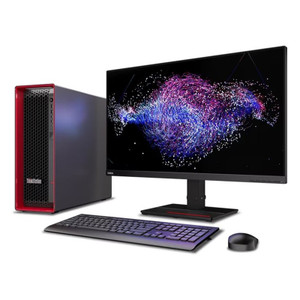
Lenovo 12U3000UUS ThinkCentre M70s Gen 5 Small Form Factor Desktop
Overview
The Lenovo ThinkCentre M70s Gen 5 (12U3000UUS) is a compact Small Form Factor desktop built around Intel's 14th-generation Core i5-14400 — a 10-core processor that handles the parallel workloads common in commercial deployments without the footprint of a tower. Whether you're provisioning workstations for a security operations center, outfitting a distributed branch office, or deploying a dedicated commercial desktop for VMS client duty, this machine delivers the compute headroom to run modern enterprise software without wasting rack space or desk real estate.
The 12U3000UUS ships with Windows 11 Pro 64-bit pre-installed, which matters for enterprise environments: BitLocker encryption, Remote Desktop host capability, and domain join are all available out of the box without an additional OS license or upgrade step.
Key Features
- Intel Core i5-14400 (10 cores): The i5-14400 splits its 10 cores across a performance/efficiency hybrid design — 6 P-cores handle the heavy lifting (VMS decoding, database queries, simultaneous streams) while 4 E-cores absorb background tasks without competing for P-core time. In a surveillance workstation context, this means you can run a live VMS client alongside recording and event management software without measurable lag.
- 16GB DDR5 Memory: DDR5 runs at higher base frequencies and delivers greater bandwidth than DDR4, which translates to faster data movement between the processor and storage — relevant when decoding multiple high-resolution video streams or running analytics-heavy software. 16GB is a realistic minimum for multi-application commercial workloads; confirm your VMS vendor's memory recommendations before assuming 16GB is sufficient for your channel count.
- 512GB PCIe 4.0 NVMe SSD: PCIe 4.0 NVMe delivers sequential read speeds roughly double what SATA SSDs provide — the operating system and applications load fast, and the drive won't become a throughput bottleneck in data-intensive workflows. 512GB is adequate for the OS and software layer; plan external or network storage for any significant video archive. Browse the storage devices category for compatible expansion options.
- Windows 11 Pro 64-bit: The Pro edition includes features that matter in managed commercial environments: Group Policy management, BitLocker full-disk encryption, Hyper-V virtualization, and Remote Desktop host — all active without additional licensing. IT teams deploying via Microsoft Endpoint Manager or SCCM will find standard domain enrollment works without workarounds.
- Small Form Factor (SFF) Chassis: The SFF enclosure is significantly smaller than a traditional mid-tower, making it practical to mount under a desk, on a VESA arm with an optional bracket, or inside a secured IT cabinet. For deployments where physical security of the workstation itself matters — SOC environments, access-controlled server rooms — the reduced footprint helps without sacrificing expandability.
- ThinkCentre Commercial Platform: The Lenovo ThinkCentre line is built to commercial tolerances, with ISV certifications from major enterprise software vendors, long-term availability commitments, and manageability features including Intel vPro (check SKU-level vPro status separately). Commercial platforms carry longer driver support windows than consumer hardware, which reduces maintenance burden in managed fleets.
Integration and Compatibility
The M70s Gen 5 runs Windows 11 Pro, which maintains broad compatibility with enterprise security and management software. VMS platforms including Milestone XProtect, Genetec Security Center, Avigilon Control Center, and Hanwha Wisenet WAVE publish Windows 11 compatibility notes — verify your specific VMS version against the vendor's current OS support matrix before deployment. The machine's 10-core i5-14400 provides enough compute for moderate-channel VMS client workloads; GPU-accelerated decoding for high channel counts may require a discrete graphics card, which the SFF chassis supports in a low-profile configuration depending on power envelope. Pair this workstation with a managed PoE switch and your IP camera infrastructure for a complete security operations environment. For enterprise provisioning, the system supports standard image deployment via WDS/MDT and is compatible with Microsoft Autopilot for zero-touch enrollment.
Frequently Asked Questions
Q: What processor is in the Lenovo 12U3000UUS, and how many cores does it have?
A: The 12U3000UUS is equipped with an Intel Core i5-14400, a 10-core (6 performance + 4 efficiency) 14th-generation processor. This configuration handles multi-threaded commercial workloads including VMS client software, office productivity, and background management agents simultaneously.
Q: Does the 12U3000UUS come with Windows 11 Pro pre-installed?
A: Yes. The unit ships with Windows 11 Pro 64-bit pre-installed. The Pro edition includes BitLocker, Remote Desktop host, domain join, and Group Policy support — features required in most managed enterprise environments.
Q: How much memory and storage does the ThinkCentre M70s Gen 5 (12U3000UUS) include?
A: It ships with 16GB of DDR5 RAM and a 512GB PCIe 4.0 NVMe SSD. The DDR5 platform delivers higher memory bandwidth than DDR4, and the NVMe drive provides fast application load times. Additional storage expansion should be planned separately for video archive or large dataset use cases.
Q: Is the 12U3000UUS suitable as a VMS workstation for a security operations center?
A: It depends on your channel count and decoding requirements. The i5-14400 with 16GB DDR5 is a practical platform for moderate-channel VMS client duty. High-channel configurations with 4K streams may benefit from a discrete low-profile GPU. Confirm your VMS vendor's recommended specs for your specific channel and resolution combination before finalizing the configuration.
Q: What is the form factor of the Lenovo 12U3000UUS, and can it be mounted under a desk or in a cabinet?
A: The M70s Gen 5 uses a Small Form Factor (SFF) chassis, which is significantly more compact than a standard tower. It can be placed under a desk, on a shelf, or inside an IT cabinet. VESA mounting is possible with an optional compatible bracket (sold separately).
Q: Does the Lenovo ThinkCentre M70s Gen 5 support enterprise image deployment?
A: Yes. Running Windows 11 Pro, the system supports standard enterprise deployment methods including WDS/MDT imaging and Microsoft Autopilot zero-touch enrollment. It is compatible with management platforms such as Microsoft Endpoint Manager (Intune) and SCCM for fleet provisioning and ongoing device management.
When integrators ask me about workstation selection for security operations environments, I keep coming back to the ThinkCentre M70s Gen 5 — specifically the 12U3000UUS — for mid-tier deployments where space is constrained and the budget doesn't support a full tower workstation. The 10-core i5-14400 with 16GB DDR5 hits a practical sweet spot: enough compute to handle concurrent VMS client sessions and event management without overspending on cores you won't saturate at moderate channel counts.
Technical Highlights:
- 10-core i5-14400 architecture: The hybrid P+E core split means background tasks (Windows Update, antivirus scans, management agents) get absorbed by the efficiency cores without stealing cycles from the performance cores running your VMS decoder. In practice, this results in more consistent frame rates during peak recording events compared to older homogeneous-core designs.
- PCIe 4.0 NVMe SSD: The 512GB PCIe Gen 4 drive delivers sequential reads that eliminate the storage bottleneck common with SATA-based workstations. Application launch times and VMS database queries are noticeably faster — particularly relevant when operators need fast access to footage during an incident response.
- DDR5 memory platform: DDR5 provides roughly 1.5–2x the memory bandwidth of DDR4 at equivalent capacities. For multi-stream video decoding, that bandwidth headroom translates directly to smoother playback when reviewing high-resolution footage across multiple channels simultaneously.
Deployment Considerations:
- The SFF chassis limits GPU expansion to low-profile cards — verify your discrete GPU's TDP against the system's power supply headroom before ordering if you're planning hardware-accelerated decoding for high-channel 4K workloads.
- 512GB is adequate for the OS and software stack, but you'll want to plan network-attached or external storage for any local video cache. Don't assume the internal drive will handle both the OS footprint and a meaningful video buffer.
This unit is the right call for branch office security workstations, SOC analyst stations running moderate-channel VMS clients, and any deployment where compact physical footprint and Windows 11 Pro manageability are non-negotiable constraints.