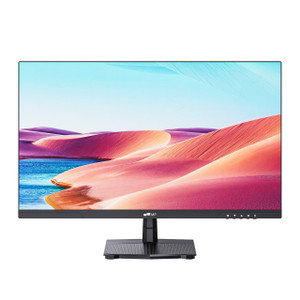
Lenovo 62CBRAR6US 27-Inch 4K IPS Professional Monitor
The Lenovo ThinkVision P27u-20 (62CBRAR6US) is a 27-inch 4K IPS professional display built for demanding workstation environments — color-critical design work, multi-source video review, and dense-data analyst desks where a single cable to a docked laptop is the baseline expectation. At 3840×2160 on a 27-inch panel, you get 163 dpi: enough pixel density that UI chrome disappears and screen real estate actually expands. Explore the full Lenovo display lineup if you need to match this panel across a multi-monitor deployment.
Overview
The P27u-20 sits at the professional tier of workstation monitors, targeting users who need accurate, consistent color across a wide gamut — not just sRGB. The IPS panel covers 99.5% Adobe RGB, 99.1% DCI-P3, and 100% sRGB simultaneously, which means a single panel can serve a photographer validating print-bound work and a video editor reviewing DCI deliverables without display recalibration between tasks. EPEAT Gold and TCO 8.0 certifications reflect the energy and materials profile buyers in regulated enterprise environments increasingly require.
Key Features
- 3840×2160 IPS at 163 dpi: At this pixel density on a 27-inch screen, you can run two full 1080p documents side by side and still have crisp, sub-pixel text. IPS delivers 178°/178° viewing angles, so color doesn't shift when colleagues lean in — important for collaborative review stations.
- 99.5% Adobe RGB / 99.1% DCI-P3 color gamut: Most commercial IPS panels cover sRGB and stop there. This one extends through Adobe RGB and DCI-P3, making it viable for prepress proofing and cinema color grading without a dedicated reference monitor alongside it. The 10-bit panel (8-bit + FRC) supports 1.07 billion colors — enough to render smooth gradients that reveal banding on lesser panels.
- DisplayHDR 400 with 400 cd/m² typical / 450 nits peak brightness: HDR 400 is the entry certification tier; it won't replace a proper HDR reference display, but it does mean HDR-flagged content renders with a recognized luminance profile rather than being tone-mapped down arbitrarily.
- Thunderbolt 4 In/Out with 100W USB-C Power Delivery: A single Thunderbolt 4 cable to a compatible laptop carries 4K video, 100W charging, and data simultaneously. Daisy-chain to a second display via the Thunderbolt 4 out port. For workstations that move between docking and desk use, this eliminates the dongle stack entirely.
- Built-in Gigabit Ethernet (10/100/1000M): The monitor acts as a network adapter when connected via Thunderbolt 4 — the laptop gains a wired connection through the display. Useful in locked-down enterprise environments where IT requires wired connectivity but the laptop has no RJ-45.
- 4 ms typical pixel response (6 ms extreme): At 60 Hz and 6 ms response, this is a professional panel, not a gaming panel. Motion is clean for video playback and UI work; fast-paced gaming will show some smear. The 1000:1 native contrast with 3M:1 dynamic contrast handles most content well.
- Full ergonomic range — tilt, swivel, pivot, height: The stand adjusts −5° to 35° tilt, ±45° swivel, ±90° pivot (portrait mode), and 135 mm height. A 100×100 mm VESA pattern means the head transfers to any standard arm or wall mount if the stand gets swapped out.
- 2× HDMI 2.0 + DisplayPort 1.2 + Thunderbolt 4: Four independent video inputs mean this monitor can serve as a KVM-adjacent hub — connect a workstation, a laptop, and a secondary source simultaneously and switch inputs without recabling. The 3.5 mm audio output routes audio from any source through headphones or powered speakers.
- 2× 3W built-in speakers: Adequate for reference audio monitoring in a quiet office; not a replacement for studio monitors. Use the 3.5 mm out if audio accuracy matters to your workflow.
- 35W typical / 240W max power draw: The 240W maximum accounts for simultaneous 100W USB-C delivery to a connected laptop plus monitor operation. At idle the panel drops below 0.5W (sleep) and under 0.3W (off) — meaningful across a large deployment over time.
Integration and Compatibility
The 62CBRAR6US connects to any host with HDMI 2.0, DisplayPort 1.2, or Thunderbolt 4/USB4. USB-C hosts without Thunderbolt 4 may connect but will lose the Ethernet passthrough and daisy-chain capability — check host specifications before specifying. The three USB 3.2 Gen 1 Type-A downstream ports turn the monitor into a 4-port USB hub, reducing cable runs to the workstation. For enterprises building out workstation accessory standards, the P27u-20 pairs cleanly with docking solutions that also carry Thunderbolt 4. Review our monitor selection guide for side-by-side coverage area and resolution comparisons across the professional display category.
Frequently Asked Questions
Q: Does the 62CBRAR6US support daisy-chaining a second monitor?
A: Yes. The ThinkVision P27u-20 includes both a Thunderbolt 4 input and a Thunderbolt 4 output port, allowing you to daisy-chain a compatible second display from the monitor's TB4 out port when connected to a Thunderbolt 4 host.
Q: How much power does the 62CBRAR6US deliver over USB-C to a connected laptop?
A: The P27u-20 delivers up to 100W via its USB-C/Thunderbolt 4 port — sufficient to charge most business and creative laptops at full speed while the display is in use.
Q: Does the P27u-20 include built-in Ethernet, and does it require Thunderbolt 4 to function?
A: The monitor includes a 10/100/1000M Ethernet port. Ethernet passthrough to the host is active when connected via Thunderbolt 4. Connecting via HDMI or DisplayPort provides video only — Ethernet and USB hub functions require the Thunderbolt 4 connection.
Q: What color gamut does the 62CBRAR6US cover, and is it factory-calibrated?
A: The panel covers 99.5% Adobe RGB, 99.1% DCI-P3, and 100% sRGB. The display is specified as a wide-gamut professional panel; verify factory calibration documentation with your purchase if a calibration report is required for your workflow.
Q: What is the warranty on the 62CBRAR6US?
A: The ThinkVision P27u-20 (62CBRAR6US) carries a 3-year manufacturer warranty.
Q: Can the 62CBRAR6US be mounted on a VESA arm?
A: Yes. The display head supports 100×100 mm VESA mounting. Remove the included stand and attach any compatible VESA arm or wall mount rated for the 5.5 kg head weight.
The spec I keep coming back to on the 62CBRAR6US is the Thunderbolt 4 in/out combination paired with 100W power delivery. In a workstation deployment where the integrator is trying to reduce cable count and eliminate separate docking stations, this monitor effectively becomes the dock — one cable to the laptop carries display, 100W charge, Gigabit Ethernet passthrough, and USB hub simultaneously. That's a meaningful infrastructure simplification, especially across a fleet.
Technical Highlights:
- 99.5% Adobe RGB / 10-bit color: The 8-bit + FRC panel hitting 99.5% Adobe RGB and 99.1% DCI-P3 makes this viable for prepress and DCI color work on a single display — you're not splitting budget between a sRGB productivity panel and a wide-gamut reference display.
- 163 dpi pixel density at 27 inches: 3840×2160 on a 27-inch panel means UI scaling stays rational (typically 1.5×–2×) while fine detail in CAD, print layouts, and video timelines is genuinely crisp, not just technically higher resolution.
- Full ergonomic articulation: The 135 mm height adjustment, ±45° swivel, and ±90° pivot aren't luxury specs — they're how you avoid ergonomics complaints six months after deployment. The 100×100 mm VESA pattern means the stand can be swapped for an arm without a bracket adapter.
Deployment Considerations:
- Thunderbolt 4 Ethernet passthrough is inactive over HDMI or DisplayPort connections — if Ethernet through the display is part of the workstation spec, confirm the host has Thunderbolt 4, not just USB4 or USB-C Alt-mode DP.
- At 240W maximum draw (monitor + 100W laptop charging + USB peripherals), verify that the circuit and PDU capacity in dense deployments accounts for the full load, not just the 35W typical figure.
The P27u-20 is the right call for creative and analyst workstations where wide-gamut color accuracy, single-cable docking, and wired Ethernet are all requirements — specifically environments running Thunderbolt 4 hosts where eliminating a separate dock is a budget and desk-space priority.