Lenovo 30HA00AWUS ThinkStation P3 Ultra Compact Workstation
Overview
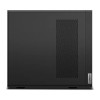
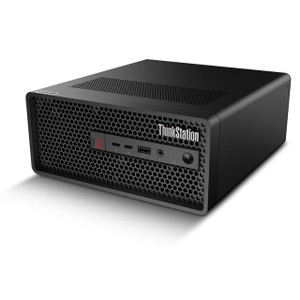
The Lenovo ThinkStation P3 Ultra 30HA00AWUS is a compact professional workstation built around Intel's 20-core Core i7-14700 processor — a configuration that handles compute-intensive workloads like professional workstations for video management, forensic analysis, and multi-stream surveillance processing without the footprint of a full tower. At 9 lbs, it sits comfortably on a desk or mounts behind a monitor, making it a practical fit for control rooms and security operations centers where rack space or desk real estate is limited.
The 30HA00AWUS ships with 16GB of DDR5-4800 RAM across a single SO-DIMM slot, leaving three additional slots open — meaning you can scale memory to 192GB without replacing the base module. That headroom matters for deployments running parallel VMS instances, analytics engines, or virtualized workloads on a single machine.
Key Features
- Intel Core i7-14700 — 20 Cores / 28 Threads: The i7-14700 combines 8 performance cores and 12 efficiency cores. Base clock is 2.1 GHz; boost reaches 5.3 GHz under single-thread load. For video management software that hammers single-threaded decode and multi-threaded analytics simultaneously, that architectural split is practical — efficiency cores absorb background tasks while P-cores handle latency-sensitive decode.
- DDR5-4800 Memory — 16GB Installed, 192GB Maximum: DDR5 at 4800 MHz delivers roughly double the bandwidth of DDR4-2400 at a comparable price point today. Starting at 16GB with three empty SO-DIMM slots means a future upgrade path to 192GB is straightforward — relevant if the analytics or VMS workload grows without requiring a full platform replacement.
- 512GB NVMe SSD — No Spinning Media: The factory SSD eliminates the seek-latency penalty that affects mechanical drives during simultaneous read/write operations typical of VMS logging and OS tasks. For operating system and application storage, 512GB is sufficient; bulk surveillance footage should route to network or dedicated storage rather than the system drive.
- Compact Form Factor — 9 lbs: At 9 lbs, the P3 Ultra occupies a fraction of the space of a full workstation tower. It can be desk-mounted, VESA-mounted behind a display, or installed in a shallow equipment enclosure — useful in command centers, front-desk security stations, or any environment where a full ATX tower is impractical.
- Expandable to 192GB RAM via 4x SO-DIMM: Four SO-DIMM slots and a 192GB ceiling give this platform a longer service life than single-channel or two-slot designs. Deploying a VMS that scales channel count over time? Adding RAM is cheaper and faster than replacing hardware.
- No Optical Drive: The P3 Ultra ships without an optical drive — consistent with enterprise deployment models that rely on network-based software provisioning. If your imaging workflow requires optical media, plan for an external USB drive; this is a non-issue for organizations already on network deployment tools.
Integration and Compatibility
The i7-14700 platform supports standard enterprise software stacks used in physical security — VMS platforms, access control servers, and analytics middleware all run on Windows-compatible x86 hardware. The DDR5 memory architecture is compatible with current Intel 700-series platform requirements. When pairing this workstation with a PoE network switch and IP camera infrastructure, ensure your VMS license covers the channel count you're running — the CPU headroom here supports high channel counts, but VMS licensing is the more common constraint in practice.
For deployments requiring dedicated GPU-accelerated analytics or real-time transcoding of high-resolution streams, verify the specific GPU configuration available with this SKU — GPU options are not confirmed in the available evidence for the 30HA00AWUS and should be confirmed before ordering if GPU compute is a hard requirement.
Explore the full Lenovo workstation catalog for platform variants with different processor, memory, and storage configurations to match your exact deployment budget and compute profile.
Frequently Asked Questions
Q: What processor does the 30HA00AWUS use, and how many cores does it have?
A: The 30HA00AWUS ships with an Intel Core i7-14700 processor featuring 20 cores and 28 threads. Base clock is 2.1 GHz with a maximum boost frequency of 5.3 GHz.
Q: How much RAM does the 30HA00AWUS come with, and can it be upgraded?
A: It ships with 16GB of DDR5-4800 SDRAM installed in a single SO-DIMM slot. The system has 4 SO-DIMM slots total and supports up to 192GB maximum, so there is substantial room for future memory upgrades without replacing the base module.
Q: What storage does the 30HA00AWUS include?
A: The system includes a single 512GB SSD. No optical drive is installed. For surveillance deployments, bulk video storage should be handled by a dedicated NAS or SAN rather than the system drive.
Q: What is the weight of the ThinkStation P3 Ultra 30HA00AWUS?
A: The unit weighs 9.00 lbs, making it a compact workstation suitable for desk, VESA-mount, or shallow-enclosure deployments.
Q: Is the 30HA00AWUS suitable for running video management software (VMS)?
A: The 20-core i7-14700 with 5.3 GHz boost and DDR5-4800 memory provides strong compute headroom for multi-stream VMS workloads. Confirm your VMS vendor's hardware requirements and GPU dependencies before selecting this configuration if GPU-accelerated decode is required.
Q: Does the 30HA00AWUS include an optical drive?
A: No. The ThinkStation P3 Ultra 30HA00AWUS does not include an optical drive. Software deployment should be handled via network or external USB media.
The 30HA00AWUS is one of the more interesting compact workstation configurations I've seen spec'd for security operations work — Intel's i7-14700 runs 20 cores with a 5.3 GHz boost ceiling, which is meaningful when you're running a VMS that pegs single-threaded decode on a dozen streams while the OS and analytics middleware compete for CPU time on the same box.
Technical Highlights:
- 20-Core i7-14700 at 5.3 GHz Boost: The hybrid core architecture (8 P-cores + 12 E-cores) handles mixed-priority workloads efficiently — high-priority decode and low-priority background indexing don't fight for the same resource pool the way they do on a homogeneous core design.
- DDR5-4800 with 192GB Ceiling: Starting at 16GB with three empty SO-DIMM slots is the right way to ship this. Buy the platform now, populate RAM as your channel count grows. DDR5-4800 bandwidth matters when your VMS is doing simultaneous frame buffering across many streams.
- 512GB SSD — No Spinning Latency: For OS, VMS application, and configuration data, the SSD removes the I/O contention that plagues mechanical drives when write logs, OS paging, and application reads overlap — common under peak recording load.
Deployment Considerations:
- At 9 lbs, this unit is genuinely compact — confirm VESA mount or desk bracket compatibility with your specific enclosure before ordering if you're planning a behind-monitor installation in a control room.
- GPU configuration for this SKU is not confirmed in available evidence — if your VMS or analytics platform requires GPU-accelerated decode (common with H.265 high-channel-count deployments), verify the GPU option before committing to this specific model number.
The P3 Ultra 30HA00AWUS is a strong fit for a security operations center workstation running a mid-to-large VMS deployment — particularly where desk space is constrained and future RAM expansion is a planning requirement rather than a day-one need.