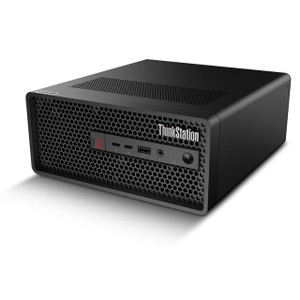
Lenovo 30HA00AUUS ThinkStation P3 Ultra Compact Workstation
Overview
The Lenovo ThinkStation P3 Ultra (30HA00AUUS) is a compact professional workstation built around Intel's 20-core Core i7-14700 processor — a platform sized for tight equipment rooms and operator desks that still need the compute headroom to run demanding applications without compromise. At 9 lb, it ships substantially lighter than tower-class workstations while retaining four SO-DIMM slots and serious expandability headroom. If your deployment needs a dense, high-throughput compute node that doesn't dominate a rack shelf or a desk, the P3 Ultra is worth a close look.
The workstation targets environments where processing density matters: video management server duty, CAD/design workstations, multi-stream analytics edge nodes, or any enterprise application where DDR5 bandwidth and a high core count translate directly into throughput gains. Lenovo's ThinkStation P3 Ultra line sits between entry workstations and full tower platforms — compact enough to deploy flexibly, powerful enough to handle real workloads.
Key Features
- Intel Core i7-14700 (20 Cores / 28 Threads): The 14th-gen Raptor Lake Refresh architecture delivers 20 cores — 8 performance cores and 12 efficiency cores — with 28 threads available for parallel workloads. At 2.1 GHz base and 5.3 GHz boost, single-threaded tasks (UI responsiveness, VMS playback scrubbing) stay snappy while multi-threaded encode or analytics batch jobs run across the full core count. This core configuration handles simultaneous live-view, recording, and analytics on a multi-camera VMS deployment without starving any process.
- 16 GB DDR5-4800 MHz (Expandable to 192 GB): DDR5 at 4800 MHz delivers roughly 1.5x the memory bandwidth of DDR4-3200, which matters on workloads that stream large data sets — decoded video frames, large CAD assemblies, or concurrent database queries. The factory-installed 16 GB sits in one of four SO-DIMM slots, leaving three slots open. Maximum supported memory is 192 GB, giving integrators room to grow the platform as workload demands increase without replacing the chassis.
- 512 GB SSD (Single Drive Installed): A solid-state primary drive eliminates the seek-time bottlenecks of spinning media — OS boot, application launch, and log I/O are all faster. The 512 GB capacity is adequate for OS and application installation; for VMS deployments storing recorded footage, plan to add external or network-attached storage rather than relying solely on this internal drive.
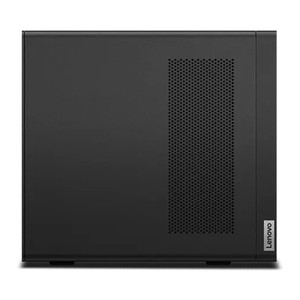
- Compact Form Factor at 9 lb: The P3 Ultra's physical footprint is sized for environments where tower workstations are impractical — under-desk deployments, wall-mount shelf installs, or stacked AV equipment racks. At 9 lb, it can be repositioned or transported without dedicated lifting equipment, which simplifies site installs and equipment room reorganizations.
- Four SO-DIMM Expansion Slots: With three slots unpopulated from the factory, the memory subsystem can scale to 192 GB without any platform swap. This is particularly relevant for analytics-heavy deployments — deep learning inference engines and object recognition workloads are memory-hungry, and the ability to add capacity in-place protects the hardware investment as software requirements evolve.
- No Optical Drive: The absence of an optical drive reflects modern enterprise deployment practice — software is delivered via network or USB media, not disc. This also contributes to the compact chassis dimensions. Verify your provisioning workflow doesn't depend on optical media before ordering.
Integration and Compatibility
The 30HA00AUUS runs Windows (confirm OS version with the full SKU build sheet), making it compatible with the major commercial video management system platforms that require Windows Server or Windows 10/11 Pro environments. The i7-14700's 20-core architecture and DDR5 memory bandwidth make it well-suited as a dedicated NVR server node or as a workstation in a distributed VMS architecture where client decode and analytics processing are separated from recording infrastructure.
For IP camera deployments feeding a VMS, pair this workstation with a managed PoE network switch to handle camera power and traffic aggregation separately — the P3 Ultra handles compute, not PoE delivery. The DDR5 platform is compatible with modern enterprise storage expansion via USB 3.x and Thunderbolt interfaces typical of the ThinkStation line (verify specific port configuration against the full Lenovo datasheet for this build). Consult Lenovo's ThinkStation compatibility matrix for validated memory module vendors when expanding beyond the factory-installed 16 GB SO-DIMM.
Frequently Asked Questions
Q: How many memory slots does the 30HA00AUUS have, and what is the maximum supported RAM?
A: The ThinkStation P3 Ultra 30HA00AUUS has four SO-DIMM slots. It ships with 1 x 16 GB DDR5-4800 MHz installed, leaving three slots open. Maximum supported memory is 192 GB.
Q: Is the 512 GB SSD sufficient for VMS recording storage?
A: For most multi-camera VMS deployments, 512 GB is not sufficient for recorded footage retention. The internal SSD is best used for the OS and VMS application. Plan for external or network-attached storage for camera recording archives.
Q: What processor does the 30HA00AUUS use?
A: It uses the Intel Core i7-14700 — a 20-core (8P + 12E), 28-thread processor with a 2.1 GHz base clock and 5.3 GHz maximum boost clock, based on Intel's 14th-generation Raptor Lake Refresh architecture.
Q: How much does the ThinkStation P3 Ultra 30HA00AUUS weigh?
A: The unit weighs 9.00 lb, making it practical for under-desk, shelf, or equipment room deployments without specialized lifting or mounting hardware.
Q: Does the 30HA00AUUS include an optical drive?
A: No. The P3 Ultra 30HA00AUUS does not include an optical drive. Software deployment should be via network or USB media.
The 30HA00AUUS is one of the more practical compact workstation options I've seen for VMS server duty — the i7-14700's 20-core configuration handles the parallel decode and analytics threads that bog down quad-core office-class hardware, and the DDR5-4800 memory subsystem gives you the bandwidth headroom that matters when you're feeding multiple decoded streams into an analytics engine simultaneously. The four SO-DIMM slots with a 192 GB ceiling mean you're not boxing yourself in at 16 GB from day one.
Technical Highlights:
- i7-14700 Boost to 5.3 GHz: Single-threaded performance at 5.3 GHz keeps VMS UI and playback scrubbing responsive even while background analytics and recording threads run on the efficiency cores — you're not choosing between responsiveness and throughput.
- DDR5-4800 MHz, 4x SO-DIMM (192 GB Max): DDR5's memory bandwidth advantage over DDR4 is real on multi-stream video workloads. Starting at 16 GB with three open slots, you can scale in-place to 192 GB as analytics software requirements grow — no chassis swap required.
- 9 lb Compact Form Factor: At 9 lb, this fits on a standard equipment shelf or under a desk without structural concerns. For distributed VMS architectures where you're placing compute nodes at edge locations rather than centralized server rooms, the physical portability matters.
Deployment Considerations:
- The 512 GB SSD covers OS and VMS application installation but is not sized for footage retention on any meaningful camera count — plan NAS or SAN storage from the start rather than retrofitting later.
- No optical drive means your provisioning workflow needs to be USB or network-based; if your team still uses disc-based OS deployment, account for that before the unit arrives on site.
This platform is well-matched for a dedicated VMS workstation in a mid-size security operations center — 20 to 60 camera deployments where a single compute node needs to handle live view, recording management, and basic analytics without the footprint or cost of a rack-mount server.