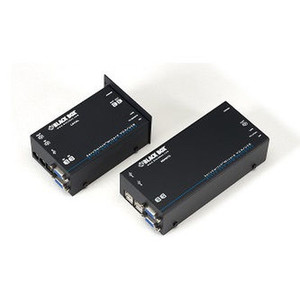
Black Box ACU5050A-R2 VGA USB Audio Dual-Access KVM Extender
Overview
The Black Box ACU5050A-R2 is a dual-access KVM extender that carries VGA video, USB peripheral control, and audio signals over standard CATx cabling — letting you separate a workstation or server from its operator console without sacrificing keyboard, mouse, or audio functionality. It belongs to Black Box's KVM extender line, a catalog built around the practical needs of broadcast, industrial control, and secure operations environments where computing hardware must be physically isolated from the operator position.
Dual-access means two operator stations can connect to the same host simultaneously — useful in control room handoff scenarios, training environments, or any situation where a primary and secondary console must share a single CPU without a software KVM switch in the data path.
The CATx transport layer is a practical advantage over fiber or proprietary cable solutions: standard Cat5e or Cat6 infrastructure you likely already have in the building handles the signal run, keeping installation costs low and making moves or extensions straightforward without specialized cabling contractors.
Key Features
- VGA Video Extension: Carries analog VGA signal over CATx, preserving display output for legacy and industrial workstations that have not migrated to DisplayPort or HDMI — a common reality in process control and broadcast production environments.
- USB Peripheral Support: Extends USB keyboard and mouse (and compatible USB devices) to the remote console, so operators interact with the host as if seated directly in front of it. No proprietary peripheral adapters required.
- Integrated Audio: Audio is carried alongside video and USB on the same CATx run — no separate audio cable or analog balun needed. This matters in monitoring stations or production suites where speaker or headset feedback is part of the workflow.
- Dual-Access Architecture: Two consoles can operate from a single host, supporting handoff workflows, training scenarios, or redundant operator positions without additional switching hardware in the signal path.
- CATx Transport: Uses standard Cat5e/Cat6 infrastructure already present in most facilities, avoiding the cost and lead time of proprietary cable runs. The ACU5050A-R2 (often searched as ACU5050A R2) fits into existing structured cabling without special terminations.
- Black Box Engineering: Sourced through the Black Box catalog, this extender is factory-new commercial-grade hardware with manufacturer warranty coverage — no grey-market, no parallel imports.
Integration and Compatibility
The ACU5050A-R2 is designed for environments running VGA-output hosts — including legacy servers, industrial PCs, broadcast playout systems, and secure workstations that have not transitioned to digital video interfaces. It pairs naturally with KVM switches upstream of the local unit, allowing a matrix or desktop switch to feed the extender's local port while the remote console handles day-to-day operation. For facilities building out server room or rack infrastructure, placing compute hardware in a locked rack while running CATx to an operator desk is a straightforward use case this unit is built to support.
Consult Black Box's published extension distance specifications for the specific CATx category you plan to deploy — Cat6 will typically support longer runs or higher resolutions than Cat5e under the same signal conditions. Verify your VGA resolution and refresh rate requirements against the published spec sheet before ordering if you are running above standard 1920×1200 or at high refresh rates.
Frequently Asked Questions
Q: What cable type does the ACU5050A-R2 use for extension?
A: The ACU5050A-R2 extends over standard CATx cabling (Cat5e or Cat6). This lets you use existing structured cabling infrastructure rather than running proprietary or fiber cable between the host and remote console.
Q: Does the ACU5050A-R2 support dual simultaneous users?
A: Yes. The dual-access design allows two separate operator consoles to connect to the same host — useful for training, shift handoff, or redundant console scenarios.
Q: What signals are extended by the ACU5050A-R2?
A: The ACU5050A-R2 extends VGA video, USB (keyboard and mouse), and audio over a single CATx cable run. No separate audio cabling is required.
Q: Can the ACU5050A-R2 be used with a KVM switch?
A: The ACU5050A-R2 can integrate with KVM switching infrastructure upstream of the local extender unit. This allows a matrix or desktop KVM switch to feed multiple hosts while the extender manages the remote console connection.
Q: Is the ACU5050A-R2 suitable for industrial or process control environments?
A: The VGA and USB support make it well-suited for industrial PCs, process control workstations, and legacy servers where VGA output is standard and physical separation of compute hardware from operator consoles is a security or environmental requirement.
The ACU5050A-R2 addresses a specific and common infrastructure problem: how do you move operators away from compute hardware without giving up VGA display, USB peripherals, or audio — and without pulling specialty cable? Black Box's answer here is a dual-access CATx extender that rides your existing Cat5e or Cat6 plant, and the dual-access architecture is the feature integrators actually ask about when scoping control room builds.
Technical Highlights:
- Dual-Access Console Support: Two independent operator positions share one host CPU over CATx — eliminates the need for a software KVM or second machine in handoff or training configurations.
- Consolidated Signal Transport: VGA, USB, and audio travel over a single CATx run — no parallel audio balun, no separate USB extender, no additional cable tray fill.
- CATx Infrastructure Reuse: Standard Cat5e/Cat6 terminations mean your existing structured cabling plant handles the extension — no proprietary cable procurement delays or specialized termination tools on the install crew.
Deployment Considerations:
- Verify your target VGA resolution and refresh rate against Black Box's published distance/resolution table before finalizing cable run lengths — performance degrades at longer runs or higher resolutions on Cat5e vs. Cat6.
- The dual-access feature means both consoles share control; confirm your workflow has a defined arbitration method (hardware priority or software protocol) to avoid simultaneous conflicting input from both operator positions.
The ACU5050A-R2 is the right call for secure operations centers, broadcast production suites, and industrial control rooms where VGA-output hardware is locked in a server room and operators need full keyboard, mouse, and audio presence at a remote desk — without pulling new cable.