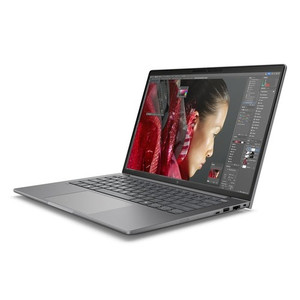
HP Inc BX7T2UT#ABA ZBook 8 G1i 14-Inch Mobile Workstation
Overview
The HP ZBook 8 G1i is a 14-inch mobile workstation built for professionals who need reliable compute performance in a portable clamshell form factor. The HP Inc workstation line targets engineers, designers, and security operations staff who run resource-intensive applications on the road or at remote sites. Model BX7T2UT#ABA ships configured with a 15th-generation Intel Core Ultra 7 255H, 32GB of RAM, and a 1TB SSD — a configuration that handles multi-application workloads without forcing compromises on memory or local storage. At 6.35 lb with a 14-inch footprint (18.60 × 10.70 × 2.50 in), it sits in the portable end of the mobile workstation category, manageable for daily transport while still accommodating a full-size keyboard layout and a display large enough for detailed work.
Key Features
- Intel Core Ultra 7 255H (15th Gen, up to 5.10 GHz, 16 cores/16 threads): The 255H's hybrid architecture — base clock 0.70 GHz with a 5.10 GHz burst ceiling — means the processor scales aggressively under burst workloads (compiling, rendering, video processing) and steps back down when idle, extending battery runtime without sacrificing peak throughput. Sixteen cores across a mixed efficiency/performance configuration handles concurrent tasks that would stall a conventional quad-core.
- 32GB RAM: 32GB is the practical floor for running a VMS client, a browser-based NVR management console, a video analytics dashboard, and a remote desktop session simultaneously without hitting swap. It's sufficient for most security operations center (SOC) workloads and light virtualization scenarios.
- 1TB SSD: A 1TB solid-state drive provides enough local capacity for OS, applications, forensic video exports, and working project files without requiring an external drive for routine tasks. SSD-based storage also means no mechanical failure risk — a relevant consideration for field deployments where the machine gets carried daily.
- 14-inch WUXGA Display (1920 × 1200, 300 nit, Anti-Glare, 60Hz, 16:10): The 16:10 aspect ratio adds roughly 11% more vertical screen real estate compared to a standard 16:9 1920×1080 panel — that extra space is genuinely useful when reviewing video timelines, reading long configuration pages, or running two documents side-by-side. At 300 nits, the display is usable in indoor office lighting; the anti-glare treatment reduces reflections in mixed-light environments. WUXGA at 14 inches produces approximately 161 PPI — adequate for text-heavy interfaces and video review at normal viewing distance.
- Intel Arc Integrated Graphics: The Arc GPU handles display output and light graphics acceleration without a discrete add-in board, keeping the chassis thin and the power draw in check. It is not a workstation-class discrete GPU; compute-heavy GPU tasks (ML inference at scale, GPU-accelerated video analytics running locally) should be offloaded to a server or a system with a dedicated discrete GPU.
- Clamshell Form Factor, 6.35 lb: At 6.35 lb, this is a workstation-class machine, not an ultrabook. Daily carry is manageable, but buyers expecting sub-4 lb travel weight should look at the consumer notebook line instead. The clamshell design prioritizes keyboard ergonomics and display rigidity over convertible flexibility.
- UWVA Anti-Glare Panel Technology: Ultra Wide Viewing Angle (UWVA) IPS-class technology maintains color accuracy at off-axis viewing angles — relevant when presenting to a colleague or client from the side of the screen, or when the machine is mounted at a non-ideal angle in a rack-side cart or field kit.
Integration & Compatibility
As a standard x86 Windows-platform workstation, the ZBook 8 G1i integrates with enterprise IT environments without additional configuration overhead. It runs VMS client software from major vendors including Milestone, Genetec, Avigilon, and Hanwha — any platform with a Windows-native client will run on this hardware. The Intel Core Ultra 7 platform supports standard enterprise security features including hardware-based encryption and TPM (consult HP's product page for specific TPM version). For security integrators provisioning field laptops for commissioning and diagnostics, the 32GB/1TB configuration avoids the need to upgrade RAM post-purchase, which matters on platforms where memory may be soldered. Pair with a USB-C or Thunderbolt docking station to extend to multiple external monitors at a desk — confirm port availability on the specific unit before ordering. For teams running on-site surveillance reviews and needing to ingest footage from NVRs or IP cameras, the 1TB SSD provides enough local buffer storage for multi-hour exports in H.265 format.
Frequently Asked Questions
Q: What processor does the BX7T2UT#ABA ship with?
A: It ships with an Intel Core Ultra 7 255H — a 15th-generation hybrid processor with 16 cores and 16 threads, base clock 0.70 GHz, boosting to 5.10 GHz under load.
Q: How much RAM and storage does the BX7T2UT#ABA include?
A: The BX7T2UT#ABA includes 32GB of RAM and a 1TB SSD as configured from the manufacturer.
Q: What is the display resolution and size?
A: The display is a 14-inch WUXGA panel at 1920 × 1200 resolution, 300 nit brightness, anti-glare, 60Hz refresh rate, with a 16:10 aspect ratio.
Q: What does the ZBook 8 G1i weigh and what are its dimensions?
A: It weighs 6.35 lb. Dimensions are 18.60 × 10.70 × 2.50 inches (W × H × D).
Q: Does this unit include a discrete GPU?
A: The BX7T2UT#ABA uses Intel Arc integrated graphics. There is no discrete GPU in this configuration. For GPU-intensive workloads, consider a ZBook variant with a dedicated NVIDIA or AMD discrete GPU.
Q: Is the ZBook 8 G1i suitable for running VMS client software?
A: Yes. The 32GB RAM and Core Ultra 7 255H configuration comfortably handles VMS client applications (Milestone, Genetec, Avigilon, Hanwha, and others) alongside standard productivity applications. The 1TB SSD provides sufficient local storage for exported video forensic files.
When I spec a field laptop for a security integration team, the RAM ceiling matters more than the clock speed — and the BX7T2UT#ABA's 32GB configuration clears the bar I'd set for running a full VMS client, a browser-based device management portal, and a remote session concurrently without memory pressure. The Core Ultra 7 255H burst headroom to 5.10 GHz means it doesn't drag when you're pulling forensic exports or running commissioning tools that spike the processor briefly.
Technical Highlights:
- Core Ultra 7 255H — 5.10 GHz Burst, 16 Cores: The hybrid core architecture handles bursty workloads (video export, software compilation, diagnostics scanning) without maintaining high clock speeds under idle — practical battery impact over a long site visit.
- 1920 × 1200 at 14 inches — 16:10 Panel: The taller 16:10 aspect ratio vs. standard 16:9 is the detail that matters when reviewing camera timelines or scrolling through NVR logs — less vertical scrolling, more content visible per screen.
- 1TB SSD: One terabyte of local SSD storage is enough headroom for a full system image, VMS client installation, forensic video working files, and project documentation without juggling an external drive in the field.
Deployment Considerations:
- At 6.35 lb, this is a carry-daily workstation — manageable for a technician's bag, but teams doing sustained air travel will notice the weight difference vs. a 4 lb ultrabook. Build the bag weight into the deployment decision.
- Intel Arc is integrated graphics, not a discrete GPU. If the use case involves running local GPU-accelerated video analytics, deep learning inference, or 3D modeling, this configuration will bottleneck at the GPU — scope a ZBook variant with a discrete GPU instead.
The BX7T2UT#ABA is the right pick for a security operations or integration team that needs a Windows workstation provisioned for VMS client work, commissioning software, and forensic video review — configured out of the box at 32GB/1TB so it doesn't need a RAM upgrade before it goes on site.