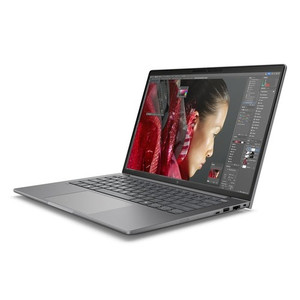
HP Inc BX7T7UT#ABA Mobile Workstation PC
Overview
The HP ZBook 8 G1i is a 14-inch mobile workstation built for professionals who need sustained compute performance in a portable form factor. BX7T7UT#ABA ships configured with an Intel Core Ultra 7 265H processor, 32GB of RAM, and a 1TB SSD — a spec set that handles CAD rendering, data-heavy security management platforms, and multi-application enterprise workflows without throttling under load. At 6.30 lb and measuring 18.70 × 11.00 inches, it travels easily between job sites while carrying legitimate workstation credentials.
Key Features
- Intel Core Ultra 7 265H (up to 5.30 GHz, 16 cores): The 15th-generation hybrid architecture sustains heavy multi-threaded workloads — VMS client sessions, simulation software, or large spreadsheet processing — without the thermal throttling that plagues thinner consumer laptops under sustained load.
- 14" WUXGA (1920×1200) Touchscreen, 300-nit, Anti-Glare: The 16:10 aspect ratio gives you noticeably more vertical screen real estate than standard 16:9 displays — useful when reviewing long configuration logs, reading technical documentation, or running a VMS layout with status panels. Anti-glare coating keeps the panel readable in mixed-light field environments. Touch input supports stylus and finger-based workflows where a mouse is impractical.
- 32GB RAM / 1TB SSD (SmartBuy configuration): 32GB handles concurrent VMS client, browser, and office application stacks without paging. The 1TB SSD provides headroom for local video evidence export, large project files, and OS overhead — no need to immediately offload to network storage.
- Discrete GPU (DSC): The discrete graphics component handles rendering acceleration for 3D CAD, video processing, and multi-monitor output — tasks that saturate integrated graphics and introduce lag in presentation or review sessions.
- Integrated Webcam (WEBC): Built-in webcam supports video conferencing without a peripheral — relevant for remote project reviews, client briefings, and hybrid-team coordination directly from the workstation.
- SmartBuy Configuration: HP SmartBuy units are pre-configured and channel-ready, reducing procurement lead time. The fixed BOM simplifies IT imaging and asset tracking compared to custom-order variants with variable component combinations.
Integration & Compatibility
The ZBook 8 G1i runs Windows and is compatible with standard enterprise deployment tools — SCCM, Intune, and similar MDM platforms. The Intel Core Ultra 7 265H architecture supports Intel vPro capabilities for remote manageability in enterprise IT environments. As a commercial-grade HP workstation, BX7T7UT#ABA integrates with HP Manageability Integration Kit (MIK) for SCCM and supports HP Sure Start, HP Sure Run, and HP Sure Recover firmware and runtime security features where applicable under the HP Wolf Security suite.
Frequently Asked Questions
Q: What processor does the BX7T7UT#ABA include?
A: The BX7T7UT#ABA ships with an Intel Core Ultra 7 265H — a 15th-generation hybrid processor with 16 cores, a base clock of 1.70 GHz, and a boost of up to 5.30 GHz, suited for sustained workstation-class workloads.
Q: What is the display resolution and panel type?
A: The display is a 14-inch WUXGA (1920×1200) LED panel with UWVA technology, 300-nit brightness, anti-glare coating, 60Hz refresh, and touchscreen capability — formatted at a 16:10 aspect ratio.
Q: How much RAM and storage does this configuration include?
A: The SmartBuy configuration includes 32GB of RAM and a 1TB SSD.
Q: What does the ZBook 8 G1i weigh, and what are its dimensions?
A: The BX7T7UT#ABA weighs 6.30 lb and measures approximately 18.70 × 11.00 × 3.00 inches.
Q: Is this a business-configured (SmartBuy) unit?
A: Yes. BX7T7UT#ABA carries the HP SmartBuy designation, indicating it is a pre-configured, channel-ready unit designed for B2B procurement and volume IT deployment workflows.
When I spec a field workstation for security integrators or enterprise IT teams, the BX7T7UT#ABA stands out for the processor-to-portability balance: the Core Ultra 7 265H delivers a 5.30 GHz boost ceiling in a 6.30 lb chassis — that is a real workstation CPU, not a rebadged ultrabook part, and it handles concurrent VMS client sessions and remote management tools without the fan ramp that signals thermal limits on thinner machines.
Technical Highlights:
- Core Ultra 7 265H (16 cores, 5.30 GHz boost): The hybrid core architecture dispatches background tasks to efficiency cores while routing VMS rendering and active user sessions to performance cores — translating directly to lower latency in multi-application field use.
- WUXGA 1920×1200 Touchscreen, 300-nit Anti-Glare: The 16:10 panel format adds roughly 11% more vertical pixels versus 1920×1080 — not trivial when you are reviewing system topology diagrams or scrolling configuration exports on-site. 300 nits is adequate in controlled indoor environments; factor ambient light carefully for outdoor triage use.
- 32GB RAM + 1TB SSD SmartBuy BOM: The fixed SmartBuy configuration eliminates BOM variability in volume procurement — IT imaging teams work from a single known hardware profile rather than managing multiple SKU variants with differing RAM or storage combinations.
Deployment Considerations:
- The SmartBuy SKU simplifies SCCM/Intune image management for enterprise IT: one hardware profile, one image, predictable driver stack — this matters when deploying across a distributed installer team.
- At 6.30 lb, this is not an ultralight travel machine. If the primary use case is all-day carry between client sites rather than desk-to-conference-room, evaluate whether the workstation GPU and full CPU TDP are worth the weight versus a lighter commercial notebook.
Best fit for security operations centers, field integration teams, and enterprise IT procurement requiring a fixed-BOM commercial workstation with discrete graphics and a high-resolution touch display — scenarios where the BX7T7UT#ABA's SmartBuy configuration reduces deployment overhead while the Core Ultra 7 265H handles the compute ceiling those environments demand.