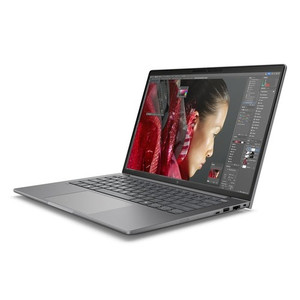
HP Inc D06J4AT#ABA 14-Inch Mobile Workstation PC
Overview
The HP ZBook 8 G1i is a 14-inch mobile workstation built around Intel's Core Ultra 7 255H processor — a 16-core, 16-thread chip that steps into serious compute territory while staying within a 6.10 lb chassis deployable across field, office, and site environments. The D06J4AT#ABA configuration ships with 32GB of RAM and a 1TB drive, giving you a ready-to-deploy system without the memory or storage compromises that slow down real workloads. The 1920×1200 WUXGA touchscreen panel at 300 nits delivers a slightly taller aspect ratio than standard 16:9 — more vertical real estate per page, which matters when working through long documents, schematics, or multi-row data tables on a 14-inch screen. If you're evaluating HP Inc mobile workstations for your organization, this configuration sits at a meaningful step up from mainstream business laptops without reaching into the bulkier, heavier 15- or 16-inch workstation tier.
Key Features
- Intel Core Ultra 7 255H — 16 Cores, 0.70–5.10 GHz: The 255H is a 15th-generation Intel chip with a wide operating range, throttling down to 0.70 GHz under light load to conserve battery and ramping to 5.10 GHz under burst demand. Sixteen cores handle parallel workloads — simulation, rendering, multi-stream processing — without the thermal and weight penalty of a desktop replacement. For teams running compute-heavy tasks in the field, this is a meaningful spec, not a marketing number.
- 32GB RAM: At 32GB, you can keep a full browser session, a VMS client, a CAD or modeling environment, and your communication tools open simultaneously without paging to disk. This is the floor for demanding professional workloads; it's also what separates a workstation configuration from a standard business laptop.
- 1TB Storage: 1TB gives you room for a large local project library, offline datasets, or locally cached video — relevant if you're deploying this system in environments where cloud connectivity is intermittent. For integrators managing field deployments, local storage capacity directly affects how much you can carry into a job site without a network dependency.
- 14-Inch WUXGA (1920×1200) Touchscreen, 300 Nits: The 16:10 aspect ratio means this panel is taller than a standard 1080p screen — you gain roughly 11% more vertical pixels, which reduces scrolling when working in spreadsheets, code editors, or document review. At 300 nits, it's workable indoors and in shade; it's not a high-brightness outdoor panel. The anti-glare coating handles office and conference room environments well. Touch input adds flexibility for annotation workflows or touch-native applications without requiring a separate stylus peripheral purchase.
- Anti-Glare LED IPS-class Panel (UWVA): Ultra Wide Viewing Angle (UWVA) technology maintains consistent color and contrast when the screen is viewed off-center — relevant when presenting to a colleague beside you, or when mounting the display at an angle on a workstation arm. This is a step above standard TN panels common in entry-level laptops.
- Discrete Graphics (DSC): The D06J4AT#ABA includes a discrete GPU alongside the processor's integrated graphics. This matters when running GPU-accelerated workloads — video analytics, 3D rendering, ML inference at the edge, or driving multiple external displays without taxing the CPU. The specific GPU model is not confirmed in available documentation; verify with HP's product configurator if the GPU tier is a hard requirement for your workload.
- Integrated Webcam: The built-in webcam supports video conferencing without an external peripheral — practical for mobile deployments where desk setups vary. Paired with the touchscreen, it supports modern collaboration platforms out of the box.
- 6.10 lb, 14-Inch Form Factor: At 6.10 lb, this is on the heavier side for a 14-inch system — a reflection of the workstation-class components inside. Plan for this if daily carry is a primary concern; if the machine mostly moves between a desk, vehicle, and site, the weight is a reasonable tradeoff for the compute headroom.
Integration and Compatibility
The ZBook 8 G1i is designed to integrate with HP's broader commercial ecosystem, including HP docking stations for extended display and peripheral management in office environments. The discrete GPU output supports external display configurations for users who need a multi-monitor setup when docked. As part of the mobile workstation category, it's compatible with standard enterprise imaging workflows, domain provisioning, and MDM platforms. The 32GB RAM and 1TB storage baseline make it a viable host for locally deployed software — including on-premise VMS clients, security management platforms, and field diagnostic tools used in physical security integration work. For organizations procuring alongside external monitors or docking solutions, this configuration is worth pairing with a USB-C or Thunderbolt dock to extend connectivity on-desk. Note that exact port configurations (Thunderbolt version, USB-A count, SD card) are not confirmed in current evidence — verify the full I/O spec against HP's official product page before finalizing procurement if specific connectivity is a hard dependency.
Frequently Asked Questions
Q: What processor does the D06J4AT#ABA use, and how many cores does it have?
A: The D06J4AT#ABA is equipped with the Intel Core Ultra 7 255H, a 15th-generation processor with 16 cores and 16 threads. It runs from 0.70 GHz base up to 5.10 GHz boost, giving it strong single-threaded burst performance alongside multi-core headroom for parallel workloads.
Q: Does the HP ZBook 8 G1i D06J4AT#ABA have a touchscreen?
A: Yes. The D06J4AT#ABA includes a 14-inch WUXGA (1920×1200) touchscreen panel with an anti-glare coating and 300-nit brightness. The 16:10 aspect ratio provides more vertical screen space compared to standard 1080p panels.
Q: How much RAM and storage does this configuration include?
A: This configuration ships with 32GB of RAM and 1TB of storage — a meaningful baseline for professional workloads requiring simultaneous multitasking, large file handling, or locally cached data.
Q: Does the D06J4AT#ABA include discrete graphics?
A: Yes, the D06J4AT#ABA includes a discrete GPU (listed as DSC in the distribution specification). The exact GPU model is not confirmed in available documentation. If the specific GPU tier is critical to your workload (for GPU-accelerated applications or external display configurations), verify against HP's official product specification sheet.
Q: How much does the HP ZBook 8 G1i weigh?
A: The D06J4AT#ABA weighs 6.10 lb. This is workstation-class weight for a 14-inch chassis — heavier than an ultrabook, consistent with the discrete GPU and higher-TDP processor inside.
Q: Is this system intended for commercial or enterprise procurement?
A: Yes. The ZBook 8 G1i is HP's commercial mobile workstation line, positioned for professional and enterprise buyers. The SmartBuy designation indicates a commercial-channel configuration optimized for volume procurement with defined specs.
The D06J4AT#ABA lands in a specific sweet spot: a 14-inch mobile workstation that brings a 16-core Core Ultra 7 255H processor and discrete GPU into a chassis under 14 inches diagonal — without the bulk of a 15-inch workstation replacement. For integrators or IT teams who need genuine compute in the field rather than a thinned-down business laptop, this configuration's 32GB RAM and 1TB storage mean the machine doesn't become a bottleneck on-site.
Technical Highlights:
- Core Ultra 7 255H (0.70–5.10 GHz, 16 cores): The burst headroom to 5.10 GHz handles single-threaded tasks that still define many professional applications, while 16 cores absorb parallel workloads — simulation, multi-stream processing, or running a VMS client alongside other tools — without saturating the chip.
- 1920×1200 WUXGA at 300 nits with touch: The 16:10 panel adds roughly 11% more vertical pixels vs. a 1920×1080 display — meaningful when reviewing schematics, network diagrams, or spreadsheet-heavy work on a 14-inch screen. At 300 nits with anti-glare, it's calibrated for controlled indoor environments, not direct sunlight.
- 32GB RAM / 1TB storage baseline: This isn't a stripped configuration. 32GB supports demanding simultaneous workloads without memory pressure, and 1TB provides room for locally cached datasets, project files, or offline video — important when site connectivity is not guaranteed.
Deployment Considerations:
- The 6.10 lb weight is honest for what's inside — plan for it if the device needs to travel daily. If weight is a primary constraint, evaluate whether a lighter configuration in the same ZBook family meets your compute requirements before committing.
- The discrete GPU is confirmed in the distribution specification but the exact model is not documented in available evidence. If GPU-accelerated workloads (AI inference, GPU-compute, multi-display driving) are a hard requirement, obtain the full HP product datasheet to verify the GPU tier before procurement.
This configuration is well-matched to security integrators or field engineers who need a machine capable of running on-premise VMS software, configuration tools, and site documentation workflows simultaneously — and who operate in environments where a docked office setup complements a mobile field presence.