HP Inc BN5K2UT#ABA Z2 Tower G1i AI-Ready Professional Workstation
Overview
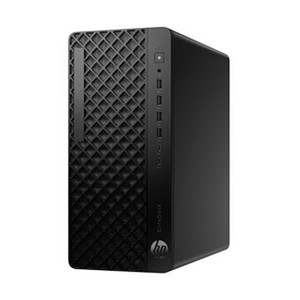
The HP SmartBuy Z2 Tower G1i — model BN5K2UT#ABA — is a 15th-generation tower workstation built around Intel's Core Ultra 9 285 processor and paired with an NVIDIA Quadro RTX 2000 Ada GPU. It targets engineering, physical security, video management, and AI-assisted workflows where you need professional-grade compute without moving to a rack-mount platform. At 29 lb and 12 × 23.23 × 19.30 in, this unit fits under a desk or in a workstation niche — it ships as an HP SmartBuy configuration, meaning the hardware combination is pre-validated by HP rather than user-configured, which simplifies procurement and support escalation.
The combination of Intel AI Boost (up to 13 TOPS from the integrated NPU), a 24-core CPU, and a Quadro-class discrete GPU makes this a legitimate candidate for simultaneous VMS recording, real-time video analytics, and edge AI inference — tasks that would bottleneck most commercial desktops.
Key Features
- Intel Core Ultra 9 285, 24 Cores (15th Gen): Base clock 1.90 GHz, boost to 5.60 GHz across 24 cores. The high core count matters for VMS workloads running parallel decode streams — more cores mean you can sustain higher channel counts without frame-drop under simultaneous search and live-view load. The 15th-generation architecture also introduces native AI acceleration tiles at the silicon level.
- Intel AI Boost — up to 13 TOPS: The integrated Neural Processing Unit delivers up to 13 Tera-Operations per Second of dedicated AI inference throughput. This offloads AI-inferencing tasks (object classification, anomaly detection pre-processing) from the CPU cores and GPU compute units, preserving those resources for rendering and stream decode. If you are running VMS analytics that expose an NPU acceleration path, this reduces per-stream CPU overhead measurably.
- NVIDIA Quadro RTX 2000 Ada (discrete GPU): The Quadro line is validated against professional CAD, BIM, and VMS vendor driver stacks — a meaningful distinction from consumer GeForce cards in enterprise environments where ISV certification matters. The RTX 2000 Ada delivers hardware ray tracing, DLSS, and CUDA cores for GPU-accelerated video decode and AI inference pipelines supported by NVIDIA drivers.
- 32GB RAM: 32GB provides headroom for running a VMS server process, a browser-based management interface, and local AI model inference concurrently without hitting swap. For most mid-scale VMS deployments (32–64 cameras with analytics enabled), 32GB is the practical minimum for sustained stability; it avoids the performance cliffs you see when analytics pipelines start competing for memory with the recording engine.
- 1TB M.2 PCIe NVMe 2280 TLC 4×4 SSD: PCIe Gen 4×4 delivers sequential read throughput well above what SATA SSDs can reach, which matters during simultaneous multi-stream write (recording) and random-access read (playback/export). The M.2 2280 form factor keeps the drive internal and leaves the chassis expansion bays available for additional storage — relevant if you plan to add spinning-disk NAS-style recording drives inside the tower.
- Tower Form Factor (12 × 23.23 × 19.30 in, 29 lb): The Z2 Tower chassis provides PCIe expansion slots, accessible drive bays, and full-length GPU support — all things a small-form-factor workstation sacrifices. If your deployment requires adding a capture card, an additional NIC, or a second GPU later, the tower form factor preserves that upgrade path. The 29 lb weight is standard for this class and not a concern for fixed desktop installs.
- HP SmartBuy Configuration: SmartBuy designates a pre-built, pre-validated bill of materials. This simplifies asset procurement for IT departments using standard-image deployment: the hardware is fixed, driver sets are known, and HP's support stack treats it as a defined SKU rather than a custom build — which reduces turnaround time on warranty and repair cases.
Integration and Compatibility
The BN5K2UT#ABA runs on Intel's 15th-generation Core Ultra architecture with Intel integrated graphics plus discrete NVIDIA Quadro RTX — a combination broadly supported by enterprise VMS platforms that publish NVIDIA CUDA acceleration paths. The Quadro-class GPU is relevant if your VMS vendor (Milestone, Genetec, Verkada On-Prem, or similar) publishes an ISV-validated driver list — Quadro cards appear on these lists where consumer GPUs do not, which can affect support ticket eligibility. The PCIe expansion slots in the Z2 Tower support additional capture cards or NICs as deployment needs grow. The 1TB NVMe SSD is the OS and application drive; secondary storage for extended retention is best handled via external NAS, a SAN connection, or additional internal drives — plan your storage architecture separately from this unit's boot drive capacity.
Connectivity to your network infrastructure should account for the physical footprint: at 19.30 in tall, ensure rack-adjacent or under-desk clearance. For PoE network switch planning in the same deployment, confirm that this workstation's NIC requirements (standard GbE or 2.5GbE) are addressed at the switch port level.
If you are deploying this unit as a VMS server in a physical security environment, pair it with a purpose-spec'd network video recorder or use the unit's expansion capacity to add a RAID controller — the tower chassis supports this in a way the SFF variants do not. Browse the broader HP Inc workstation and compute line for rack and SFF variants that serve different density requirements. For guidance on sizing compute for multi-camera VMS environments, the camera selection and VMS sizing guide covers CPU, RAM, and storage dimensioning by channel count.
Frequently Asked Questions
Q: What processor does the BN5K2UT#ABA use, and how many cores does it have?
A: The BN5K2UT#ABA uses an Intel Core Ultra 9 285, a 15th-generation processor with 24 cores running from a 1.90 GHz base clock up to 5.60 GHz boost. It also includes Intel's integrated Neural Processing Unit (NPU) with AI Boost delivering up to 13 TOPS for dedicated AI inference workloads.
Q: What GPU is included in the BN5K2UT#ABA?
A: The unit ships with an NVIDIA Quadro RTX 2000 Ada discrete GPU. The Quadro line is validated by professional software vendors (ISVs) for engineering and VMS workloads, which is relevant if your software stack publishes an NVIDIA ISV certification list for driver support.
Q: Is 32GB of RAM sufficient for a multi-camera VMS server deployment?
A: For mid-scale VMS environments — typically 32 to 64 cameras with analytics enabled — 32GB is the practical working minimum for stable concurrent recording and live-view. Larger deployments or those running multiple simultaneous AI analytics pipelines may benefit from additional RAM if the platform and chassis support expansion.
Q: What does the 1TB NVMe SSD cover, and can I add more storage?
A: The 1TB M.2 PCIe NVMe 2280 SSD is the system and application drive. It provides high-speed OS and software access. The Z2 Tower chassis includes additional drive bays and PCIe slots, so you can add internal drives or a RAID controller for extended video retention storage — the SSD is not the ceiling on total storage capacity.
Q: What does Intel AI Boost (up to 13 TOPS) mean in practice for security or analytics deployments?
A: Intel AI Boost refers to the dedicated NPU (Neural Processing Unit) built into the Core Ultra 9 285 silicon, capable of up to 13 TOPS of AI inference throughput. When VMS or analytics software is written to use the NPU acceleration path, this offloads inference tasks from the CPU and GPU — preserving those resources for stream decode and rendering, which can reduce per-stream CPU load in AI-assisted surveillance environments.
Q: What are the physical dimensions and weight of the BN5K2UT#ABA?
A: The Z2 Tower G1i measures 12.00 × 23.23 × 19.30 inches (L × W × H) and weighs 29 lb. Plan for adequate under-desk or workstation niche clearance, particularly vertical clearance given the 19.30-inch height.
The BN5K2UT#ABA is the workstation I'd recommend when a deployment needs a single box to handle VMS server duties, real-time analytics, and occasional engineering review tasks — and where the IT team needs a fixed, supportable SKU rather than a field-configured build. The 24-core Core Ultra 9 285 boosting to 5.60 GHz, combined with Intel AI Boost at up to 13 TOPS and a Quadro RTX 2000 Ada GPU, covers the three distinct compute demands (stream decode, AI inference, GPU-accelerated rendering) without forcing tradeoffs between them.
Technical Highlights:
- 24-Core Core Ultra 9 285 (to 5.60 GHz): Sustained multi-stream VMS decode across 32–64+ channels stays manageable at these core counts; you are unlikely to hit CPU saturation on recording alone, which leaves headroom for concurrent analytics without throttling.
- Intel AI Boost — 13 TOPS NPU: When the VMS or analytics stack exposes the NPU path (increasingly common in newer Milestone, Genetec, and OEM analytics plug-ins), offloading inference here measurably reduces per-stream CPU overhead — meaning your channel capacity doesn't shrink as you add AI rules.
- 1TB PCIe Gen 4×4 NVMe SSD: The 4×4 lane configuration delivers sequential throughput well above PCIe Gen 3 or SATA alternatives — important for workloads writing multiple simultaneous high-bitrate streams while also serving random-access playback requests without I/O queuing.
Deployment Considerations:
- The 1TB NVMe is the OS/app drive only — plan your retention storage separately. The Z2 Tower chassis accepts additional internal drives and a PCIe RAID controller, which is the right path for onboard retention rather than relying on this SSD for video storage.
- At 19.30 inches tall and 29 lb, this unit is sized for a floor or large desktop niche — verify physical clearance before ordering, particularly in server rooms where space is allocated in rack units rather than tower footprints.
This configuration fits best as a dedicated VMS server and analytics host in a mid-scale physical security deployment — 32 to 64 cameras with AI analytics enabled — where the team needs a commercially supportable, pre-validated HP SmartBuy SKU rather than an assembled workstation with ambiguous support pathways.