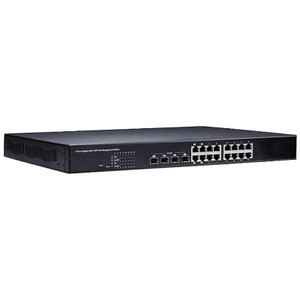
Product images are provided for reference and may not represent the exact model, configuration, or included components.

Overview

SKU: 140-POE1611-G00
UPC: 4712896446485
Condition: New
Availability: Special Order · Usually Ships in 2-3 Weeks
Write a Review 32% OFF

Geovision GV-POE1611 V2 16 Gigabit Port - 140-POE1611-G00

Geovision 140-POE1611-G00 16-Port PoE+ Managed Switch Overview The Geovision 140-POE1611-G00 is a 16-port managed gigabit switch with 250W PoE+ (802.3…

$611.00 $416.99 SAVE $194
Special Order
Ships in 2-3 Weeks

Quantity:

Adding to cart… The item has been added
Compatibility guidance available for your deployment
Senior specialists for pre and post-sales support
Authorized sourcing and documentation support
Shipping and lead-time confirmation before install

Laura Bennett, IPSD Senior Specialist

Talk to Laura

200+ hrs training • U.S - based

Senior Specialist • 877-277-7147

Geovision GV-POE1611 V2 16 Gigabit Port - 140-POE1611-G00

$611.00
$416.99

Overview

SKU: 140-POE1611-G00
UPC: 4712896446485
Condition: New
Availability: Special Order · Usually Ships in 2-3 Weeks

No Bots, Just Experts

Questions about this product? Free pre-sales support from a senior specialist — product questions, compatibility checks, BOM quotes, price confirmation — typically answered within one business day. Need camera placement or system design work? Engineering time is $175 per hour (qty 1 = 1 hour). Hardware buyers get up to one hour ($175) credited back on their order.

Description

Geovision 140-POE1611-G00 16-Port PoE+ Managed Switch

Overview

The Geovision 140-POE1611-G00 is a 16-port managed gigabit switch with 250W PoE+ (802.3at) power delivery across all ports. Built for medium-scale surveillance deployments, it centralizes power and data to IP cameras and PTZ domes without separate power injectors at each unit. Each port can deliver up to 30W under 802.3at standard, enough for most fixed domes and compact PTZ heads; the 250W total budget means you can run a mix of power-hungry and low-draw devices simultaneously without exceeding capacity.

Compatibility

The 140-POE1611-G00 works with any ONVIF-compliant IP camera or PTZ that accepts PoE+ input—including Geovision's own GV-camera series, Axis, Hikvision, Uniview, and other standard IP surveillance devices. Gigabit ports support both legacy 100Mbps cameras and newer 1Gbps models without loss. Two additional gigabit uplink ports allow daisy-chaining to a core switch or NVR for larger systems. Verify your device's actual power draw against the 802.3at 30W per-port limit; devices rated for PoE++ (95W+) will require external power supplies.

Installation Notes

Mount in a standard 19-inch equipment rack or on a wall using provided brackets. Connect uplink ports to your network backbone (NVR, core switch, or internet gateway) and run CAT5e or CAT6 to each camera. The switch auto-negotiates link speed and applies per-port power delivery—no manual configuration needed for basic operation. Managed features (VLAN, QoS, port mirroring) are available through a web interface for advanced setups. Operating temperature range is 0–50°C; avoid humidity extremes and ensure 12V DC power input (included power supply).

What's in the Box

  • 1x GV-POE1611 V2 16-port managed switch
  • 1x 12V DC power supply
  • Mounting bracket and hardware
Specifications
Poe Power: PoE+ (802.3at)
Cable Category: IPPTZCam
Brand: Geovision
MPN: 140-POE1611-G00
poe_power: PoE+ (802.3at)
Cable_Category: IPPTZCam
Type: GV-POE1611 V2 16 Gigabit Port
ONVIF: Yes
Operating_Temp: 0°C to 50°C
VMS_Compatibility: ONVIF-compliant IP cameras and PTZ systems
PoE_Wattage: 250W total budget
Q&A
Reviews
Have Questions?

RELATED PRODUCTS

System Design, Deployment & Technical Support

Support services and planning resources for commercial surveillance, access control, and infrastructure deployments.

Fixed scope • Fixed price

System Design Assistance

  • Get help validating product compatibility
  • Coverage requirements
  • Storage planning and deployment architecture before you buy.
Request Design Help

Deployment & Configuration Support

  • Access fixed-scope support for rollout planning
  • User setup guidance
  • Migration and system standardization across single-site or multi-site deployments
View Support Services

Guides, Tools & Calculators

  • PoE requirements
  • Storage retention
  • Camera selection and deployment methodology
Open Technical Resources