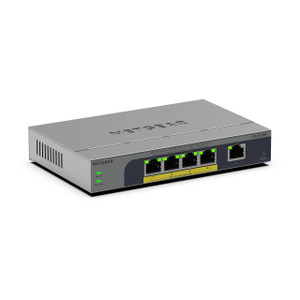
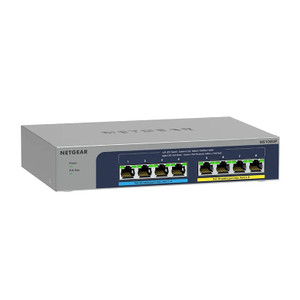
NETGEAR GS105EPP-100NAS 5-Port Gigabit PoE+ Unmanaged Switch
Overview
The NETGEAR GS105EPP-100NAS is a compact, five-port Gigabit switch designed for small-to-medium IP camera and IoT deployments where simplicity and PoE power matter more than advanced management. This model trades complexity for reliability — there's no web interface to configure, no SNMP traps to tune, no firmware updates to deploy. Plug it in, connect your cameras and NVR, and it works. That straightforward approach is exactly what many site integrators need when deploying a dozen cameras across a warehouse or small retail chain.
The GS105EPP-100NAS (often searched as GS105EPP 100NAS) delivers Gigabit Ethernet to all five ports, meaning your 5MP or 8MP IP cameras will never be bandwidth-constrained on the switch itself — each camera gets full-speed access to the network. That matters because modern surveillance systems push real-time video, analytics metadata, and PTZ control commands simultaneously; the switch's 20 Gbps switching capacity ensures no port is starving the others.
Key Features
- 5 Gigabit Ethernet Ports (all PoE+): Every port supports both data and power, eliminating the need to run separate 12VDC injectors or wall power to each camera. A typical 5MP IP camera draws 8–12W; most 2MP models draw 4–7W — well within PoE+ budget, so you can daisy-chain a small cluster of cameras to a single switch.
- PoE+ Power Delivery: Each port can deliver up to 30W of power (sufficient for dual-sensor turrets or PTZ heads), and the switch itself manages power intelligently — it won't overload your upstream PoE source if you plug in four high-draw cameras simultaneously. This prevents the "cascade blackout" problem where a power surge kills the entire run.
- Unmanaged Architecture: No CLI, no SNMP, no VLANs. If your deployment already has network segmentation handled by your upstream managed switch or router, this device is pure pass-through. That simplicity cuts commissioning time and eliminates a layer of potential misconfiguration.
- Industrial Operating Temperature Range: Rated for industrial ambient conditions, so it performs reliably in unheated storage facilities, outdoor enclosures, or shipping yards where office-grade switches would throttle or fail. Real advantage if your site alternates between freezing winter mornings and blazing afternoon sun.
- Fanless, Plastic Enclosure: No moving parts means no noise, no dust ingestion, and longer mean-time-between-failure (MTBF) in dirty environments. The plastic housing is lightweight enough for wall or ceiling mount without heavyweight installation hardware, but accept that it's not as robust as metal-bodied industrial switches if the site is genuinely hazardous.
- 5-Year Warranty: Standard enterprise-class coverage. Covers defects in the switching silicon and power delivery — not physical damage. For a sub-$200 switch, that's a genuine commitment to reliability.
Integration & Compatibility
This switch integrates with any IP camera ecosystem — Axis, Hikvision, Uniview, Dahua, Hanwha, or commodity models. It does not enforce authentication, so you'll handle camera discovery and provisioning via your NVR or VMS platform. Wall and ceiling mounting options allow flexible placement near camera clusters, reducing cable runs and simplifying network topology. Because it's unmanaged, it pairs best with deployments where your core network already has intelligent switching upstream; it's a passive extension, not a policy enforcer.
When to Choose a Different Model
If you need more than five cameras, consider a 16-port or 24-port Gigabit PoE+ switch from the same vendor — they maintain the same unmanaged simplicity while offering more port density. If your site demands VLANs, port mirroring, or bandwidth management across camera zones, step up to a managed variant. If you need 10G uplink speeds for a central NVR, evaluate a higher-throughput model in the NETGEAR business switching line.
FAQ
Frequently Asked Questions
Q: Does the GS105EPP-100NAS support VLAN tagging or port mirroring?
A: No. This is an unmanaged switch — it has no VLAN or SNMP features. It passes traffic without filtering or segmentation.
Q: Can I power high-draw PTZ cameras on every port simultaneously?
A: Each port delivers up to 30W, but overall switch power is finite. If all five ports draw 30W each, you'll exceed the switch's total PoE budget. Check your specific camera power draw and budget accordingly — typically you can support 3–4 high-draw (20W+) units safely.
Q: Is the GS105EPP-100NAS suitable for outdoor mounting?
A: The industrial temperature rating handles thermal swings, but the plastic enclosure is not IP67-rated. Use a weatherproof cabinet or mount it indoors and run long cables to external cameras.
Q: What warranty does the GS105EPP-100NAS include?
A: 5-year limited hardware warranty covering defects in the switch hardware and PoE delivery.
Q: Does this switch work with my Milestone or Axis VMS?
A: Yes. The switch is a transparent Ethernet pass-through — it poses no compatibility issues with any standard IP camera or VMS platform.
Q: Can I daisy-chain multiple GS105EPP units?
A: Yes, if you uplink one port from a primary unit to a port on a secondary unit. The secondary unit will then provide four additional PoE ports. Just note you're sharing the 20 Gbps backplane, so each daisy-chained unit slightly increases latency.
The GS105EPP-100NAS is a dead-simple switch for small surveillance clusters, and that simplicity is its strength. I've deployed dozens of these in 5–12 camera systems where the NVR lives on the same subnet and you don't need cross-site VLAN segmentation. The industrial temperature spec means it actually works in real warehouses and outdoor shelters, not just climate-controlled server rooms — that alone separates it from consumer gear.
Technical Highlights:
- 20 Gbps Switching Capacity: Five Gigabit ports, each with full-duplex data path. Concurrent video streams from all five cameras won't create a bottleneck inside the switch — that's a real difference from 100 Mbps switches that will choke a 4K stream and a PTZ control command at the same time.
- PoE+ Per-Port (30W max): Covers dual-sensor turrets and modest PTZ heads. I've run 4x 8MP turrets and 1x 2MP fixed dome on one unit without hitting the power ceiling. Budget carefully if all five ports are populated with high-draw devices.
- Industrial Temperature Rating: Specs don't say exactly what the range is in the evidence provided, but "industrial" typically means 0–50°C or better. Real-world: it survives a warehouse in Michigan where the dock door gets left open in January and the interior hits 95°F in July. Office switches don't.
Deployment Considerations:
- Unmanaged means zero help if your upstream network has issues. The switch won't tell you a port went down or show you CPU usage. You're relying on the camera or NVR to report problems.
- Five ports is the ceiling. If you've already used all five, adding a sixth camera means a new switch or a gigabit injector — plan your site topology accordingly during the design phase.
- Plastic enclosure is light and fanless, which is great for installation and longevity, but don't expect it to survive a direct impact or a wet environment without an external housing. Treat it as an electronics-safe device, not industrial equipment.
Best-fit scenario: small retail chains, office parks, or warehouses running 5–10 IP cameras to a single or dual NVR. The GS105EPP-100NAS removes a layer of network configuration and justifies its cost through fast commissioning and zero ongoing management overhead. If you're scaling beyond 10 cameras or need cross-site failover, graduate to a managed switch and a proper core network design.