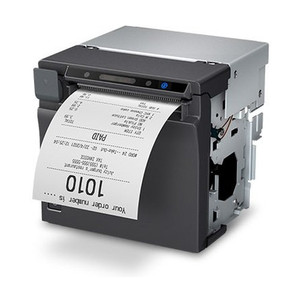
Epson C32C881017 Wall Mounting Bracket for M30 Series Printers
Overview
The Epson C32C881017 is a dedicated wall-mounting bracket engineered for the Epson M30 series of receipt and label printers. This accessory enables wall-mounted deployment in environments where floor or desk space is constrained, or where overhead positioning improves workflow efficiency. The bracket is designed to integrate securely with M30 printer models, allowing quick installation without permanent modification to the printer housing.
Key Features & Compatibility
- M30 Series Compatibility: Specifically engineered for Epson M30 receipt and label printers. Verify your exact printer model before purchase — the C32C881017 bracket is not universal across all Epson printer lines. Installing on an incompatible model will result in misalignment and potential printer instability.
- Wall-Mount Installation: Allows vertical wall installation, freeing up counter and floor space in retail, ticketing, and warehouse environments where real estate is premium. Typical mounting surfaces are drywall, wood studs, or concrete with appropriate anchoring hardware.
- Flexible Positioning: Once installed, the bracket permits angle adjustment or repositioning relative to the wall, enabling alignment with point-of-sale terminals, label dispensers, and workflow stations without major reinstallation effort.
- Straightforward Hardware Setup: Installation requires standard mounting hardware (screws and anchors appropriate to your wall type) and a drill or impact driver. No special tools, proprietary fasteners, or technician-level configuration is needed — a single technician can typically complete installation in under 30 minutes.
- Supports POS, Ticketing, & Warehouse Labeling: Common deployment contexts include ticketing counters, point-of-sale terminals where label and receipt printing must be immediately accessible without occupying work surface area, and warehouse label-printing stations where wall-mounted proximity improves scanning and label application efficiency.
Deployment Considerations
Before installation, confirm that your printer model is a genuine M30 series unit — the C32C881017 is not backward-compatible with older Epson receipt printer lines or forward-compatible with newer models. Check the printer's model number on the rear or bottom housing; it should clearly state "M30" or "M-30" (e.g., TM-M30II, TM-M30, TM-M30II-NT).
Ensure the mounting wall can safely support the combined weight of the bracket and loaded printer. If the target surface is drywall, use wall studs or heavy-duty wall anchors rated for the printer's weight. If mounting to concrete or tile, use concrete anchors and a masonry bit.
After installation, allow 24 hours for any adhesive-based anchors to cure before resuming full print operations. Test the bracket stability by gently pushing on the mounted printer from multiple angles — it should not shift, flex, or wobble under normal handling.
The C32C881017 bracket does not include weather protection or IP rating; it is suitable for indoor environments only. Do not mount in humid, wet, or outdoor spaces, as printer electronics will be exposed to moisture.
Frequently Asked Questions
Q: Will the C32C881017 bracket work with my Epson TM-M30II printer?
A: Yes, the C32C881017 is compatible with TM-M30II and other M30 series models. Confirm your exact model number before ordering to ensure compatibility.
Q: What wall surfaces does the C32C881017 support?
A: The bracket is designed for standard drywall, wood, and concrete surfaces. You will need appropriate anchors (drywall anchors for drywall, lag bolts for studs, concrete anchors for masonry). The bracket itself does not include wall anchors — you supply hardware matching your wall type.
Q: Can I adjust the angle of the printer after mounting the C32C881017?
A: Minor angle adjustments are typically possible by loosening mounting fasteners slightly and repositioning the bracket. Major angle changes may require remounting. Consult the bracket documentation or contact the printer vendor for specific adjustment guidance.
Q: Does the C32C881017 bracket include installation hardware?
A: The bracket itself is included; wall-mounting hardware (screws, anchors, fasteners) is not. Select fasteners appropriate to your wall type and the printer's weight.
Q: Is the C32C881017 suitable for outdoor or wet environments?
A: No. The bracket provides no weather or moisture protection. Use only in dry, indoor environments. Epson receipt and label printers are not rated for outdoor operation.
Q: How long does installation of the C32C881017 take?
A: A single technician typically completes wall mounting in 20–40 minutes, depending on wall type and complexity. Plan additional time for stud-finding or drilling in masonry.
Ted PerryPerspective based on aggregated IP Security Depot and affiliated engineering team experience.
The C32C881017 bracket solves a real logistics problem in retail and warehouse POS environments: M30 series printers need to be close to transaction points and label stations, but counter space is always contested. Wall mounting eliminates that trade-off, provided you have solid wall real estate and the right fastening hardware for your surface type.
Deployment Considerations:
- M30 Series Lock-In: This bracket is exclusive to M30 printers. If your estate includes mixed generations of Epson receipt printers (M20, M30, M50 variants), you'll need different brackets for each — no universal mounting across the family. Verify compatibility before bulk ordering.
- Hardware Burden: The bracket ships without wall anchors. You own the responsibility of selecting and installing fasteners appropriate to your wall material. Drywall anchors insufficient for a loaded M30 will fail and drop the printer — do not under-rate your anchors.
- No Weather Sealing: If any part of your deployment involves humidity, splashing, or thermal cycling, the C32C881017 offers zero protection. Epson M30 printers are indoor-rated; mounting brackets do not change that thermal or IP envelope.
Installation Takeaway: Best suited for fixed POS counters, ticketing stations, and warehouse back-office areas where wall space is available and environmental conditions are controlled (70°F–85°F, under 60% RH). Ideal for single-site deployments where installation is a one-time task. Not recommended for mobile or temporary setups, or for facilities with frequent wall reconfigurations.