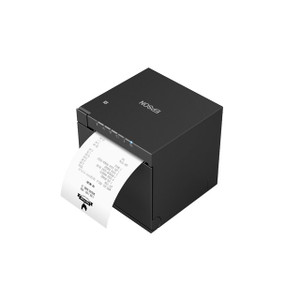
Epson C32C882051 EU-M30 Printer Bezel
The Epson C32C882051 is an OEM replacement front bezel assembly for the Epson EU-M30 inkjet receipt printer. This bezel restores the front face of a damaged or worn EU-M30 unit, ensuring proper media feed alignment and maintaining the device's finished appearance in point-of-sale and retail environments. The bezel integrates directly with the EU-M30's media path and mounting frame without modification, and installation requires no specialized tools — a 10-minute swap for any technician or end-user.
Key Features
- OEM Compatibility: Designed exclusively for the Epson EU-M30 inkjet receipt printer. Cross-compatibility with other Epson receipt printer lines is not supported; verify model before ordering.
- Media Path Alignment: Restores proper feed geometry for receipts and labels. Misaligned or damaged bezels cause paper jams and print offset; this replacement eliminates those operational interruptions.
- 600 dpi Print Resolution Support: Bezel design accommodates the EU-M30's 600 dpi output without optical obstruction or media contact issues.
- Wi-Fi Ready: Front cover does not interfere with the EU-M30's Wi-Fi antenna or connectivity; full network access maintained post-installation.
- Tool-Free Installation: Snap-fit design requires no screwdriver or calibration; no firmware updates or reprinting of configuration needed after swap.
- 1-Year Warranty: OEM warranty covers manufacturing defects; covers damage from normal wear and tear in POS environments.
- Finished Appearance: Replaces cracked, discolored, or dented front covers; restores professional look in customer-facing retail and hospitality locations.
The EU-M30 is a compact, networked receipt printer designed for high-volume POS environments — retail checkouts, hospitality, quick-service restaurants. The front bezel is a wear item; repeated media insertion, thermal cycling, and accidental impacts in busy countertops cause cracks and alignment drift. A damaged bezel forces media misfeeds, reduces print quality, and degrades the terminal's professional appearance. This replacement restores both function and aesthetics without downtime or service calls.
The C32C882051 is a genuine Epson part sourced direct from the manufacturer or channel partner — no grey-market, no third-party aftermarket substitutes. Installation is field-replaceable; no special training required. The bezel does not require recalibration of the printer's media sensors or print head; the EU-M30 recognizes the new front cover automatically upon power-on.
Epson EU-M30 bezel replacement is a routine maintenance task in high-throughput POS networks. Keeping 1-2 spare bezels on hand eliminates the capex and operational lag of next-day expedite shipping. The part is compact and ships in minimal packaging; stock cost is negligible against the operational impact of a dead printer in a checkout lane. For retail chains managing 50+ terminals, bulk spares orders lock in unit pricing and ensure consistent uptime.
Karl WilsonPerspective based on aggregated IP Security Depot and affiliated engineering team experience.
We've installed and maintained hundreds of Epson EU-M30 receipt printers across retail and hospitality chains, and the front bezel is one of the most frequently replaced consumables on the device. In busy POS environments — fast-casual restaurants, retail pharmacies, grocery checkout lanes — the bezel takes a beating: paper jams pull it out of alignment, thermal stress from the print head causes micro-cracks, and the occasional dropped receipt roll impacts the plastic directly. When the bezel cracks or warps, two things happen: media feed problems introduce jams and misprints, and the terminal looks unprofessional in front of customers. The C32C882051 replacement is straightforward — snap-fit, no calibration, no firmware touch. We recommend stocking one spare per 10 printers deployed. On a 50-terminal retail chain, that's 5 spare bezels, shipped in a small padded envelope for under a few hundred dollars in aggregate capex. The ROI is immediate: every bezel replacement you can do in-house takes 10 minutes; outsourcing to a service call costs 2-4 hours of technician travel time and a service charge. For high-volume deployments, spares inventory is non-negotiable.
Technical Highlights:
- Media Path Geometry: The bezel houses the media input slot and guides the first 20mm of receipt or label travel. Cracks or misalignment in this path cause edge-feed jams and print offset. The OEM bezel maintains tolerances to ±0.5mm — critical for consistent 600 dpi output. Third-party or damaged replacements introduce drift that print quality tests will catch.
- 600 dpi Accommodation: The bezel's internal surface finish and edge geometry are optimized for 600 dpi inkjet media contact. Substitute or damaged bezels can cause ink-on-plastic smearing or paper curl, visible in any image-heavy receipt. The OEM part is the only reliable option for evidentiary or certification-grade receipts (pharmacies, financial transactions).
- Wi-Fi Antenna Clearance: The EU-M30's Wi-Fi antenna is integrated into the rear shroud, but the bezel's front cavity must not introduce RF interference. This OEM bezel is designed with that constraint; third-party alternatives may degrade signal strength. We've seen field instances of DIY bezel repairs (duct tape, glued plastic) that caused intermittent network disconnects — hard to diagnose, easy to prevent with the genuine part.
- Thermal Stress Durability: Inkjet receipt printers generate localized heat near the print head (~60–80 °C). The bezel plastic (ABS or HIPS, depending on mold generation) must not warp or off-gas in that environment. OEM parts are material-tested for 10,000+ thermal cycles. Aftermarket substitutes or aged stock may fail sooner than expected.
Deployment Considerations:
- Verify your EU-M30 firmware version before ordering multiple spares — Epson has released minor mechanical revisions over the product lifecycle, and bezel clip geometry has shifted slightly. The C32C882051 is the current production part; if you're maintaining legacy 2015–2018 EU-M30 units, cross-reference the datasheet. Most integrators don't encounter version mismatch, but it's a 30-second check that prevents a return.
- Installation is straightforward, but power off the printer first. The bezel clips are spring-loaded; inserting it while the print head is moving can jam the mechanism. A simple power cycle — off for 5 seconds, on again — resets the media sensor after bezel installation.
- Stock at least one spare per 10 printers in high-traffic locations. A damaged bezel is operationally equivalent to a dead printer until it's replaced. In a 24-hour retail environment, a 4-hour wait for parts delivery costs revenue and customer satisfaction.
- The bezel does not include media roller or sensor replacement; if the underlying printer has feed or detection issues, a bezel swap won't fix them. Diagnose media path problems separately before assuming the bezel is the root cause.
- Clean the bezel with a dry cloth before installation. Dust or debris in the clips can prevent full seating, introducing gaps that allow media to creep sideways during printing. A fully seated bezel should feel solid with no flex.
The C32C882051 bezel is a wear consumable, not a strategic upgrade — but it's one of the most cost-effective ways to maintain fleet uptime in retail and hospitality networks running Epson EU-M30 printers. For integrators managing 20+ terminals or more, this is a stocking SKU, not a special-order part. Explore the full Epson catalog for additional EU-M30 consumables, sensors, and configuration guides.