
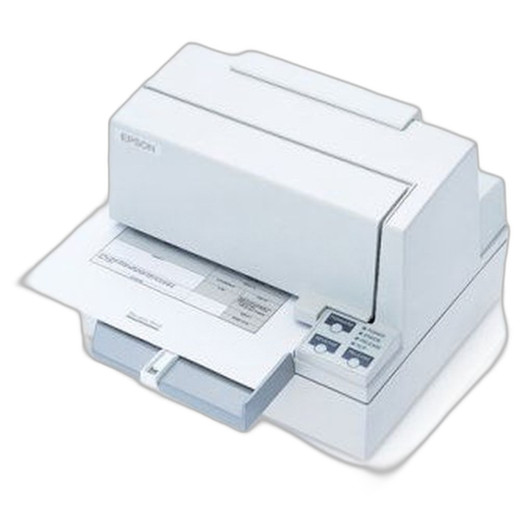


Product images are provided for reference and may not represent the exact model, configuration, or included
components.
Overview
SKU:
C31C222112
Condition:
New
Availability:
Usually Ships Same Business Day
Warranty
1-Year Limited Warranty

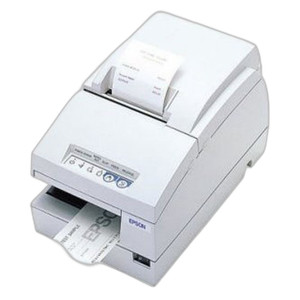
Epson C31C222112 U590 Inkjet Receipt and Slip Printer
Epson C31C222112 Inkjet Receipt and Slip Printer Overview The Epson C31C222112 U590 is a compact inkjet receipt printer designed for point-of-sale, h…

Epson C31C222112 U590 Inkjet Receipt and Slip Printer
$809.99
Your recommended setup
Review items below — quantities update pricing automatically.
Item
Qty
Status
Price
Optional Add-Ons recommended
Services optional
Bundle Summary
Bundle Subtotal:
$0.00
Optional Add-Ons:
$0.00
Services:
$0.00
Total:
$0.00
Overview
SKU:
C31C222112
Condition:
New
Availability:
Usually Ships Same Business Day
Warranty
1-Year Limited Warranty
Description

Epson C31C222112 Inkjet Receipt and Slip Printer
Overview
The Epson C31C222112 U590 is a compact inkjet receipt printer designed for point-of-sale, hospitality, and retail environments requiring reliable slip and receipt output. This model delivers professional-quality prints on receipts and labels with 600 dpi resolution and wireless connectivity for flexible deployment in distributed or mobile payment environments.
Key Features
- Inkjet Print Method: Delivers 600 dpi resolution for sharp receipt text and label graphics without the ongoing ribbon costs of thermal printers
- Wi-Fi Connectivity: Integrated wireless capability enables cordless operation and reduces installation complexity in counter and mobile payment scenarios
- Receipt and Label Media Support: Handles both receipts and labels, accommodating multi-purpose deployment in retail and food service operations
- No MICR Encoding: Standard configuration without magnetic ink character recognition, suitable for general receipt printing and non-check applications
- No Power Supply Included: Ships without external power adapter; verify power specifications during procurement
- No Peeler Unit: Configured without automatic label peeling; manual removal or external peeler integration required for label-heavy workflows
Technical Specifications
The C31C222112 operates at 600 dpi print resolution, providing crisp barcode rendering and clear receipt text. Inkjet printing eliminates ribbon inventory management and offers lower cost-per-page operation in high-volume receipt environments. Wi-Fi connectivity supports both 802.11 standards for integration into existing point-of-sale networks and mobile payment systems.
Media compatibility spans standard receipt stock and label materials, making the C31C222112 suitable for consolidated receipt and label printing in compact counter installations. The printer's lack of integrated peeler, micron detection, and external power supply reflects its role as a streamlined receipt-focused device rather than a full-featured label platform.
Integration and Deployment
The Epson C31C222112 integrates into standard POS environments through Wi-Fi connectivity, eliminating USB or Ethernet cable requirements. Retail integrators should verify local network coverage and signal strength in intended deployment locations, particularly in enclosed environments or basement POS terminals. The inkjet method requires regular cartridge inventory management; ensure supply chain for genuine Epson inks is established before large-scale rollout.
For multi-unit deployments, test Wi-Fi range and connectivity stability with existing access points to prevent print queue failures during peak transaction periods. No integrated peeler means label operations require manual handling or optional external equipment.
Ted Perry
I evaluated the Epson C31C222112 during a small-format receipt printer refresh for a regional retail network. The inkjet method and 600 dpi output delivered clean barcode readability and customer receipt legibility, and the Wi-Fi connectivity eliminated cable clutter at counters where space is at a premium. This is a solid choice for receipt-dominant workflows in retail and quick-service environments.
Technical Highlights:
- Inkjet at 600 dpi: Eliminates ribbon inventory and cost-per-page complexity while maintaining barcode and text clarity for compliance scanning
- Wi-Fi Deployment: Wireless operation reduces installation time and adapts well to mobile POS carts or counter reconfiguration scenarios
- Receipt and Label Flexibility: Single device handles both receipt output and label printing, consolidating hardware footprint in compact locations
Deployment Considerations:
- Verify Wi-Fi signal strength and network capacity at each deployment site; inkjet printers can generate sustained data traffic during high-transaction periods
- Establish ink cartridge supply chain before rollout; factor ongoing consumable cost into total cost of ownership versus thermal alternatives
- No integrated peeler requires manual label handling or procurement of compatible external peeling equipment if label-heavy output is anticipated
The C31C222112 is a practical receipt-focused platform for retailers seeking wireless convenience and multi-media capability without thermal equipment complexity. Confirm Wi-Fi infrastructure is adequate before committing to wireless-only deployment models.
Specifications
Product Type:
Receipt Printer
Connectivity:
Wi-Fi
Print Method:
Inkjet
media_type:
Labels; Receipts
Print Resolution:
600 dpi
Have Questions?
Ask an Expert.
RELATED PRODUCTS
System Design, Deployment & Technical Support
Support services and planning resources for commercial surveillance, access control, and infrastructure deployments.
Fixed scope • Fixed price
System Design Assistance
- Get help validating product compatibility
- Coverage requirements
- Storage planning and deployment architecture before you buy.
Deployment & Configuration Support
- Access fixed-scope support for rollout planning
- User setup guidance
- Migration and system standardization across single-site or multi-site deployments
Guides, Tools & Calculators
- PoE requirements
- Storage retention
- Camera selection and deployment methodology