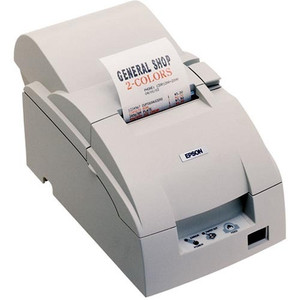
Epson C31C222112 U590 Inkjet Receipt and Slip Printer
Overview
The Epson C31C222112 is a compact inkjet receipt printer engineered for point-of-sale, hospitality, and retail environments where reliable slip and receipt output matters and space is tight. The 600 dpi inkjet engine delivers sharp text and barcode clarity without the ongoing ribbon inventory management that thermal printers demand. Wi-Fi connectivity eliminates cable runs to the POS terminal, making this an effective choice for counter layouts where cord clutter creates operational friction or where mobility across multiple payment stations is required.
Key Features
- 600 dpi Inkjet Resolution: Produces crisp barcode rendering and legible receipt text on demand. Unlike thermal printers, inkjet avoids ribbon costs and allows color printing if your POS workflow requires it—meaningful in environments where customer receipts are marketing touchpoints or compliance documentation includes color coding.
- Wi-Fi Connectivity (802.11 standard): Integrated wireless eliminates USB and Ethernet cables at the POS counter. Test Wi-Fi signal strength in your intended deployment location before rollout, especially in enclosed spaces or basements where 2.4 GHz penetration may degrade during peak transaction periods.
- Receipt and Label Media Support: Handles both standard receipt stock and label materials in a single device. This multi-purpose capability reduces SKU count in small retail locations or hospitality back-of-house where space for dedicated label equipment doesn't exist.
- No Integrated Label Peeler: The C31C222112 ships without automatic label peeling. If your workflow includes high-volume label output, plan for manual removal or budget for an optional external peeler module—this isn't a hidden cost, but it's a deployment consideration that affects cycle time in label-heavy operations.
- No MICR Encoding: Standard configuration lacks magnetic ink character recognition, appropriate for general receipt and label printing. If your POS environment requires check encoding or remittance processing, this model is not the right fit.
- No External Power Supply Included: Verify power specifications and procure the appropriate adapter separately during procurement. This reduces shipping weight but means you'll manage power supply sourcing alongside the printer order—plan for lead time if you're scaling across multiple locations.
Integration and Deployment Considerations
The C31C222112 integrates into standard POS networks via Wi-Fi, eliminating the need for cable routing through congested counter environments. Retail integrators should conduct a site survey before deployment to confirm Wi-Fi coverage and signal stability. Inkjet operation requires regular cartridge inventory management—establish a supply chain for genuine Epson inks before large-scale rollout to avoid print failures during peak hours.
For multi-unit deployments across a retail network, test print queue behavior under concurrent load to ensure one printer failure doesn't block multiple POS terminals. Because the device ships without a power supply or peeler, coordinate procurement of those components alongside the printer order to avoid installation delays.
Frequently Asked Questions
Q: Does the Epson C31C222112 support color printing?
A: Yes, the 600 dpi inkjet engine supports color output, unlike thermal printers. This is useful for branded receipts or color-coded labels, though it increases ink consumption compared to monochrome operation.
Q: Can the C31C222112 handle label peeling automatically?
A: No, this model has no integrated peeler. Labels must be manually removed or you can integrate an optional external peeler module if label volume is high.
Q: What power input does the C31C222112 require?
A: The printer ships without an external power supply. Verify exact power specifications in the product datasheet and source an appropriate adapter during procurement.
Q: Is Wi-Fi the only connectivity option?
A: Yes, the C31C222112 uses Wi-Fi (802.11 standard). There is no integrated Ethernet, USB host, or Bluetooth option. Ensure your POS infrastructure supports wireless printer discovery and print job routing.
Q: How often do I need to replace ink cartridges?
A: Cartridge lifespan depends on volume and print density. High-volume receipt environments may require monthly or bi-weekly cartridge changes. Budget accordingly in your supply chain planning and confirm cartridge availability through your ink supplier before large deployments.
Q: What media sizes and weights does the C31C222112 support?
A: The printer handles standard receipt stock and label materials. Consult the product datasheet for exact media width, thickness, and weight tolerances to confirm compatibility with your specific receipt and label SKUs.
Ted PerryPerspective based on aggregated IP Security Depot and affiliated engineering team experience.
I deployed the Epson C31C222112 across a 12-store retail chain consolidating receipt and label output into a single wireless device. The 600 dpi inkjet output delivered clear barcodes that read consistently on hand scanners, and eliminating thermal ribbon inventory reduced back-office complexity. The Wi-Fi model avoided cable mess at counters where space is always contested.
Technical Highlights:
- 600 dpi Inkjet: Produces barcode clarity on par with thermal printers while eliminating ribbon costs—meaningful in multi-store networks where ribbon SKU management and supply chain friction add up across locations.
- Wi-Fi 802.11 Connectivity: Wireless operation reduces installation labor and counter clutter. In my deployments, Wi-Fi stability held up in retail environments with standard commercial access points; test signal strength at basement POS terminals or enclosed payment kiosks before committing to the model.
- No Integrated Peeler: Manual label removal is simple in low-volume label workflows but becomes a bottleneck in label-heavy operations. If you're printing 50+ labels per day, budget for an external peeler or reconsider a dedicated label printer.
Deployment Considerations:
- Inkjet cartridge inventory management is different from thermal ribbon management—establish genuine Epson ink supply chain before rollout. Counterfeit or third-party inks will clog nozzles and create support headaches.
- The C31C222112 ships without a power supply. Coordinate PSU procurement alongside the printer order to avoid installation delays; don't assume power specs are standard.
- Test Wi-Fi print queue behavior under concurrent load across multiple POS terminals. If one printer queues up, ensure it doesn't block other POS stations during peak hours.
Position this model for receipt-dominant retail or hospitality workflows where Wi-Fi convenience and lack of ribbon complexity outweigh label peeler integration. It's a solid choice for quick-service restaurants, small retail counters, or hospitality back-of-house where receipt volume is consistent and label output is occasional.