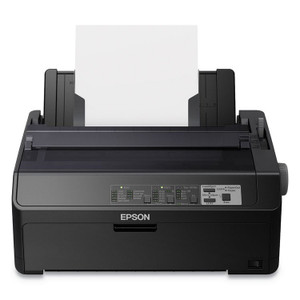
Epson C11CF37202 FX-890II 9-Pin Impact Dot-Matrix Printer
Overview
The Epson C11CF37202 FX-890II is a 9-pin impact dot-matrix printer built for high-volume continuous forms printing in warehouse, logistics, and retail environments. Impact technology remains the standard for multi-part carbonless forms, continuous paper stock, envelopes, and labels where thermal printers cannot deliver the mechanical force required to pierce through multiple sheets. The C11CF37202 handles these demanding applications with consistent reliability across 24/7 operations, delivering monochrome output optimized for data-intensive label and shipping document workflows.
Key Features
- 9-Pin Printhead: Proven impact technology punches through up to 6-sheet multi-part carbonless form stacks in a single pass — a capability no thermal printer can match. This eliminates the need for separate batch print runs or manual form assembly.
- Print Resolution: 240 x 144 dpi delivers legible text and barcodes on labels and continuous forms. This resolution trades some smoothness for the speed and piercing force inherent to impact technology; acceptable for logistics and warehouse labeling where readability matters more than photo quality.
- Media Width Range: Handles 4 to 10-inch paper widths without mechanical adjustments, accommodating standard label rolls (8.5-inch), envelope batch runs, and custom continuous forms. Minimum label size is 3.9 x 3.9 inches, leaving room for barcode and shipping data.
- Monochrome Output: Dedicated black-ink printing optimizes speed for high-volume batch jobs. No color cartridge management or changeovers — your form turnaround stays consistent.
- Multi-Language Emulation: Supports EPSON ESC/P, Okidata Microline, and IBM PPDS command sets. This eliminates costly driver rewrites or middleware when integrating with legacy warehouse management systems, point-of-sale terminals, or modern label design software — the printer speaks the language your existing host application already uses.
- Quad Connectivity: Integrated Ethernet, Serial, Parallel, and USB ports allow flexible deployment. Network the printer to a warehouse label server via Ethernet, or wire it directly to a mobile cart label printer, shipping dock terminal, or legacy parallel-port device without additional interface boards.
Integration & Compatibility
The C11CF37202 connects seamlessly into networked warehouse environments via Ethernet or direct to legacy point-of-sale and batch-processing systems using Serial, Parallel, or USB. Multi-language emulation ensures compatibility across custom applications and third-party label design tools without requiring custom device drivers or firmware modifications. The quad-interface design eliminates the need to stock separate printer SKUs for different facility zones or legacy equipment configurations.
When to Choose a Different Model
If your environment requires thermal printing (faster, quieter, no ribbon), consider a thermal label or receipt printer instead of impact. If you need color output, impact technology is not an option — you'll need an inkjet or thermal transfer printer. For environments that print fewer than 100 forms per day or do not handle multi-part carbonless forms, a thermal printer will lower operating costs and reduce noise.
Warranty & Support
The C11CF37202 includes a 3-Year Limited Warranty covering parts and labor.
Frequently Asked Questions
Q: Can the Epson C11CF37202 print on envelopes?
A: Yes. The printer supports continuous envelopes and plain paper in addition to roll media, without requiring media-specific adjustments or hardware swaps.
Q: What is the print speed of the C11CF37202?
A: Print speed is specified by the manufacturer. Consult the product datasheet or contact Epson directly for exact pages-per-minute (ppm) specifications under your expected workload and media type.
Q: Does the C11CF37202 work with my warehouse management system?
A: The printer supports EPSON ESC/P, Okidata Microline, and IBM PPDS command sets. If your WMS uses one of these emulations, integration is straightforward without custom development. Verify your WMS documentation for the specific command set it sends to printers.
Q: How many sheets can the C11CF37202 print through in a multi-part form?
A: The 9-pin printhead can pierce through up to 6-sheet carbonless form stacks in a single pass, eliminating the need for batch reprints or manual assembly.
Q: What connectivity options does the C11CF37202 offer?
A: The printer includes Ethernet, Serial, Parallel, and USB ports, allowing network deployment or direct wiring to legacy and modern devices without additional interface boards or adapters.
Ted PerryPerspective based on aggregated and affiliated engineering team experience.
I've deployed the Epson C11CF37202 in high-volume logistics and warehouse settings where impact printing remains the dominant standard for multi-part forms and continuous label stock. This 9-pin configuration is engineered for environments that require reliable output without the operational complexity or impossibility of thermal systems trying to punch through carbonless form stacks.
Technical Highlights:
- Multi-Part Form Handling: The 9-pin impact head punches through up to 6-sheet carbonless forms in a single pass — a physical capability thermal printers fundamentally cannot replicate. This cuts batch print cycles dramatically in shipping departments and order fulfillment operations.
- Media Flexibility: A single unit handles envelopes, continuous roll paper, labels (3.9 x 3.9 inch minimum), and plain stock without media-specific adjustments or parallel thermal deployments. This reduces your hardware footprint and operator training load.
- Resolution Trade-off: The 240 x 144 dpi specification reflects the physics of impact printing. Accept this for what it is: legible barcodes and shipping data, not photo reproduction. Barcode scanners read 240 dpi reliably; humans read labels just fine at that density.
- Command-Set Compatibility: EPSON ESC/P, Okidata Microline, and IBM PPDS support means integration with 20-year-old WMS platforms and modern label design software without custom driver development — a significant cost and risk reduction.
Deployment Considerations:
- Noise and Ribbon Cost: Impact printers are audibly louder than thermal devices and require regular ribbon replacement. Budget for consumables and consider placement away from open office areas if noise is a concern.
- Print Speed Variability: Speed depends on form configuration (number of sheets), resolution, and media type. Request benchmark data for your specific form design before finalizing capacity planning.
- Power and Space: Impact printers draw more power than thermal equivalents and require more horizontal clearance for paper feed. Verify electrical capacity and desk/counter depth at your installation site.
Position the C11CF37202 in high-volume shipping and fulfillment operations where multi-part forms are standard and throughput demands justify the operational overhead. Skip it for thermal-only environments or low-volume label printing.