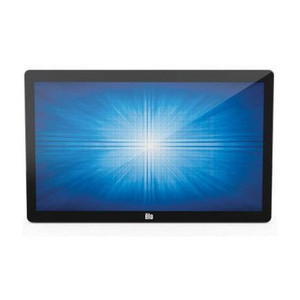
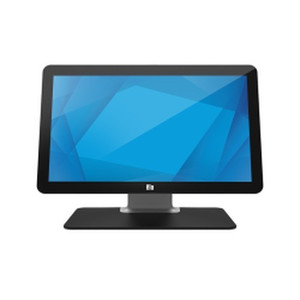
ELO Touch E351806 24-inch Full HD Projected Capacitive Touch Display
Overview
The ELO Touch E351806 is a 24-inch desktop touchscreen built for point-of-sale and transaction-heavy retail environments where reliability and touch responsiveness matter. It delivers Full HD resolution (1920 × 1200) on a projected capacitive 10-touch surface, meaning multiple simultaneous touch points register without drift or calibration creep — a hard requirement for kiosk, hospitality, and fast-food deployments where staff or customers are hammering the same buttons all day. The zero-bezel design keeps the footprint tight on cramped countertops, and dual video inputs (VGA and HDMI) make it adapter-friendly whether you're refreshing legacy POS hardware or integrating with modern payment terminals.
Sourced factory-new from the manufacturer, model E351806 arrives with a stand included and ships ready to deploy.
Key Features
- 24-inch Full HD IPS Panel (1920 × 1200): Sufficient resolution for dense menu layouts and product imagery without requiring users to lean in or squint. The larger diagonal keeps interactive elements sized appropriately for gloved or wet-finger operation in food-service or warehouse picking environments.
- Projected Capacitive 10-Touch: Unlike resistive screens, capacitive touch requires no pressure — a fingertip alone registers the input. Ten simultaneous touch points eliminate the "single-touch bottleneck" in multi-user scenarios (e.g., collaborative kiosk interfaces or team-based transaction flows). No calibration drift over thousands of touches per shift.
- USB Controller: Simplifies integration by reducing wiring complexity. The touch data streams over USB to any Windows, Linux, or macOS host, so you're not locked into proprietary serial or parallel connections. Standard driver support across most POS platforms (Square, Toast, NCR, Oracle Micros, etc.) means you can swap this display into existing system stacks without firmware re-engineering.
- Dual Video Inputs (VGA + HDMI): VGA handles legacy infrastructure; HDMI covers modern systems. You get flexibility during hardware refresh cycles — plug into whichever output your terminal or PC provides without hunting for adapters. Both can be active simultaneously, though you'll configure the display to prioritize one input.
- Zero-Bezel Design: Minimizes the black border around the active touch area, reducing visual clutter and maximizing usable screen real estate on tight counter or kiosk enclosures. Also simplifies multi-display tile installations if you need to daisy-chain units side-by-side.
- Black Desktop Stand Included: The bundled stand is fixed-angle (not adjustable tilt/height), so verify your mounting requirements before deployment. If you need VESA wall mounting or articulated positioning, you'll need a separate arm bracket.
Integration & Compatibility
The E351806 connects via USB (touch data) and either VGA or HDMI (video). Any PC, thin client, or POS terminal with a USB port and VGA/HDMI output can drive this display. Driver support is broad across Windows 7+ and Linux; macOS compatibility depends on your POS vendor's touch stack. No special networking or PoE — this is a dumb display that relies on the host system for all logic and application software. That simplicity is a feature: fewer moving parts, fewer firmware updates, less security surface.
If you're integrating into a large retail chain or warehouse automation setup, ensure your POS or WMS software explicitly supports ELO Touch peripherals (many do out of the box via standard HID protocols). Test the USB controller driver on your target OS before bulk ordering.
When to Choose a Different Model
If you need a smaller footprint, ELO Touch offers 15- and 17-inch variants in the same product family. If your environment is wet or outdoor-facing, look for IP-rated enclosures or sealed display variants — this desktop model is not splash-resistant. For industrial PLC or automation dashboards, you may prefer a larger 27-inch or a fanless embedded touchscreen; for pure barcode scanning kiosks, a 7- or 10-inch tablet-style screen is often more cost-effective.
Frequently Asked Questions
Q: Does the E351806 work with Windows 11?
A: Yes. The USB HID touch driver is compatible with Windows 11, Windows 10, and Windows 7 SP1+. Consult ELO Touch's driver download page or your POS vendor's hardware compatibility matrix to confirm the specific driver version for your OS.
Q: Can I wall-mount the E351806?
A: The stand included is desktop-only. For wall mounting, you'll need a separate VESA-compatible arm or bracket (check your display's VESA hole pattern with ELO Touch documentation). The display itself does not have integrated wall-mount provisions.
Q: What's the warranty coverage?
A: Factory-new units come with a full US manufacturer warranty. Contact the vendor for the specific warranty term and claim process; most ELO Touch displays include a 1–3 year manufacturer defect warranty.
Q: Does projected capacitive touch work with gloves?
A: Standard capacitive screens require skin contact to register a touch. If operators wear heavy work gloves, you may experience reduced responsiveness. For glove-friendly operation, consider resistive touch (less responsive but glove-tolerant) or capacitive glove styluses designed specifically for capacitive screens.
Q: Can I run both VGA and HDMI simultaneously?
A: The display can accept both input signals, but you configure it to prioritize one via the on-screen menu. It will not display a split picture from both inputs — use the menu to switch or select a default input on power-on.
Q: Is the E351806 suitable for 24/7 operation?
A: Yes. LCD panels are rated for continuous duty cycles. Verify the operating temperature range of your installation environment and ensure adequate ventilation around the stand to prevent heat buildup; the display itself is passively cooled (no fan).
The E351806 hits a sweet spot for mid-market retail and QSR (quick-service restaurant) deployments where you need a responsive, multi-touch interface without overengineering. The projected capacitive 10-touch sensor on this 24-inch Full HD panel means your order-entry or self-checkout kiosk won't choke when a customer taps two buttons at once or swipes rapidly through menu pages. Unlike resistive screens, there's no creeping calibration drift — important if your staff is logging hundreds of transactions a shift.
Technical Highlights:
- Full HD (1920 × 1200) on a 24-inch panel: Gives you a 16:10 aspect ratio and roughly 92 ppi pixel density, which is sharp enough for text-heavy transaction screens and product photo thumbnails. Not 4K, but you won't need it for POS — you'll save on host system GPU burden and cable bandwidth compared to higher-res displays.
- Projected Capacitive 10-Touch with USB Controller: Ten simultaneous touch points eliminate the single-finger-only bottleneck. The onboard USB controller handles all HID translation, so you don't burn CPU cycles on custom touch drivers. Standard Windows and Linux HID support means your POS software (Toast, Square, Oracle Micros, whatever) recognizes this as a generic USB input device — zero vendor lock-in.
- VGA and HDMI inputs: Dual video flexibility is underrated in retrofits. You can swap between legacy PC and modern thin client without hardware swap-outs, and the USB touch stream remains independent of which video input you're using.
Deployment Considerations:
- The bundled stand is fixed desktop position — no tilt, no height adjustment. If your counter height or ergonomics call for a different angle, budget for a VESA arm or third-party mounting bracket upfront.
- Projected capacitive touch requires direct skin contact. If your crew wears heavy gloves or you're targeting outdoor kiosks with winter shoppers, this isn't the right tool — you'll want resistive or a capacitive pen-input variant.
- The display is passive-cooled (no fan), so verify ambient temperature in your install location. A sun-facing kiosk or a hot galley kitchen can thermally stress an LCD; keep it out of direct sunlight and ensure airflow around the stand.
The E351806 is purpose-built for fast-paced transaction environments where touch speed and multi-point input matter more than ruggedness or extreme temperature tolerance. Retail counters, hospitality order kiosks, and internal warehouse picking stations are where this display earns its cost.
", "search_keywords": "ELO Touch E351806, 24 inch touchscreen display, Full HD POS display, projected capacitive touch, 10-touch display, USB touch controller, VGA HDMI touchscreen, retail POS display, kiosk display, buy touchscreen display", "upc_ean": "", "warranty": "", "weight_lbs": "", "width_in": "", "height_in": "", "depth_in": "", "quick_specs": { "Display Size": "24 inches (diagonal), 16:10 aspect ratio", "Resolution": "Full HD 1920 × 1200 pixels", "Touch Technology": "Projected Capacitive, 10-point simultaneous touch", "Video Inputs": "VGA and HDMI", "Connectivity": "USB controller for touch data", "Stand": "Fixed desktop stand (included)", "Datasheet": "" }, "extracted_specs": { "Resolution": "Full HD (1920 × 1200)", "IP_Rating": "", "IK_Rating": "", "PoE_Power": "", "WDR": "", "IR_Lowlight": "", "Compression": "", "ONVIF": "", "Audio": "", "Analytics": "", "Lens": "", "Mount_Type": "Desktop stand (fixed)", "Form_Factor": "Desktop display", "Max_FPS": "", "IR_Range": "", "Sensor_Size": "", "Min_Illumination": "", "Storage": "", "Operating_Temp": "", "Certifications": "", "Cybersecurity": "", "VMS_Compatibility": "", "PoE_Wattage": "", "PTZ_Range":