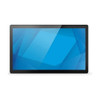
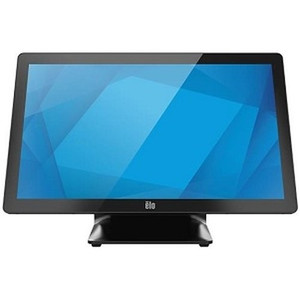
ELO Touch E541463 21.5-Inch Android 14 Interactive Touchscreen
Overview
The ELO Touch E541463 is a 21.5-inch interactive display built on Android 14 with Google Mobile Services (GMS), designed for point-of-service, self-service, and industrial control applications where a responsive touchscreen and integrated compute matter. This unit combines display, processor, memory, and connectivity in a single form factor—useful when you need to eliminate the separate PC and reduce footprint and cable runs in tight spaces.
At its core, the E541463 delivers 1920 × 1080 resolution (Full HD), which is sufficient for text-heavy applications and menus but won't support high-density graphical content or video playback at premium quality. The Qualcomm Snapdragon 6490 Octa-Core processor handles routine multitasking, and 8 GB of RAM ensures smooth operation under moderate load. The 64 GB flash storage provides enough room for applications and cached data on a single-unit deployment, though network storage or cloud sync will be necessary for larger-scale fleet management.
Key Features
- Projected Capacitive 10-Touch Panel: Supports simultaneous multi-touch input across the display, allowing gesture-based navigation and two-handed data entry. This is standard for retail and service kiosks and enables responsive, intuitive UI design. Capacitive touch is reliable indoors but will not register through heavy gloves or in wet conditions without special coatings.
- 1920 × 1080 Full HD Display: Provides crisp, readable text and interface elements for typical business applications. This resolution is adequate for POS systems, scheduling displays, and control panels but lacks the pixel density needed for detailed imagery or video playback. If your application relies heavily on photo or video content, consider upgrading to a higher-resolution variant.
- Android 14 with GMS: The full Google Mobile Services suite means access to the Play Store, Gmail, Google Drive, and other Google ecosystem apps. This lowers the barrier to deploying off-the-shelf software versus building custom Android builds. Updates and security patches flow through Google's framework, though you are responsible for testing compatibility with your specific applications.
- Qualcomm Snapdragon 6490 Processor and 8 GB RAM: The octa-core processor handles routine business logic and UI responsiveness without bottlenecking on single-threaded tasks. Eight gigabytes of RAM is standard for modern Android and allows running multiple apps simultaneously without frequent context switching or slowdowns. This is a mid-range SoC—sufficient for kiosks, POS terminals, and control interfaces, but not designed for real-time video transcoding or heavy machine-learning inference on-device.
- Wi-Fi, Ethernet, Bluetooth 5.2: Multiple connectivity options reduce deployment friction. Ethernet provides a hardwired, low-latency connection for mission-critical data (prefer this for POS and payment systems). Wi-Fi adds flexibility for locations where cabling is impractical. Bluetooth 5.2 enables pairing with wireless peripherals—keyboards, barcode scanners, or receipt printers—though for high-throughput scanning, USB or Ethernet-attached devices will perform more reliably.
- 8 MP Camera: Built-in camera enables photo capture, document scanning via third-party apps, or basic video conferencing. An 8 MP sensor delivers acceptable image quality for documents and casual snapshots but lacks the dynamic range and low-light sensitivity of dedicated cameras. If your workflow demands high-quality scanning or video, integrate an external USB camera or scanner instead.
- EloView Compatibility: EloView is ELO Touch's remote management platform. This enables centralized provisioning, app deployment, and real-time monitoring across multiple E541463 units in a distributed fleet. If you are deploying 5+ units, EloView integration simplifies maintenance and reduces hands-on service calls.
Integration & Compatibility
The E541463 runs stock Android 14 with GMS, so compatibility with mainstream Android business software (Square, Toast, Toast POS, Shopify, custom Java/Kotlin apps) is broad. For VMS integration or enterprise backend connections, confirm your software supports HTTP/HTTPS APIs and MQTT; the display itself does not include built-in ONVIF or specialized surveillance protocols. You will manage this device through the Android settings interface or via EloView for fleet-wide configuration. Standard 802.3 Ethernet and 802.11ac Wi-Fi ensure straightforward network integration; if your facility runs 802.11b/g only, you may need to upgrade network infrastructure.
When to Choose a Different Model
If your application requires higher resolution (4K or above), better color accuracy for photo work, or a larger display footprint (27 inches or more), investigate other members of the ELO Touch I-Series 5 line. If you need rugged outdoor operation or IP-rated environmental protection, the E541463 is an indoor-only unit—look for ELO's industrial or hardened variants. If your software stack is Windows-dependent or legacy, consider an ELO Touch Windows-based model instead.
The E541463 is a solid mid-range touchscreen for self-service and point-of-control deployments where Android 14 and integrated compute eliminate the need for a separate PC. The 1920×1080 resolution is acceptable for business applications, menus, and text-heavy interfaces. The real value lies in the 10-point capacitive touch responsiveness and the combination of Ethernet and Wi-Fi—dual connectivity reduces site prep friction.
Technical Highlights:
- Snapdragon 6490 Octa-Core + 8 GB RAM: Mid-range performance suitable for POS, kiosks, and control interfaces. Handles routine multitasking without lag; not designed for on-device video transcoding or machine-learning inference.
- 64 GB Flash Storage: Sufficient for OS, apps, and cached data on single units. For larger fleets or media-heavy workflows, plan for network storage or cloud sync to avoid running out of space during normal operation.
- 10-Touch Projected Capacitive Panel: Responsive multi-touch input; gesture and two-handed entry work smoothly. Will not register through heavy gloves or in wet conditions without special protective coatings.
- Android 14 with GMS: Full Play Store access and Google ecosystem integration. Updates flow through Google's framework; test third-party apps in your environment before rolling out at scale.
Deployment Considerations:
- The 8 MP camera is useful for incidental document capture or basic video calls, but don't rely on it for high-volume scanning or video conferencing—external USB devices will perform better.
- 1920×1080 is fine for text and UI but will look soft if displaying high-resolution photos or video. If visual fidelity matters, verify content at this resolution in a test deployment first.
- Capacitive touch does not work with styluses or in wet glove scenarios. If your environment requires either, confirm third-party workarounds or look at resistive-touch alternatives.
Deploy the E541463 in retail POS networks, self-service kiosks, warehouse control stations, or industrial signage where Android ecosystem apps and integrated compute simplify installation and reduce hardware footprint. The E541463 is less suitable for video surveillance, high-resolution content, or outdoor/harsh-environment applications.
Frequently Asked Questions
Q: What is the warranty on the ELO Touch E541463?
A: Warranty details are not specified in the available product data. Contact the manufacturer or your distributor for warranty terms, coverage periods, and support options.
Q: Can the E541463 run Windows or does it support only Android?
A: The E541463 runs Android 14 only. It does not support Windows. If your application requires Windows, consult the ELO Touch product family for Windows-based touchscreen models.
Q: Is the E541463 suitable for outdoor installation?
A: No. The E541463 is designed for indoor environments. It lacks environmental ratings (IP or IK codes) for outdoor, wet, or dusty conditions. For outdoor applications, consult ELO Touch's rugged or industrial display line.
Q: Does the E541463 support PoE (Power over Ethernet)?
A: No. The E541463 does not support PoE. Power is delivered via a separate AC or DC adapter. Confirm the power specification with the manufacturer before purchasing, and plan for dedicated electrical infrastructure at each installation site.
Q: Can I manage multiple E541463 units remotely across a fleet?
A: Yes. The E541463 is compatible with EloView, ELO Touch's centralized management platform. EloView enables provisioning, app deployment, and monitoring across multiple units. For deployments of 5+ units, EloView integration simplifies maintenance and reduces per-unit service costs.
Q: What third-party software integrates with the E541463?
A: The E541463 runs stock Android 14 with Google Mobile Services, so it supports most mainstream Android business apps from the Play Store, including POS software (Square, Toast), productivity tools, and custom Java/Kotlin applications. Verify compatibility with your specific software before deployment.