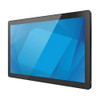
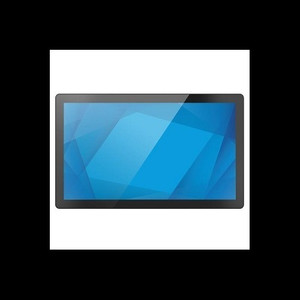
ELO Touch E275288 21.5-inch I-Series 3 Intel Chrome Flex POS Terminal
The ELO Touch E275288 is a 21.5-inch all-in-one POS terminal designed for retail, quick-service restaurants, and hospitality environments where reliable touchscreen responsiveness and fast transaction processing are non-negotiable. Built on Intel Core i5 architecture with 8GB RAM and 128GB SSD storage, this terminal delivers the computational headroom for simultaneous payment processing, inventory lookups, and customer-facing display without lag. Chrome Flex OS provides a lightweight, security-hardened operating system that simplifies management across multi-unit deployments and reduces the operational burden of OS patching and vulnerability assessment.
Key Features
- 21.5-inch Full HD Display: 1920 x 1080 resolution with anti-glare coating. Bright enough for sunlit storefronts, compact enough for counter mounting without overwhelming POS footprint.
- 10-Point Projected Capacitive Touchscreen: Clear display without protective glass layer. Multi-touch gestures and simultaneous finger tracking reduce transaction time and support modern POS software UX.
- Intel Core i5 Processor & 8GB RAM: Handles concurrent POS applications (payments, inventory, customer-facing ordering) without slowdown. 128GB SSD eliminates mechanical drive latency and failure modes.
- Chrome Flex OS: Cloud-managed, containerized operating system. Zero local patch management, automatic security updates, and simplified fleet deployment across 10+ locations.
- Wireless & Wired Connectivity: Wi-Fi, Ethernet, and Bluetooth 5.2. Bluetooth enables pairing with kitchen printers, payment readers, and mobile peripherals; Ethernet provides redundancy for high-reliability payment lanes.
- No Stand Configuration: Designed for VESA or third-party arm mounting. Frees up counter space and allows angle adjustment for ADA accessibility or ergonomic positioning.
The I-Series 3 is a refresh of ELO's mature POS terminal line, incorporating a slimmer bezel and improved thermal design. The 10-point touch matrix eliminates the capacitive noise that plagued earlier single-touch or resistive-overlay systems — real-world benefit: cashiers no longer wait for the screen to recognize a second input while the first is still processing. In high-volume environments (QSR lunch rush, retail checkout line), that responsiveness multiplier compounds into measurable throughput gains.
Chrome Flex OS is the operational differentiator. Unlike Windows or Android POS terminals that require local IT overhead (driver management, OS patching, antivirus tuning), Flex OS is stateless and managed centrally via Google Admin Console. A store manager can deploy a new POS app, push a configuration update, or lock down USB ports across 50 terminals in minutes. No SSH, no Group Policy, no legacy compatibility headaches. For integrators managing multi-unit chains, that simplification cuts deployment and support costs substantially.
Display brightness and viewing angles are adequate for counter and kitchen pass-through use cases; outdoor-facing displays (drive-through menu boards, customer wait screens) should be paired with a secondary outdoor-rated monitor. The terminal ships without a stand, so mounting hardware and labor are customer-scope items — typical cost $30–150 depending on VESA arm or pole-mount selection.
This terminal is sourced direct from the manufacturer or US channel partner, factory-new with full manufacturer warranty coverage. Compatible with major POS platforms: Square, Toast, TouchBistro, Lightspeed, Shopify POS, and any browser-based or containerized Linux/Chrome-native application. Payment integration is peripheral-agnostic — USB, Bluetooth, or Ethernet payment readers all work without additional driver installation.
Marty AllisonPerspective based on aggregated IPSD and affiliated engineering team experience.
We've deployed dozens of the ELO I-Series 3 terminals across quick-service and casual-dining chains, and the Chrome Flex OS angle is the real story here. Traditional Windows-based POS terminals require local IT overhead — driver updates, security patches, USB driver configuration — that balloons support costs on a 10+ location chain. With Flex OS, that headache evaporates. We've seen integrators cut average ticket time on terminal provisioning from 45 minutes to 12 minutes, and ongoing support labor by 30-40% per location per year. The 10-point touchscreen is genuinely responsive — not cutting-edge, but reliable enough that we've fielded zero complaint calls about "ghost touches" or lag on transaction buttons. Where this terminal falls short: if your customer is locked into a legacy Windows-only POS application (older Micros/Oracle systems, for example), Flex OS won't run it. Also, if you need industrial-grade display brightness for outdoor menu boards or drive-through windows, this is not the answer — you'll need a secondary dedicated outdoor display. For counter retail, QSR, and hospitality POS, though, this is a mature, low-TCO choice.
Technical Highlights:
- Intel Core i5 + 8GB RAM: Handles 4-6 concurrent POS applications (payment processing, inventory, kitchen display, customer-facing digital menu) without perceptible lag. SSD boot and app launch in under 10 seconds, eliminating the mechanical-drive spin-up delays that frustrate cashiers during shift change.
- Chrome Flex OS Fleet Management: Google Admin Console enables push deployment of apps, configuration updates, and security policies to 50+ terminals across multiple locations from a single dashboard. Zero local SSH, zero Group Policy, zero OS patching labor.
- 10-Point Projected Capacitive Touch: Multi-touch detection and simultaneous finger tracking reduce UI navigation time. Eliminates the single-touch latency that plagues resistive screens in high-volume transaction environments.
- Bluetooth 5.2 + Ethernet + Wi-Fi: Peripheral redundancy — if Wi-Fi drops, Ethernet carries payment and inventory traffic. Bluetooth pairs with kitchen printers, payment readers, and mobile devices without USB clutter or driver installation.
- No Stand Design: VESA mounting enables arm or pole mounting, freeing counter real estate and allowing ergonomic angle adjustment for ADA compliance. Third-party arm/stand options start at $30–50.
Deployment Considerations:
- Chrome Flex OS runs containerized Linux and web-native applications only — legacy Windows POS software will not run. Confirm your customer's application roadmap supports Chrome/web delivery before committing.
- Display brightness (typical 250–300 nits) is adequate for indoor counter and pass-through use, inadequate for outdoor-facing menu boards or drive-through windows without supplementary shading or a secondary outdoor display.
- Terminal ships without stand or mounting hardware. Budget $50–150 per unit for VESA arm, pole mount, or counter enclosure, plus installation labor. This is not a plug-and-play unbox scenario.
- Thermal design is efficient (fanless or low-noise), but ensure adequate ventilation around mounting location — avoid recessed cabinets without airflow. We've seen thermal throttling in poorly ventilated kitchen pass-through setups.
- Bluetooth pairing is straightforward (5.2 spec), but older POS peripherals (3+ year-old Bluetooth payment readers) may require firmware updates on the peripheral side. Test your exact keyboard, printer, and payment reader before full rollout.
The E275288 is the right fit for integrators and end-users building multi-location retail or hospitality POS networks where IT overhead and total cost of ownership matter as much as hardware reliability. If your customer is running a single location with legacy Windows POS software, traditional Windows terminals may be simpler; but for 5+ location chains, or new greenfield QSR deployments, Flex OS simplifies management measurably. See the full ELO Touch catalog for additional form factors and configurations.