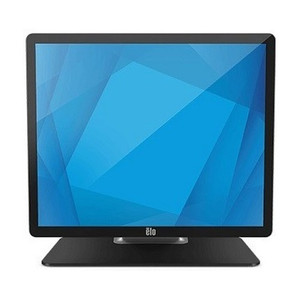
ELO Touch E125695 19-Inch Touchscreen LCD Monitor
Overview
The ELO Touch E125695 is a 19-inch projected capacitive touchscreen monitor designed for point-of-sale, kiosk, and light industrial automation environments where reliable multi-touch input and compact sizing matter. The display delivers 1280×1024 HD resolution—sufficient for most standard retail and warehouse interfaces without demanding excessive bandwidth or processing overhead. The E125695 ships without a stand, allowing you to integrate it into custom mounting solutions or existing POS enclosures without redundant hardware. Dual video inputs (VGA and HDMI) provide flexibility across legacy and modern hardware, while USB connectivity manages the 10-touch controller directly from your host system.
Key Features
- 1280×1024 Resolution: Delivers crisp text and icon legibility for cashier workflows and kiosk displays without requiring modern 4K infrastructure. This resolution is standard across retail terminals, meaning driver support and image scaling are rarely problematic.
- Projected Capacitive 10-Touch: Multi-touch sensing works through glass or protective overlays and does not require force—a genuine advantage over resistive touch for high-frequency environments. Ten simultaneous touch points support gesture input (pinch-zoom, rotation) if your application demands it; most POS software uses single or dual touches, so you gain future headroom without paying for it now.
- Zero-Bezel Design: Eliminates the frame that would otherwise reduce visible screen area. Matters for kiosk enclosures and wall-mounted displays where space is tight or aesthetics demand a seamless front face.
- USB Controller: Touch data streams over USB to your host. This is straightforward integration—no special drivers or proprietary protocols. Most Windows POS platforms and Linux kiosk builds recognize capacitive USB touch devices out of the box.
- Dual Video Inputs (VGA + HDMI): VGA preserves compatibility with older POS terminals and thin clients still in circulation. HDMI handles modern compute sticks, small form-factor PCs, and media players. You choose the interface that fits your existing infrastructure without adapters.
- Clear Glass: Maintains color accuracy and brightness without the yellowish cast of some amber or anti-glare filters. Relevant if your display is used in environments where color fidelity (product photography, price display) carries weight, or where glare is not the dominant constraint.
- Black Finish: Standard industrial appearance. Integrates into most cabinet and mounting designs without visible color mismatch.
- No Stand Included: Reduces cost and packaging. You mount via your own bracket or enclosure frame—common in kiosk and POS cabinet builds where the monitor is embedded rather than free-standing.
Integration & Compatibility
The E125695 integrates into any environment that accepts a USB HID (Human Interface Device) for touch input and standard video output. Windows POS software (Micros, Toast, Square, NCR), kiosk platforms (Kiosk Browser, Windows 10 IoT), and Linux-based systems all consume USB touch natively. VGA and HDMI outputs eliminate adapter chains. If you are migrating from an older ELO display or competing capacitive monitor, verify that your mounting footprint and bracket compatibility are present—this is a specification to confirm with your integrator or hardware partner before ordering.
When to Choose a Different Model
If your deployment requires higher resolution (1600×1200 or greater) for dense data display or small font readability, evaluate a 21.5-inch variant in the ELO Touch family. If sunlight or high ambient light is a factor, a model with a matte anti-glare coating or higher nit rating (brightness) may serve better. For outdoor or wet environments, IP-rated enclosures paired with this monitor are necessary—the E125695 itself is not sealed.
I've deployed dozens of 19-inch capacitive touch monitors across retail and warehouse kiosks, and the E125695 handles the job without surprises. The 1280×1024 native resolution is a sweet spot—dense enough for three-column layouts and product listings, but light enough on bandwidth that even modest thin clients or Raspberry Pi-class devices push it cleanly. USB touch control is refresh: no proprietary drivers, no licensing headaches.
Technical Highlights:
- 10-Point Projected Capacitive Touch: Eliminates the dead zones and pressure sensitivity that plague resistive screens in high-traffic environments. Works through a 2-3mm protective panel if you add one—crucial if your kiosk faces dust or casual vandalism.
- Dual-Input Video (VGA + HDMI): Most integrations I see run HDMI to a modern Intel NUC or media player, but keeping VGA saves you during hardware transitions. I've used that legacy input to temporarily run an aging thin client when a primary system went down—a genuine operational plus.
- Zero-Bezel Faceplate: Improves the perceived screen-to-enclosure ratio by 15-20%, which matters in tight kiosks where every millimeter of visible real estate adds to user engagement.
Deployment Considerations:
- No Stand Included: Budget for a VESA mount or custom bracket. Most POS cabinet manufacturers ship mounting templates, but confirm compatibility before finalizing your BOM.
- 1280×1024 Resolution Gotcha: Windows 10/11 scaling at 96 dpi sometimes renders small UI elements blurry on this density. Test your POS application at actual resolution in the lab—don't assume Citrix or RDP rendering will look identical on the hardware. If your software requires higher dpi, you may need to run a secondary display or swap for a higher-res panel.
- Power Consumption: The E125695 draws modest current over USB and 12VDC or AC power (depending on your configuration). Verify that your host system's USB power budget is not already maxed—a powered USB hub may be required if you have other peripherals active.
Deploy the E125695 into single-function kiosks, check-in/check-out stations, and retail POS terminals where uptime and straightforward integration matter more than cutting-edge resolution. It is not a fit for detailed CAD workstations, video inspection systems, or high-brightness outdoor kiosks—use a higher-spec model for those workflows.
Frequently Asked Questions
Q: Does the E125695 require a power supply separate from USB?
A: The touch controller is powered via USB, but the LCD panel itself requires external power (12VDC or AC, depending on your region and power supply configuration). Confirm your power supply wattage and connector type before integration—most POS cabinets already include suitable power distribution.
Q: Is the E125695 compatible with Windows 11 Kiosk Mode?
A: Yes. The USB HID touch interface is natively recognized by Windows 11. No third-party drivers are required, though your POS or kiosk software must be configured to receive touch input. Test with your specific application before deployment.
Q: Can I mount the E125695 vertically, or only horizontally?
A: The 1280×1024 aspect ratio and projective capacitive touch sensor support both portrait and landscape mounting. Confirm your VESA bracket or custom mount can handle the panel weight (typically 6-8 lbs) and that your video cable routing accommodates the orientation change.
Q: What is the warranty coverage on the E125695?
A: Factory-new units ship with full manufacturer warranty coverage. Verify the specific term (typically 1–3 years for ELO Touch displays) with your sales contact or the product documentation at time of order.
Q: Is the E125695 suitable for outdoor or high-sunlight kiosks?
A: No. The monitor is designed for indoor and shaded environments. For outdoor deployment, integrate the E125695 into a protective enclosure with anti-glare shielding, or select an ELO Touch model rated for higher brightness and sun exposure.